
Smartlead Mailbox Warmup Disabled After a Pool Bounce: How to Diagnose and Re-Enable
Smartlead removes mailboxes from the warmup pool silently when a bounce fails its six-hour validation check. Here's how to find affected mailboxes, fix the root cause, and re-enable warmup before the silent reputation bleed reaches your reply rates.
The first sign is usually a campaign that looks fine on paper. Open rates holding, sequences running, no error banners anywhere. Then a week later someone notices reply rates have dropped and nobody can explain why. If you're running Smartlead and your outbound relies on the warmup pool, the answer is often a disabled mailbox that no one knew was disabled - and the warmup-pool bounce that triggered it happened days ago with no alert, no email, no dashboard flag. As of June 2026, Smartlead still does not send an active notification when a mailbox is removed from the warmup pool; the only signal is a passive dashboard indicator you have to check manually.
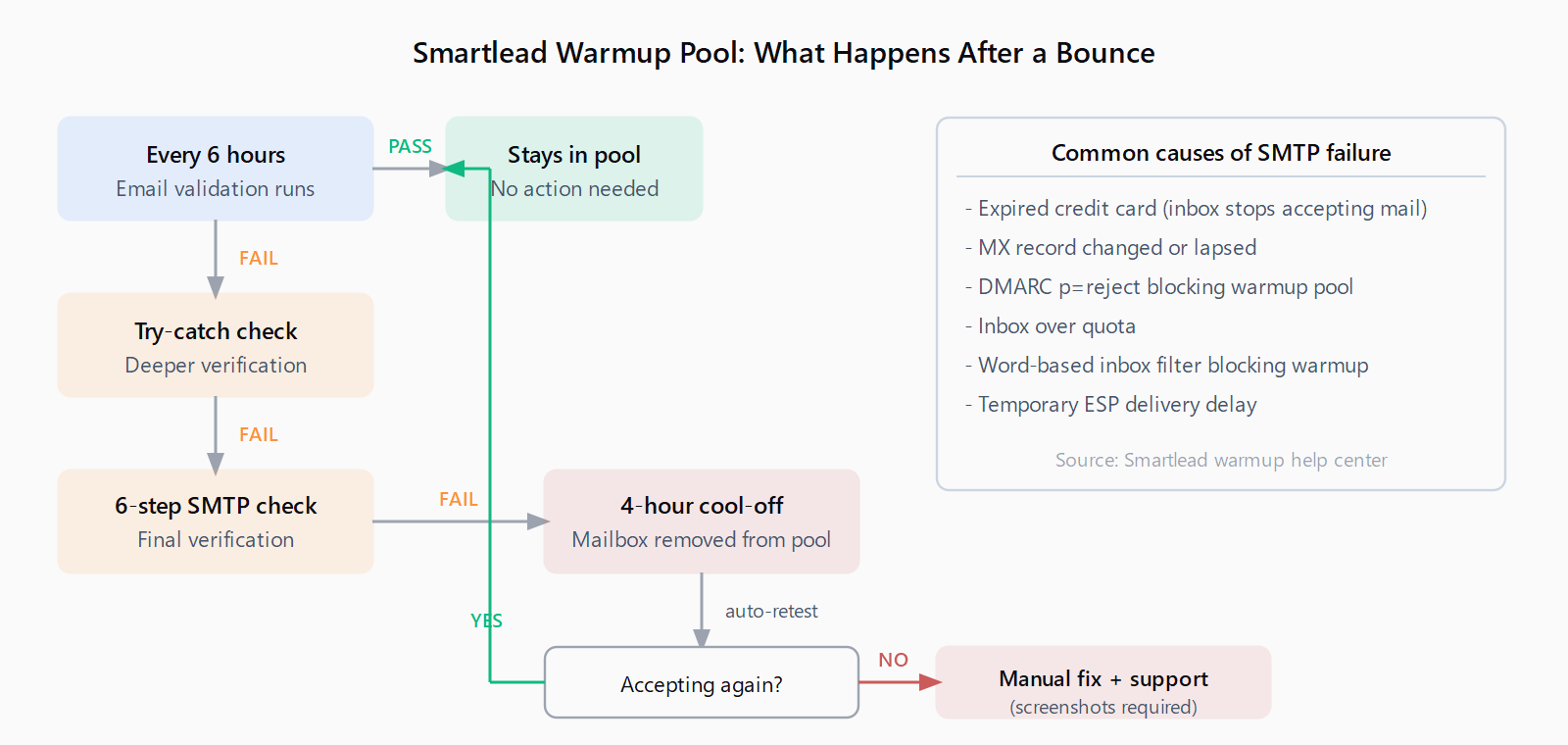
Smartlead validates every address in its warmup pool every six hours using a three-stage check: basic email validation, a slower try-catch mechanism for edge cases, then a six-step SMTP verification. Any mailbox that fails those checks gets automatically removed from the pool and placed in a four-hour cool-off period. If the mailbox recovers within four hours - say a temporary ESP queue cleared, or an inbox that was briefly full started accepting again - Smartlead adds it back with no lasting damage. If it doesn't recover, the mailbox stays off the pool until you manually intervene.
The problem isn't the mechanism, which is actually sensible. The problem is that "manually intervene" often means a week has passed by the time anyone notices.
Reply rates have dropped 40%. No error in the dashboard. No alert. By the time your reply rate falls off, the warmup problem causing it has often been present for two to three weeks already.
That's from Smartlead's own documentation on warmup failure signs. Inbox placement shifts before open rates decline. Open rates decline before reply rates drop. The metric your sales team measures - booked meetings per 100 sends - is the last thing to move. By the time it does, the warmup-pool bounce that started the slide is ancient history.
Why the warmup gets disabled in the first place
The six-hour validation checks for the most common failure causes: expired credit cards on the sending domain's email account (the inbox stops accepting mail when billing lapses), MX records that changed or weren't renewed, DMARC policies set to reject third-party senders - which the warmup pool technically is - and full inboxes. There's also a subtler one: word-based filters on the receiving side that block warmup emails containing certain phrases. Any of these will cause the SMTP check to fail and trigger removal from the pool.
The DMARC case trips up more people than it should. If you've set p=reject on your domain without also authorizing Smartlead's sending infrastructure in your SPF record, the warmup pool's outbound emails to your mailbox will hard-fail DMARC. The pool stops including your mailbox, warmup quietly halts, and your domain reputation starts drifting. This happens most often after a DNS migration or a new DMARC policy rolled out across all company domains without checking individual mailbox configurations first.
How to diagnose which mailboxes are affected
Smartlead surfaces the reason for every disabled mailbox, but you have to know where to look. In the Email Accounts tab, click the "Mailbox Issue Found" indicator or use the filter icon to show disconnected mailboxes. Select "Skip Validation - Show All Issues," then click the question-mark icon next to any blocked mailbox. That shows the specific reason: SMTP failure, DMARC reject, full inbox, MX resolution error. Clicking "Check Solution" opens vendor-provided steps for that exact failure type.
If you have more than a handful of mailboxes, Smartlead's bulk unblock feature is the faster path once you've resolved the underlying issue. Navigate to Email Accounts, click the count showing how many mailboxes have warmup disabled, confirm the selection, and click "Unblock Mailboxes." The process takes roughly 30 minutes and doesn't require per-mailbox OTP entry. One caveat: if your account has fewer active mailboxes than blocked ones - which can happen when you're in the middle of scaling up - the system directs you to support instead of running the automated flow.
Step-by-step: re-enable warmup after a pool bounce
The order of operations matters here. Re-enabling warmup before fixing the underlying cause just triggers another cool-off cycle.
Step 1: Identify the failure reason. Use the Mailbox Issue Found filter described above. Write down the specific error for each blocked mailbox.
Step 2: Fix the root cause first. For DMARC rejects, update your SPF record to include Smartlead's sending infrastructure, or adjust your DMARC policy from p=reject to p=quarantine while you sort out the authorization. For expired accounts or full inboxes, fix the billing or clear the inbox. For MX issues, verify the MX record is pointing to the correct mail host and hasn't changed during a recent DNS migration. For SMTP connectivity failures, reconnect the mailbox via SMTP/IMAP or OAuth in Smartlead's email account settings.
Step 3: Verify the fix before attempting re-enable. Send a test email from a different mailbox to the affected address and confirm it arrives. Send one back. Screenshot both. If Smartlead still requires manual support intervention (which happens when the four-hour cool-off period expired and the auto-retest also failed), you'll need those screenshots.
Step 4: Run bulk unblock or re-enable individually. Once you've confirmed the mailbox is sending and receiving correctly, use the bulk unblock flow or re-enable warmup on each mailbox individually in the Email Accounts settings. Watch the warmup sent and received counts the next day - both numbers should be moving. If sent goes up but received stays flat, there's still a delivery issue.
Step 5: Confirm warmup pool tier. After re-enabling, check the Email Accounts tab for the pool tier designation - Foundation, Growth, Premium, or Ultra Premium. A mailbox that bounced and was disabled may re-enter at a lower tier than before, which means weaker reputation signals from the warmup emails it receives. The tier normalizes over time, but it helps to know where you're starting from.
Prevent future warmup disablement
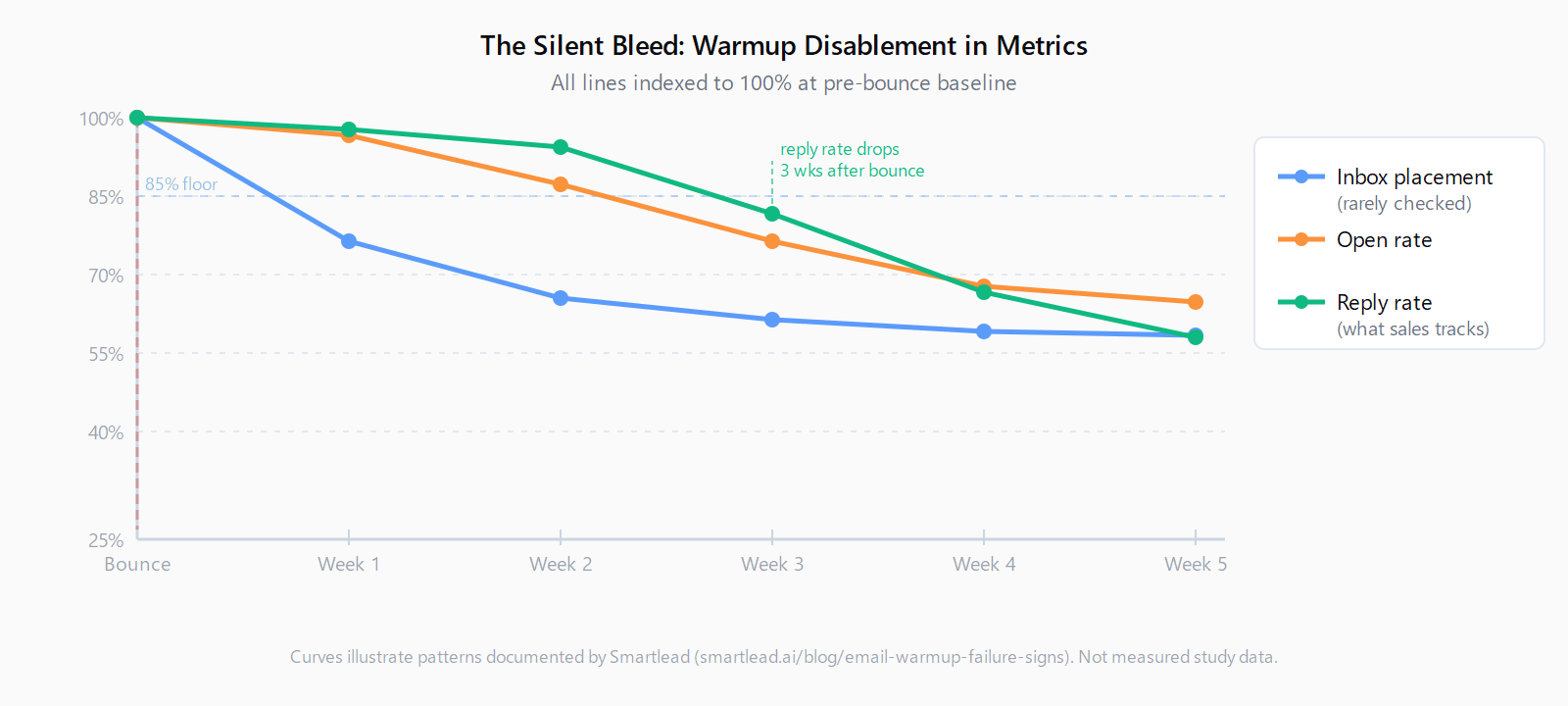
The most reliable prevention is a weekly five-minute check: open Email Accounts, filter for any mailbox with warmup disabled, and verify that both sent and received warmup email counts are moving across your active mailboxes. That's it. Catching a disabled mailbox in week one is a 30-minute fix. Catching it after three weeks means the affected campaign has been running at degraded inbox placement the whole time, and the recovery period before placement stabilizes above 85% is two to three weeks from the point you intervene - not from the point the bounce first happened.
A few other configuration decisions reduce exposure. Cold email infrastructure built on dedicated subdomains - separate from your root company domain - means a warmup disruption on a sending mailbox doesn't bleed into your main domain's reputation. Keeping warmup enabled continuously, including during active campaign periods, is also documented as better than cycling warmup off between campaigns: the pool needs consistent signal to maintain reputation, and a mailbox that goes dark for 30 days re-enters at reduced tier. And if you're also focused on keeping sequence bounce rate below 3%, know that the warmup pool's health is a separate variable from your list quality - both matter, and a healthy list doesn't offset a disabled warmup.
The Smartlead warmup failure signs documentation suggests a monitoring threshold of 85% inbox placement as the floor; below that, campaigns are effectively running at impaired deliverability even if opens and clicks look acceptable. Most operators don't check placement directly, which is why the warmup dashboard counts are a better leading indicator - warmup sent and received going flat is the first signal, well before inbox placement data moves.
List quality and bounce protection settings work together with warmup health - worth reviewing bounce protection settings in your sequencer alongside the warmup configuration. They're solving different parts of the same problem.
At Leadex, we spend a lot of time thinking about what happens before a sequence starts - specifically, the research and list quality that determines whether a campaign has a chance at good deliverability in the first place. Warmup health is the infrastructure layer under that; you can have a perfectly targeted list and still hit spam folders if the sending mailboxes haven't been warming consistently. The Leadex agent handles the list side of that equation - describing your ICP in plain English and getting enriched, deduped contacts out - but warmup is firmly in the infrastructure layer that has to be right first.
FAQ
Why did my Smartlead warmup get disabled without any notification?
Smartlead removes mailboxes from the warmup pool when they fail a six-hour validation check, but the notification is passive - there's no email alert, only a change in the Email Accounts dashboard. The Mailbox Issue Found filter shows affected mailboxes, but you have to check it proactively. Smartlead acknowledges this is a silent failure mode and recommends checking the dashboard weekly.
How long does the warmup cool-off period last?
The cool-off period is four hours. After four hours, Smartlead automatically re-tests whether the mailbox is accepting email. If it is, the mailbox is added back to the pool automatically. If it still isn't accepting, it stays off the pool and requires manual re-enable after you fix the underlying issue.
Can I re-enable warmup myself or do I need to contact Smartlead support?
You can re-enable via the bulk unblock feature or individually through Email Accounts settings, as long as the underlying issue is fixed and the mailbox is accepting email again. Support intervention is only required when the automatic four-hour re-test also failed - in that case Smartlead asks for screenshots showing both sending and receiving are working before they manually reactivate the mailbox.
Does a warmup pool bounce affect my sending domain's reputation permanently?
Not permanently, but it does cause a temporary reputation dip proportional to how long the mailbox stayed disabled. Inbox placement typically needs 14 to 21 days of consistent warmup to stabilize above 85% after a disruption. The earlier you catch and fix a disabled mailbox, the shorter the recovery window.
What is the difference between warmup disabled and a mailbox disconnected in Smartlead?
A disconnected mailbox has lost its SMTP/IMAP or OAuth connection to Smartlead entirely - campaigns stop sending. A warmup-disabled mailbox is still connected and still sending campaign emails, but is no longer participating in the warmup pool. This is why warmup disablement is easy to miss: campaign traffic continues normally while reputation-building from warmup quietly stops.