
How to Tune Instantly's 1.8% Bounce Protection Without Choking Campaigns
Instantly's Bounce Protection auto-pauses one inbox at a time when the rate crosses 1.8%. Here's how to tune the threshold without throttling clean inboxes or letting reputation rot.
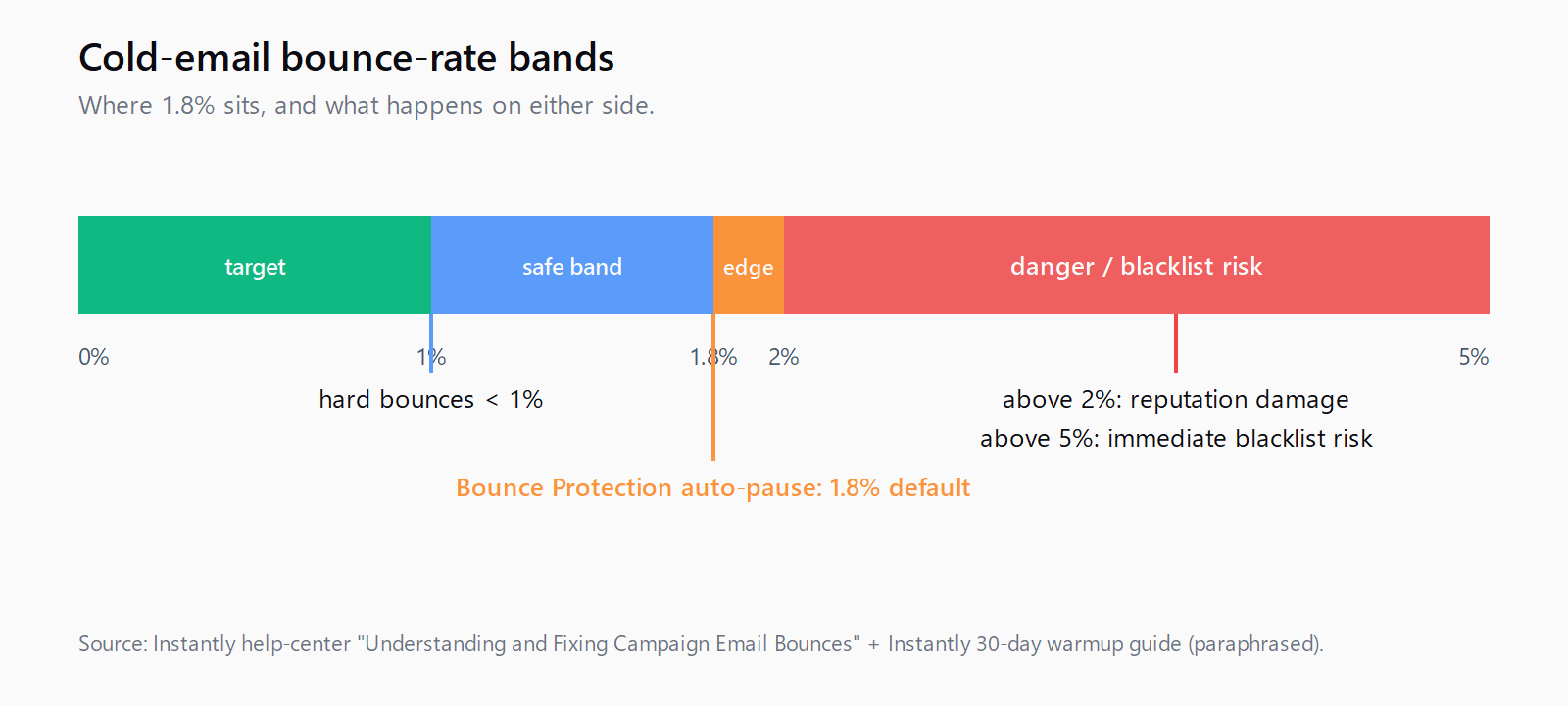
Instantly's Bounce Protection feature does something more surgical than most outbound platforms admit they need: when a single inbox's bounce rate crosses the configured ceiling, it pauses that inbox and leaves every other inbox in the campaign sending. The default ceiling is 1.8%, the recommended steady-state target is under 1%, and the upper recovery edge before things start to break is 2%. Almost every team I talk to either leaves Bounce Protection off (because it pauses inboxes they think are fine) or raises it to 5% (because they don't want to investigate). Both decisions are wrong, and the cost shows up six months later as a domain reputation you cannot rebuild.
This post is the runbook I wish someone had handed me the first time I touched that setting. It covers what the 1.8% number actually means at a per-inbox level, when to investigate versus when to wait, how to set per-inbox volume caps that make the threshold meaningful, and the list-verification step that makes the whole system honest. If you run cold email at any volume worth metering, this is the deliverability dial that compounds - adjacent to the Gmail spam-complaint ceiling discipline but operating on a different signal entirely.
What Bounce Protection actually does at the inbox level
The mental model most teams build for Bounce Protection is "campaign safety net" - they assume that when bounces spike, Instantly halts the whole campaign and waits for a human. That's wrong. Bounce Protection operates on the individual sending inbox: each connected mailbox carries its own rolling bounce rate, and when one mailbox crosses the configured ceiling (1.8% by default), Instantly auto-pauses that specific inbox. The campaign keeps sending from the remaining mailboxes.
That distinction matters because it changes how you tune the threshold. Set it too tight (say, 1.2%) and a single bad batch on a Monday morning - five bounces against 400 sends - pauses an otherwise clean inbox until you intervene. Set it too loose (3% or higher) and an inbox that's actually drifting because of a poisoned list segment gets to keep sending and shred its sender reputation for another two days before anyone notices. The 1.8% default is the equilibrium point Instantly's deliverability team settled on, and on this question I trust their data more than my instincts.
"Hard bounces seriously damage your domain health and sender reputation." [...] "Suggested safe limits: 30 cold emails + 10 warmup emails per account per day."
That second sentence is the part teams skip when they argue about the threshold. The 30-email-per-day per-inbox cap is what makes 1.8% mean anything: if you're sending 30 cold emails per day and your bounce rate is 1.8%, you're talking about roughly one bounce every two days - a signal noisy enough to live with but consistent enough to detect drift inside a week. If you're sending 200 a day per inbox (don't), 1.8% is four bounces a day, and the random walk on a normal list will trip the auto-pause before the inbox has actually done anything wrong.
When to investigate versus when to just unpause
The first thing to do when Bounce Protection pauses an inbox is not raise the ceiling. The ceiling exists to force the conversation that fixes the underlying problem; bumping it from 1.8% to 2.5% to keep sending is the deliverability equivalent of taping over a check-engine light.
The actual investigation is three questions, in order. First: was the paused inbox sending to the same list segment as the other inboxes? If yes and only this inbox tripped, the inbox itself is degraded - DNS misconfiguration, a recently-discovered spam trap in the warmup pool, an SPF/DKIM drift since the last campaign. Second: did the bounce spike correlate with a specific upload batch? If yes, the list is poisoned and every inbox is going to trip the threshold once it processes the same segment. Third: has the inbox been sending for more than 60 days without a warmup top-up? Sender reputation decays without ongoing warmup activity, and a previously clean inbox can start bouncing on legitimate addresses at a rate that looks identical to a bad list.
If the answer to the first question is "yes, only this inbox," you investigate the inbox in isolation and leave the rest of the campaign running. If the answer to the second is "yes, the bounce spike maps to upload batch 14," you pause the whole campaign yourself (don't wait for Bounce Protection to pause every inbox one by one) and re-verify that segment with a second-pass validator. The hardest case is the third - gradual reputation decay - because there's no single bad batch to point at, just a slowly-rising baseline. The fix for that one is always more warmup, not more sending.
The 30-emails-per-inbox cap that makes the threshold work
The threshold and the volume cap are one decision, not two. Cap each inbox at 30 cold emails per day plus 10 warmup emails per day; that's the volume at which 1.8% means roughly one bounce every two days, which is the signal-to-noise ratio Bounce Protection was designed against. Push individual inboxes beyond 40 sends and the math stops working - the random walk on bounces gets noisy enough that you either trip the threshold falsely or raise it past the point where it can detect drift.
Scale by adding inboxes, not by pushing existing ones harder. A team running 20 inboxes at 30 emails per day is sending 600 cold emails daily with a per-inbox bounce signal Instantly can actually reason about. A team running 5 inboxes at 120 emails per day is sending the same volume with bounce signals that are statistical noise on each inbox in isolation. The first configuration scales cleanly; the second hits a wall the first time a list batch goes bad. Personalization tuning sits on top of this - the best-scored email in the world still bounces if the list it's sent against hasn't been verified twice.
The second-pass verification step
Instantly's in-platform verification is the first line of defense and the help-center article documenting the bounce feature is explicit about its limits:
"Verify all leads before launching the campaign." [...] "Only contact verified leads." [...] "Run your contact lists through verification services quarterly to remove invalid addresses, disposable emails, spam traps, and inactive accounts."
The verbatim-quoted line "Only contact verified leads" reads like marketing, but the operational implication is real: a list that passed Instantly's verification can still trip Bounce Protection if it sat untouched for 90 days, because email validity is a perishable signal. Run every list through a second-pass validator (NeverBounce, ZeroBounce, or whatever your team standardizes on) immediately before launch, and re-run quarterly on long-running campaigns. The cost is single-digit cents per address; the cost of letting a 4% bounce rate poison a sending domain you've spent six months warming is in the four figures.
Where Leadex sits in this workflow
The list is upstream of the threshold, which is upstream of the campaign. We built Leadex for the upstream end of that chain - the part where you describe the ICP in chat, the agent browses the open web and your connected enrichment providers, dedupes against your CRM, and produces a list with URLs and timestamps per row. Bounce Protection then has clean inputs to work against. The reason this matters for deliverability specifically: company enrichment in Leadex "typically completes in under 60 seconds" per batch, which is fast enough that you can re-verify a list the same morning you send to it, rather than the Monday three weeks ago when you last touched it. List freshness is the input variable Bounce Protection is implicitly measuring; if you let the list age, the threshold catches the rot.
FAQ
What is the best bounce rate for cold email in 2026?
Hard bounces under 1%, total bounces under 2%. Above 2% damages sender reputation; above 5% can trigger immediate blacklisting on major mailbox providers. Instantly's 1.8% Bounce Protection default sits inside the safe band but close enough to the upper edge to detect drift early.
Should I disable Instantly's Bounce Protection?
No. Disabling it removes the only per-inbox circuit breaker on the platform, which means a degraded inbox keeps sending until something catches it manually - usually three days later when domain reputation has already dropped. Leave it on at 1.8%.
Why is my Instantly inbox paused?
Bounce Protection auto-pauses any individual inbox whose rolling bounce rate crosses the configured ceiling (1.8% by default). The campaign continues sending from other inboxes. Investigate the paused inbox before re-enabling: check DNS, check the recent upload batch, and check whether the inbox has gone 60+ days without warmup activity.
Can I raise the Bounce Protection threshold above 2%?
Technically yes; operationally no. Above 2% you've crossed into the "damages reputation" band, and the threshold loses its function as an early-warning signal. If you find yourself wanting to raise it, the actual problem is either list quality, per-inbox volume too high, or a warmup gap - fix one of those instead.
How many emails per inbox per day is safe?
Thirty cold emails plus ten warmup emails per inbox per day is the Instantly-documented safe ceiling. Scale by adding inboxes rather than pushing individual inboxes higher; the 1.8% threshold's signal-to-noise ratio is calibrated against that volume.