
How to Set Up Cold Email Infrastructure Without Burning Your Domains
The post most teams need to read before worrying about open rates is this one. Gmail and Yahoo began permanently rejecting non-DMARC bulk mail in November 2025, and Microsoft followed with its own bulk-sender enforcement in May 2026. Domain setup errors that used to land you in spam folders now produce hard bounces - and the errors come from the same place they always have: teams sending from the wrong domain with the wrong configuration.
The infrastructure setup is not complicated, but the specific numbers matter. Wrong inbox-to-domain ratios cause domain burnout. Wrong warmup pace causes spam flagging before you've sent a single cold email. Missing authentication now causes outright rejection under Gmail's 0.3% spam complaint ceiling and its equivalents. None of these failures are recoverable without a domain reset that costs weeks. The setup below is derived from Instantly's infrastructure guide and their analysis of 32 million cold emails.
Why secondary domains, not your primary
Your primary domain handles transactional email, support replies, and internal communication. If a cold outreach campaign damages the sender reputation of that domain, all of those flows get caught in spam filters. Domain reputation is not segmented by use case - there's no separation between your cold outreach and your customer receipts at the SMTP level.
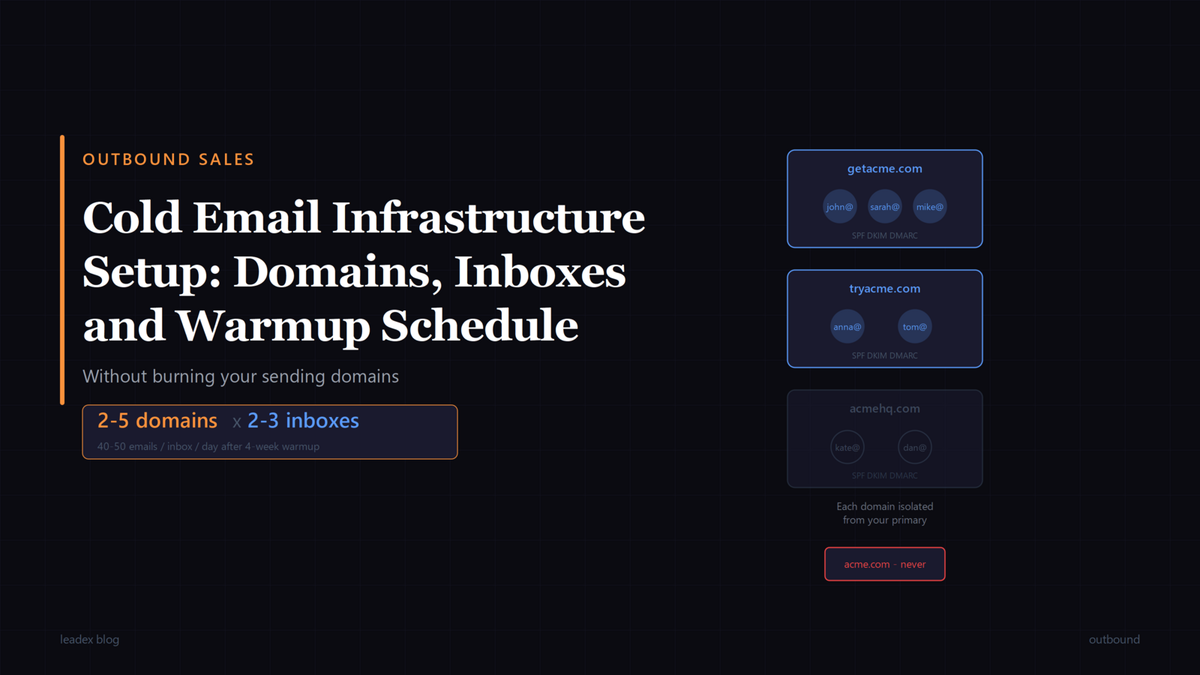
Secondary domains exist specifically to carry outbound volume. If your company is Acme Corp at acme.com, buy getacme.com, tryacme.com, and acmehq.com for sends. These domains absorb the reputation risk when a campaign underperforms. Your primary domain stays clean.
We've run an analysis recently on 32M cold emails and have seen worse performance (reply rate) with domain extensions such as .biz, .online etc. [...] .com and country domain extensions (.de, .be etc.) work best.
The TLD choice matters more than the domain name itself. The Spamhaus TLD reputation list shows why certain extensions have systematically poor deliverability: receiving mail servers have learned to treat them as high-spam-volume. Country-code extensions work well for regional campaigns. Avoid hyphens and numbers in secondary domain names - letters only.
For most teams starting out, two to five secondary domains is the right range. Fewer than two means a single domain burnout halts your entire outreach motion. More than five at the start creates more infrastructure than a small team can monitor during ramp-up.
How to authenticate every domain before you send
Three DNS records are required on every sending domain before you touch it for cold email: SPF, DKIM, and DMARC. All three. Since Gmail and Yahoo's enforcement and Microsoft's May 2026 equivalent, missing any one of these results in immediate rejection for bulk sends - not spam-folder delivery, rejection. The setup is not optional and it is not reversible after the fact.
SPF declares which mail servers are authorized to send on behalf of your domain. DKIM adds a cryptographic signature to each outgoing message, proving it wasn't modified in transit. DMARC ties the two together and tells receiving servers what to do when either check fails. DMARC also enables reporting that shows you when someone is spoofing your secondary domains - worth monitoring even before you start sending.
Your email service provider (Google Workspace, Microsoft 365) generates the specific record values. The DNS changes are three entries per domain: a TXT record for SPF, a TXT record for DKIM, and a TXT record for DMARC. Additionally, set up a custom tracking CNAME - this routes open and click tracking through a subdomain of your secondary domain rather than a shared provider URL, which matters for deliverability at moderate volume.
How many inboxes per domain, and what to name them
The rule is 2-3 inboxes per secondary sending domain. Instantly's infrastructure guide puts the sending ceiling at 40-50 emails per inbox per day once a domain is fully warmed. Two inboxes on one domain gives you 80-100 sends per day from that domain; three inboxes gives you 120-150. Going above 3 inboxes per domain concentrates too much volume on one domain's reputation - when a campaign produces spam complaints, those complaints sit on a single domain rather than being distributed across your infrastructure.
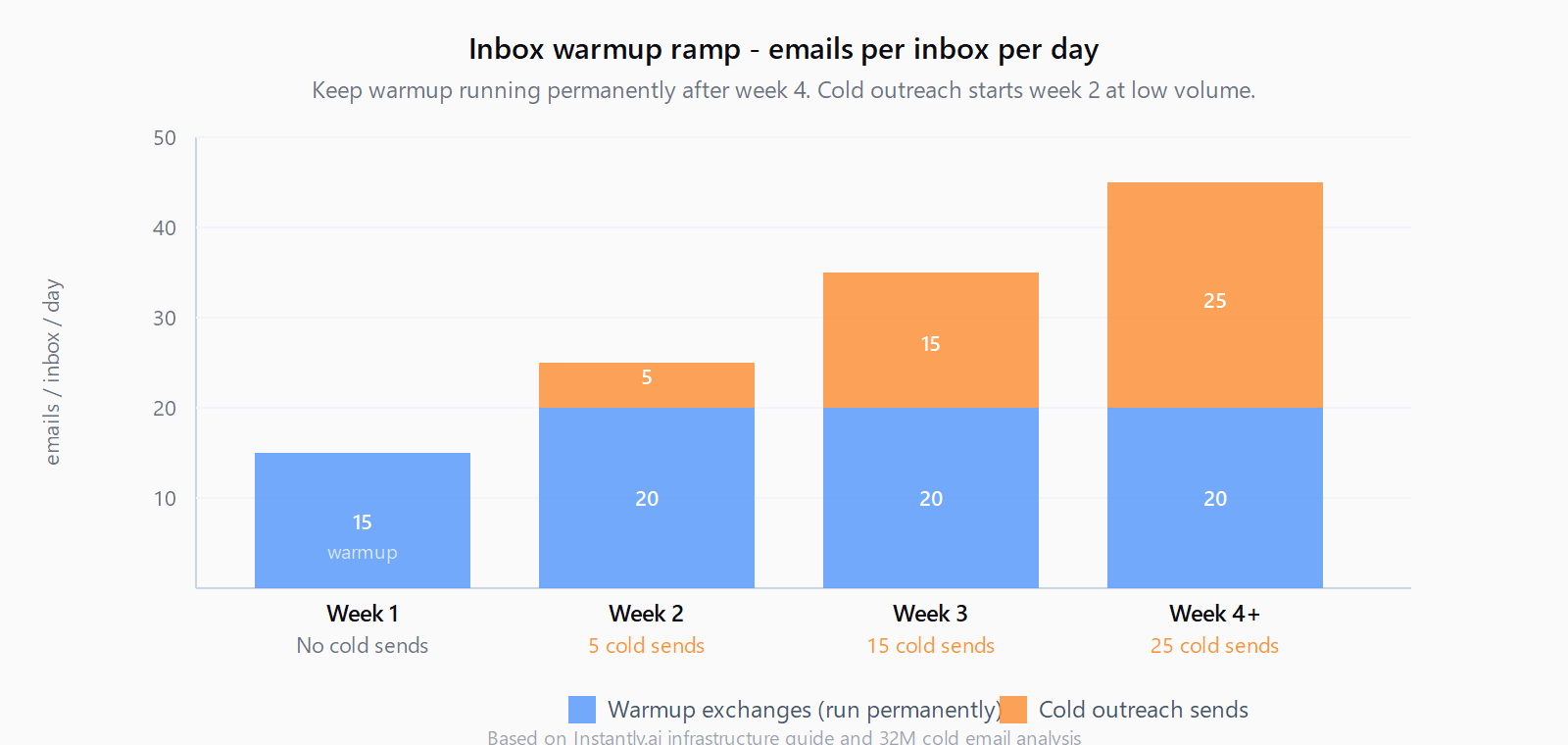
Warmup activity counts toward your daily send limit. If you're running automated warmup - which you should be, permanently - those exchanges eat into the 40-50 daily ceiling. The practical split that Instantly recommends is 20-30 cold outreach sends per inbox per day, with warmup making up the balance.
For inbox naming, person-first accounts outperform role accounts. john@getacme.com outperforms sales@getacme.com or outreach@getacme.com. Role-based prefixes pattern-match against spam filters at the recipient's inbox provider before the email is ever read. Use your team members' real first names on the secondary domain inboxes.
How to ramp the warmup schedule
A new domain and inbox needs 2-4 weeks of warmup before it sends a cold email. Skipping this step almost guarantees spam folder placement - receiving servers have no reputation signal for the domain, which looks identical to a newly registered throwaway, which is what spammers use.
The warmup ramp: start at 10-15 emails per inbox per day (automated warmup exchanges only, no cold sends), increase by roughly 5 emails per day each week, and keep warmup running permanently at background volume once the domain is active. This is not a setup-and-forget step - it's ongoing maintenance. The warmup exchanges simulate real engagement: automated tools send from your inbox to a network of other inboxes, those inboxes reply and mark messages as not-spam, and the receiving server's reputation model registers positive signals before your actual cold emails start arriving.
Once past the warmup period, cap cold outreach sends at 40-50 emails per inbox per day. The ceiling is real - go above it and deliverability drops before spam complaints register in any report. Stay under it and the domain compounds positive reputation over weeks and months.
We think about this at Leadex because we push enriched lead lists directly to HubSpot or as a CSV to whichever sequencer a team uses. The research side is fast - Leadex can have a "first 500-lead list by lunch" - but that list is worthless if the sending infrastructure delivering the outreach has a burned domain or a missing DMARC record. Infrastructure setup is the prerequisite that determines whether research effort translates into replies.
FAQ
How many secondary domains do I need for cold email?
Start with two to five secondary domains. Each domain with 2-3 inboxes can send 80-150 cold emails per day once fully warmed (reserving some inbox capacity for warmup exchanges). Two domains at 3 inboxes each gives you roughly 240-300 sends per day at steady state. Scale up only after your initial domains are warmed and producing results.
How many email accounts per sending domain?
Two to three inboxes per secondary sending domain is the standard. Above 3 inboxes per domain, you concentrate too much volume on a single domain's reputation. Each inbox handles 40-50 emails total per day (cold outreach plus warmup), with cold sends capped at 20-30 of those.
How long does it take to warm up a new cold email domain?
Two to four weeks before sending any cold email. Start at 10-15 automated warmup exchanges per inbox per day, increase by 5 per day each week, and keep warmup running permanently at background volume once the domain is active. Rushing the warmup ramp is the most common cause of new domain spam-folder placement.
Do I still need SPF, DKIM, and DMARC if I'm sending low volume?
Yes, all three, on every domain, before sending a single email. Gmail, Yahoo, and Microsoft now enforce authentication requirements for bulk senders, and the threshold for "bulk" is lower than most teams expect. Missing DMARC on a secondary domain used for cold email results in immediate rejection, not spam-folder delivery.