
How to Tune Salesforce Account Fuzzy Match Rules to Cut False Positives on Short Company Names
Short company names like GE, SAP, or 3M score 50-66% on Levenshtein similarity with a single character change, which fires most default duplicate thresholds. Here is how to compound the rule with Website exact-match or split rules by name length to fix it.
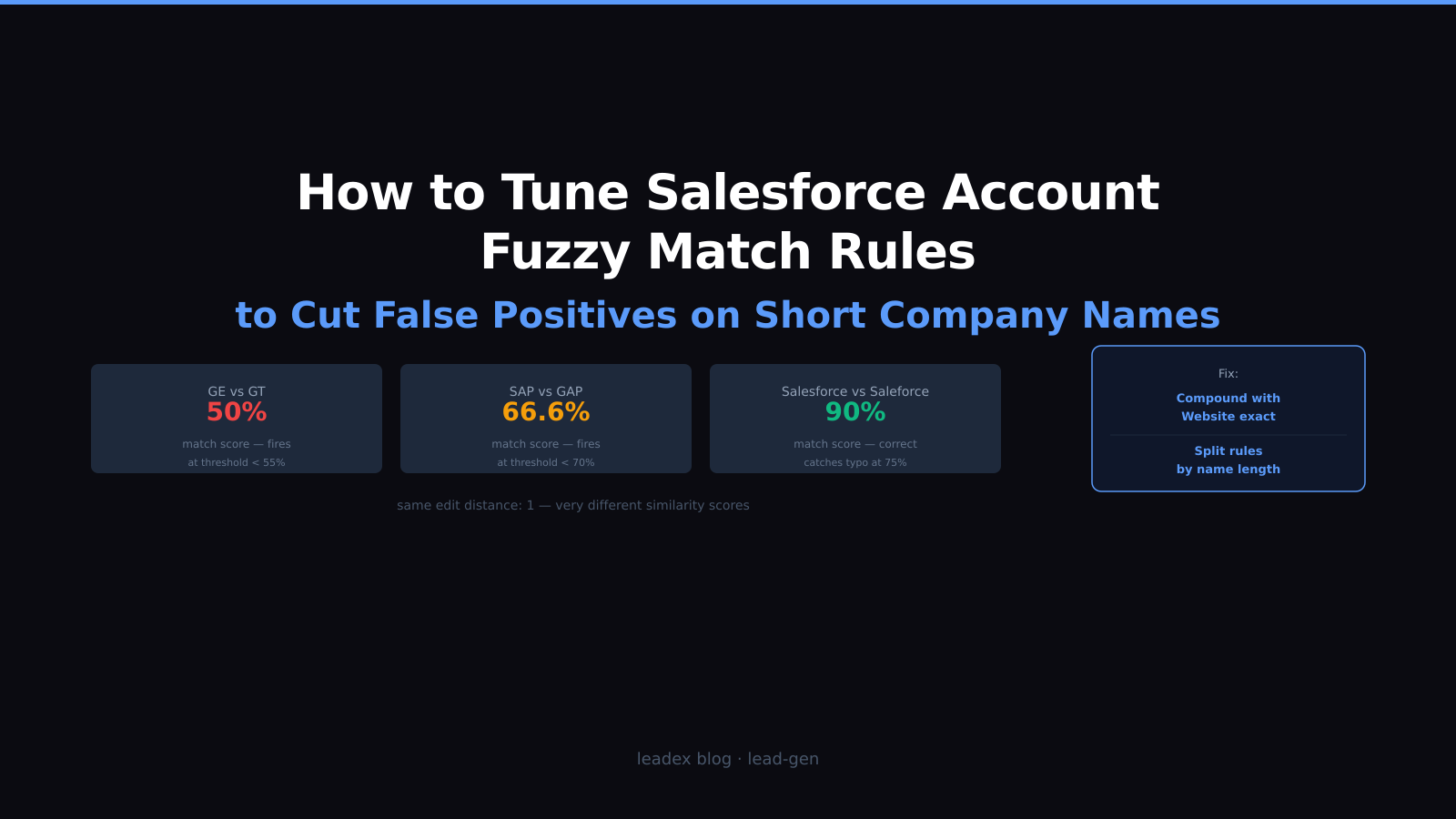
The two fixes that actually work: either add a compound exact-match on Website or Email so a short name alone cannot trigger the rule, or split your Account matching into two rules — one using exact on Account Name for names under six characters, one using fuzzy for longer names. The false positives come from a math problem in the underlying algorithm, not from the rule threshold being too low, and raising the threshold alone will not solve it.
The standard Account matching rule in Salesforce fuzzy-matches on Account Name, Billing Street, Billing City, Billing State, Billing Postal Code, and Billing Country. When billing address data is incomplete — common in early-stage prospect lists — the name field carries most of the matching weight. That is where the short-name problem lives: a company with a 2-4 character name is one or two typographical edits away from a completely different company with a high similarity score.
A quick note on the duplicate rules failing silently pattern: the false positive scenario is the mirror image. Silent failures suppress matches that should fire; false positives fire matches that should not. Both problems usually trace back to the matching rule configuration, not the duplicate rule action setting.
Why the Levenshtein formula breaks on short names
Salesforce fuzzy matching uses Levenshtein edit distance — the number of single-character inserts, deletes, or substitutions needed to convert one string into another. The similarity score converts that into a percentage: score = 1 minus (edit_distance divided by length_of_longer_string). Longer strings make the denominator bigger, so the same single-character difference has less impact on the score.
The problem with short names is visible in the arithmetic. "GE" and "GT" differ by one character. Levenshtein score: 1 - (1 / 2) = 50%. Any matching rule threshold below 55% will flag these as potential duplicates. "SAP" and "GAP" differ by one character. Score: 1 - (1 / 3) = 66.6%. Any threshold below 70% fires. Compare that to "Salesforce" and "Saleforce" — same edit distance of 1, but score is 1 - (1 / 10) = 90%. A 70% threshold catches the typo without touching anything else.
Salesforce does not expose a threshold slider in the standard matching rule UI — the threshold is fixed inside the rule engine and can only be adjusted by contacting Salesforce Support, which raises it by roughly 5 percentage points at most. That ceiling is not enough to prevent short-name collisions across the 50–70% range where they cluster. The fix has to come from changing what fields are combined, not from raising the threshold on a single-field rule.
Step 1: Audit your current rule in Allow+Report mode
Before changing anything, set your Account duplicate rule action to Allow + Report and let it run for a week. This creates a Duplicate Record Set for every match the current rule fires, without blocking any record saves. The Duplicate Record Sets view shows you how many matches the rule is producing, what percentage are genuine duplicates, and whether short names are driving the false positive volume.
To scope the problem: navigate to Setup > Duplicate Management > Duplicate Record Sets, filter by Object = Account and Created Date = last 7 days. Build a simple report that shows Account Name for both records in each set. Sort by Account Name length — a custom formula field LEN(Name) on Account works here. Any sets where both records have names under six characters and the Account IDs are clearly different companies are your false positive evidence.
This audit step also tells you whether you need a structural fix at all. Orgs with mostly mid-market and enterprise accounts (company names averaging 8–15 characters) may see acceptable false positive rates from the standard rule. The short-name problem concentrates in databases with a high proportion of publicly traded companies, government agencies, and acronym-heavy tech companies where 2–5 character names are common.
Step 2: Rearchitect the matching criteria
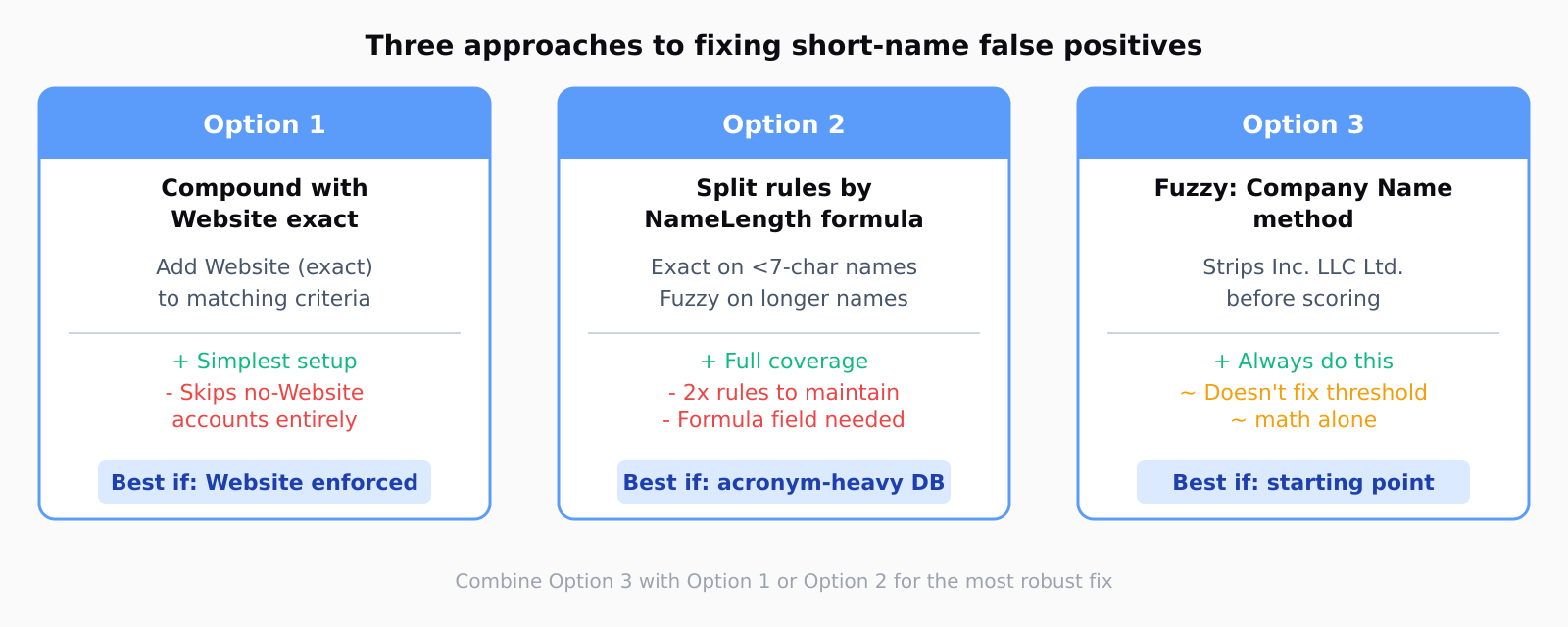
Three rewrites work in practice, each trading off coverage against precision differently.
Compound with Website exact. Add Website as a second field with exact matching and set the filter logic to require both Account Name (fuzzy) AND Website (exact) to match. A company with a 3-character name will not collide with a different company unless both the name scores high enough on fuzzy and their websites match exactly. This is the simplest fix and works well for orgs that enforce Website field population during Account creation. Its weakness: Accounts without a Website field populated are excluded from the rule entirely — they match nothing, which means genuinely duplicate Accounts that both lack a Website slip through.
Split into two parallel rules. Create a formula field on Account called NameLength__c = LEN(Name) and use it to filter each matching rule. Rule A fires only when NameLength__c >= 7 and uses fuzzy on Account Name at a 75% threshold, which works reliably for names of this length. Rule B fires only when NameLength__c < 7 and uses exact on Account Name plus fuzzy on Billing City as a secondary signal. This keeps both long-name and short-name accounts covered without the same threshold applying to both. The tradeoff is maintenance: two matching rules, two duplicate rules, and a formula field to keep in sync.
Use the Fuzzy: Company Name method. The standard Fuzzy method applies Levenshtein to the raw Account Name string. The Fuzzy: Company Name method strips legal suffixes (Inc., LLC, Ltd., Co., Corp., GmbH) before scoring. This does not solve the short-name threshold problem directly, but it prevents a different category of false positive: "Acme Inc." and "Acme LLC" scoring below 90% because the suffix changes the string length. Using Fuzzy: Company Name instead of plain Fuzzy on the Account Name field is the right default for Account deduplication regardless of whether short names are a problem.
When Leadex enriches an Account list — describing the ICP, running firmographics, pulling contact names and LinkedIn profiles — it returns results keyed on domain. If two Salesforce Accounts share the same domain and the duplicate rule did not catch them, the import creates contact records under both. Cleaning that up manually takes longer than fixing the matching rule beforehand. The multi-provider enrichment waterfall pattern we covered previously assumes clean Account data as a prerequisite for the same reason: matching on domain at the import step only works if there is one canonical Account record per domain. Leadex typically completes a batch in under 60 seconds, but the output is only as clean as the CRM it writes into.
Step 3: Clear the historical backlog
Duplicate rules only prevent new duplicates from that point forward. Any short-name false positives that slipped into the org before you fixed the rule need to be found and resolved separately.
On Salesforce Unlimited or Performance editions, Duplicate Jobs (Setup > Duplicate Management > Duplicate Jobs) run a bulk scan of existing Accounts against any active matching rule and populate Duplicate Record Sets for manual review. Run a Duplicate Job after activating your rewritten matching rule — the new compound criteria will produce far fewer false positives in the scan than the old rule did. The Duplicate Record Sets give you a merging queue to work through progressively.
On Professional or Enterprise editions without Duplicate Jobs, the manual path is a report: Accounts grouped by Website domain (or by Billing City plus first five characters of Name for orgs without Website data), filtered for Count greater than 1. Export to CSV, sort by name similarity, and use the native three-record merge UI to consolidate. Third-party tools like Cloudingo and DemandTools handle this at bulk scale without the edition restriction, and are worth the cost if the historical backlog runs into thousands of records.
One practical note on the no-duplicate field mapping pattern for third-party data imports: the same principle applies in Salesforce. When writing enriched data back via API or Data Loader, an upsert on External ID or Website domain is safer than a blind insert — it routes the record to the existing Account even when the enrichment tool name string does not exactly match the canonical Account Name in Salesforce. That avoids creating new Account records when a duplicate exists under a slightly different spelling.
FAQ
Why does Salesforce fuzzy match fire on completely different company names?
Fuzzy matching uses Levenshtein edit distance, which measures the number of single-character changes between two strings. Short company names (under six characters) have a high similarity score for any one-character difference because the score is calculated relative to string length. A 3-character name with one character changed scores 66.6%, which exceeds most default rule thresholds even though the two companies share nothing in common.
Can you adjust the fuzzy match threshold in Salesforce matching rules?
The matching rule threshold is not adjustable in the Salesforce admin UI. Salesforce Support can raise it by roughly 5 percentage points on request, but cannot remove it entirely. The practical fix is to change what fields are combined in the matching criteria — adding a compound exact-match on Website or Email — rather than trying to raise the threshold past its ceiling.
What is the best matching method for Account Name in Salesforce?
Use Fuzzy: Company Name rather than generic Fuzzy for the Account Name field. The Company Name variant strips legal suffixes (Inc., LLC, Ltd., Corp., GmbH) before scoring, which prevents false positives where the same company name with different legal forms scores below the threshold. For short company names specifically, combine it with a compound exact-match on Website or Billing City to require a confirming second signal before the rule fires.
How do I find duplicate Accounts in Salesforce without Duplicate Jobs?
Build a custom report on the Account object with Website as the grouping field and a count of Accounts per Website, filtered for Count greater than 1. Accounts sharing a Website domain are strong duplicate candidates. A secondary report grouping by the first five characters of Account Name and Billing City catches cases where Website is not populated. Export to CSV and work through results in the native merge UI, which handles up to three records at a time.
What happens to related records when I merge duplicate Accounts in Salesforce?
Salesforce automatically re-parents related records — Contacts, Opportunities, Cases, Tasks, and Activities — to the master Account when the merge completes. The merged duplicate Account moves to the Recycle Bin and is recoverable for 15 days. Custom object records with a lookup or master-detail relationship to Account also re-parent correctly. The exception: if a field has security restrictions that prevent the merging user from seeing it, that field may silently default to the master record's existing value rather than carrying over the merged value.