
How to Stop Salesforce Duplicate Rules Failing Silently on API Loads
Salesforce duplicate rules enforce on the UI but bypass silently on Bulk API, Data Loader, and Apex with allowSave=true. A four-check audit catches the leak before months of dirty CRM data accumulate.
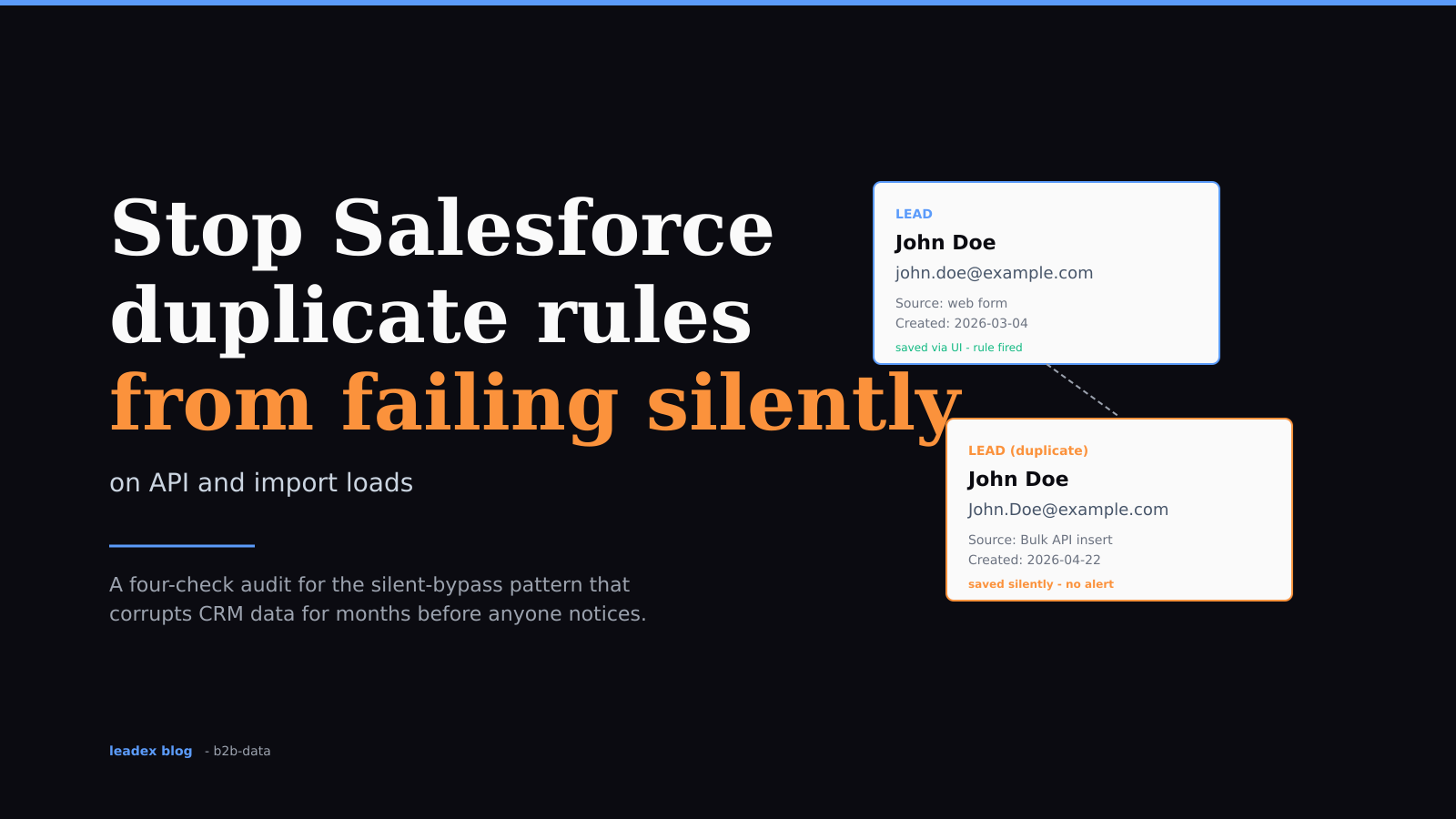
Salesforce duplicate rules are the feature every CRM admin trusts and almost none verify. You set them up once, ship a couple of matching rules on Lead and Contact, click "Allow with alert," and assume the platform will hold the line. It will, in the UI. On every other write path - Data Loader, Bulk API, REST integrations, Apex code that lives inside an integration user - the rule can fail silently. As of 2026 (Salesforce Spring '26 release), the surface that lets this happen is unchanged: a flag named allowSave on Database.DMLOptions, a second flag named runAsCurrentUser, and a UI-only alert that Bulk API loads never see.
I have watched this go wrong on three orgs in the last year, all the same shape. Admin runs a Lead audit six months after a big import, finds 8,000 duplicates that "shouldn't be possible," and discovers the rule was technically enforced - it just enforced an "Allow with alert" action that nothing on the API side could see. The rule was firing. The action was wrong.
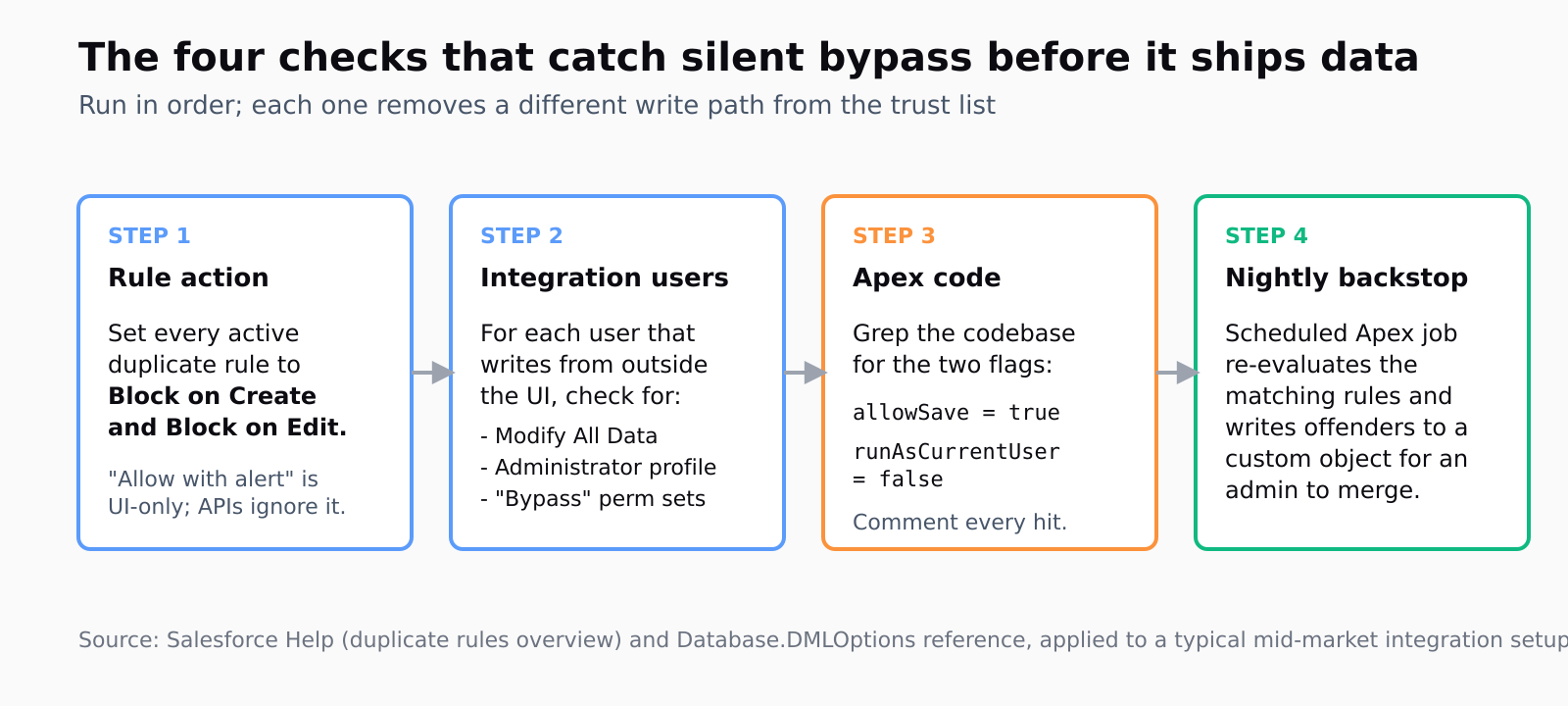
This post walks through the four checks that catch the silent bypass before you ship dirty data, and an Apex code-review pattern that keeps the bypass intentional. Most of it is a settings audit, not code.
Why do Salesforce duplicate rules fail silently on the API?
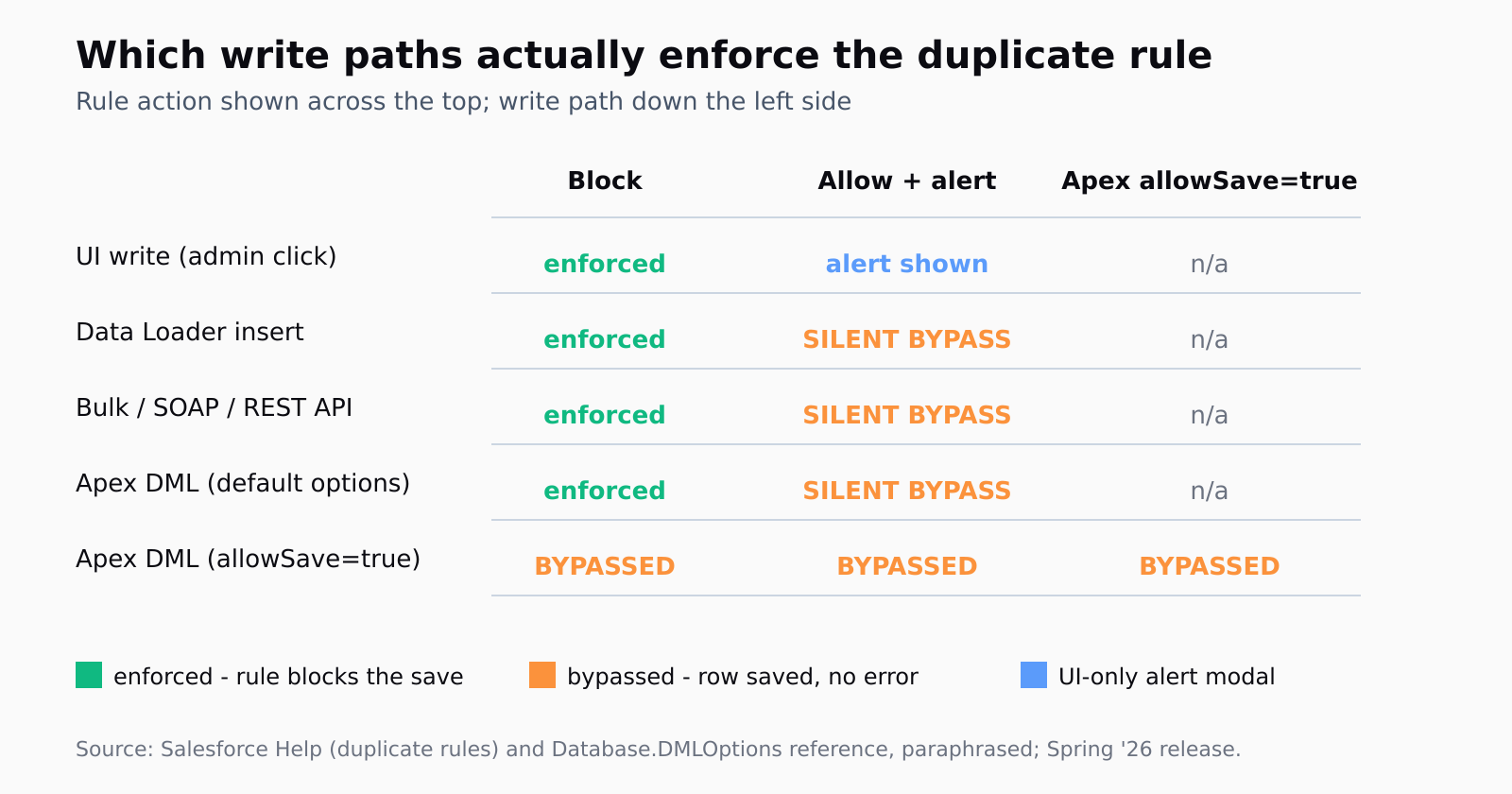
Three independent paths land at the same outcome - a duplicate gets saved and no error surfaces to the caller.
The first is the duplicate rule's Action on Create and Action on Edit setting. Salesforce ships two real options that matter: "Block" (the save fails, the caller gets an error) and "Allow" (the save proceeds; you can additionally show an alert and a report). The alert is a modal that only renders in the UI. The Bulk API, the SOAP API, the REST API, and Data Loader all skip the modal and save the row. As the Salesforce Help article on creating a duplicate rule puts it, the alert and report are UI-side affordances; the only API-enforceable action is Block.
The second is the DMLOptions.DuplicateRuleHeader.allowSave flag in Apex. When Apex code sets this to true before an insert or update, the rule is bypassed for that DML, full stop. The walkthrough on bypassing duplicate rules in Apex shows the exact pattern, and it's a two-line addition that's almost impossible to spot in a code review unless you grep for it.
The third is the partner of allowSave - DMLOptions.DuplicateRuleHeader.runAsCurrentUser. The default is true. When flipped to false, Salesforce applies the rule at system level, not the current user's permission set. That sounds harmless and it isn't.
The runAsCurrentUser = false doesn't apply duplicate rules based on the current user's permissions or settings. Use system-level behavior instead. This is very important because if runAsCurrentUser = true (default), Salesforce still applies the duplicate rules for that user, and your bypass won't work.
That's from the SalesforceFAQs walkthrough (paraphrasing the platform's own behavior). The implication: if an integration user has been granted "Bypass Duplicate Rules" via a custom permission, and the Apex sets runAsCurrentUser = false, the duplicate rule is suppressed regardless of what the rule says. Two flags, both defaults, and the audit log shows a clean save.
How do I audit my integration users for silent-bypass risk?
Pull the list of users that write to Salesforce from outside the UI. Usually a small set: the Data Loader account, the Workbench user, the user behind each external integration (Apollo, the marketing automation API, the custom Apex job), and any sandbox-refresh accounts that escaped into production. Five to fifteen users for most mid-market orgs.
For each one, check three things. First, do they have a permission set assigned that includes the "Modify All Data" system permission? If so, they bypass duplicate rules entirely by platform design; the rule never evaluates. Second, do they have a custom permission with "Bypass" in the name? Salesforce admins often create one for legitimate dedupe-aware integrations and then forget which users still have it. Third, is the user's profile set to "Administrator" or similar? Same problem.
While you're in there, grep the codebase for the two strings that flip the silent bypass on. The query is exact: allowSave = true and runAsCurrentUser = false. Every hit is a code-review gate, not necessarily a bug - some are intentional. Comment each hit with why the bypass is needed. The same goes for SOAP/REST clients: the jsforce issue thread on the duplicate-rule header from 2020 is still the clearest write-up of how jsforce, simple-salesforce, and direct REST callers need to set Sforce-Duplicate-Rule-Header: allowSave=false explicitly per call.
How do I configure the duplicate rule itself so the API can't bypass it?
The right setting is Block on both Action on Create and Action on Edit. That's the only action the Bulk API and REST API actually enforce. "Allow with alert" works for an admin clicking through the UI; it does not work for any of your data pipelines.
If your team has a legitimate use case for allowing duplicates - the SalesforceFAQs walkthrough names one (inbound demo requests where a second Lead from the same email is the desired outcome, for tracking purposes) - the fix is not to weaken the rule. It's to add an explicit code-side bypass on the integration that needs it, with an audit trail. The duplicate rule on the platform stays at Block; the one Apex class that needs to override it sets allowSave = true with a comment naming the use case. Everything else hits the wall.
While editing the rule, look at the matching rule that powers it. The default matching rules on Lead and Contact match on email, and they're case-sensitive in a way that catches "john.doe@example.com" and "John.Doe@example.com" as different records on some legacy orgs. Add a custom matching rule that normalizes email to lowercase before the comparison, or you'll get a clean Block action and still ship duplicates whenever Marketing sends a list in title-case.
How do I catch duplicates that already slipped through?
The duplicate rule's "report duplicates" toggle is the wrong tool for this. It writes a DuplicateRecordSet entry per detected duplicate at save time, but only when the rule actually fired - which is exactly the failure mode you're trying to catch. The duplicates that slipped past didn't fire the rule; they got saved as if they were unique.
The right backstop is a scheduled Apex job that runs every night, queries Lead and Contact for matches against the same matching rules the duplicate rule uses, and writes the offenders to a custom object. The matching rule itself is queryable via the Tooling API; you don't have to reimplement it. Once a week, an admin reviews the custom object, merges the records via the standard merge tool, and notes which integration produced them. Three months of this and you'll know which pipeline is the leak.
This is the same hygiene problem that touches tracking champion job changes - the moment a champion's email changes, your old record becomes the duplicate of someone else's new record - and the former-customers landing pattern, where the same person re-enters the CRM through a different domain. Every CRM hygiene play in outbound depends on the duplicate rule actually being enforced; when it isn't, the play falls apart upstream.
How do I dedupe upstream so the rule isn't the only line of defense?
The honest answer is: don't trust the duplicate rule alone. Dedupe before the load, not after. Every research and enrichment pipeline that pushes contacts into Salesforce should run a dedupe pass against the destination object before the Bulk API insert - hit the CRM's REST API with a SOQL query, build a set of existing emails, and exclude matches from the upload. This is plumbing work, not magic, and it removes the duplicate rule from the critical path.
This is the seam where Leadex lives - between open-web research and the CRM write. The agent dedupes during the research run, before any data leaves the cloud-browser pipeline, and the deduped CSV pushes to HubSpot or Salesforce with a row-level URL plus timestamp for every contact. The duplicate rule is still on, set to Block, and the integration user has none of the bypass permissions. Two lines of defense, not one. That fits the framing in the context data versus signal data piece - the data itself has to be clean before the signal interpretation matters.
The other thing to do upstream is normalize the inputs. Lowercase emails, strip trailing whitespace, canonicalize phone numbers to E.164, and drop the obvious junk (the noreply@ mailboxes, the generic info@ addresses) before the row ever gets a chance to hit the duplicate rule. Most "the rule isn't working" tickets I have looked at turn out to be casing or whitespace problems, not the rule itself.
FAQ
Why does my Salesforce duplicate rule work in the UI but not via API?
The rule's Action on Create and Action on Edit is almost certainly set to "Allow with alert" rather than "Block". The alert is a UI-only modal; the Bulk API, REST API, and Data Loader never render it and save the row. Change the action to Block on every duplicate rule that protects an object you import into.
How do I make Salesforce duplicate rules apply to Data Loader inserts?
You don't toggle Data Loader. You toggle the rule. Set the Action on Create to Block. Data Loader respects Block; it ignores Allow-with-alert because there's no UI to alert in. If you also need the alert behavior in the UI for human users, you can have both - Block is enforced everywhere, including the UI.
What's the difference between allowSave and runAsCurrentUser in DMLOptions?
allowSave = true tells the platform to save a row that the duplicate rule would otherwise reject. runAsCurrentUser = false tells the platform to evaluate the rule at system level instead of using the current user's permissions and settings. Both are flags on Database.DMLOptions.DuplicateRuleHeader. The combination is the silent-bypass pattern: any Apex that sets both ignores duplicate rules regardless of admin configuration.
Should I set my duplicate rule action to Allow or Block?
Block, unless you have a specific tracked use case that requires duplicates. If you do, gate that use case with an explicit per-call Apex override (allowSave = true) and code-review every hit. The platform-wide default belongs on Block; the bypass belongs in code, with a comment.
Will Salesforce duplicate rules dedupe records that already exist in my org?
No. Duplicate rules only run at save time. Existing duplicates have to be found by a separate matching job (or the standard merge tool) and cleaned up after the fact. A scheduled Apex query that uses the same matching rules nightly is the backstop most orgs eventually build.