
How to Build a 5-Step Clay Waterfall That Hits 85%+ Match Rate Without Burning Credits
A cheap-first, conditional-gate recipe for a 5-step Clay waterfall that lands at 85-95% match rate on US tech lists and roughly 5.6 Data Credits per row under the post-March-2026 pricing model.
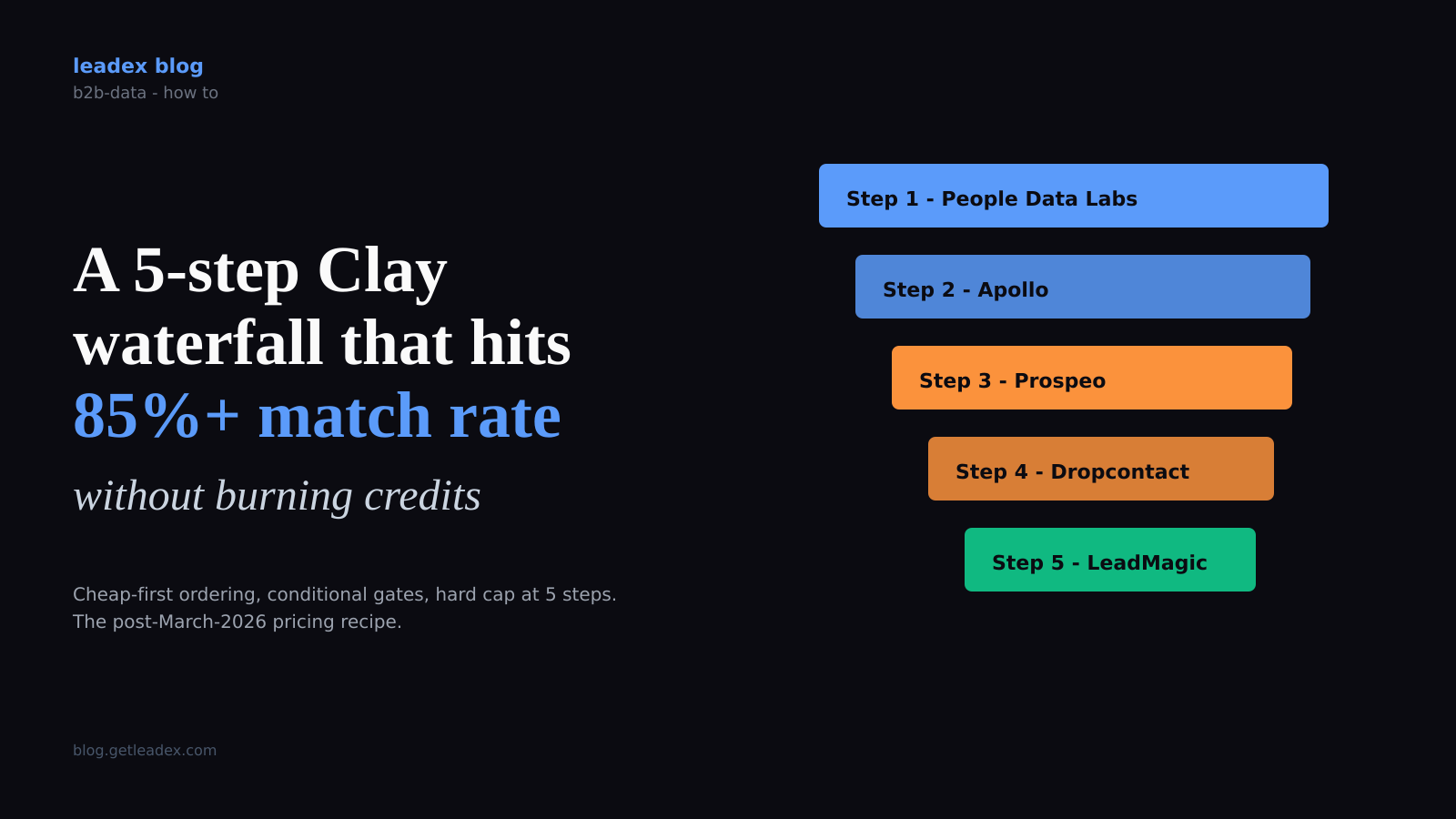
Most Clay waterfalls I've inherited from other teams are not actually waterfalls. They are eight providers fanned out in parallel, all firing on every row, and the credit meter spinning like a slot machine. The point of a waterfall - and the reason Clay built the feature in the first place - is the conditional step: provider N only fires when provider N-1 came back empty. Get the order wrong and you are paying premium rates for data the $0.01 provider would have found.
This post is a recipe for a five-step email-and-mobile waterfall that lands a 85-95% match rate on US tech roles while keeping average Data Credit cost per row under 7. It works against the post-March-2026 pricing model (Clay split credits into Data Credits and Actions on 11 March 2026, and Data Credits got 50-90% cheaper across the board), which means the cheap-first ordering matters more now than it did under the old single-credit system. The savings are not theoretical.
Waterfall enrichment lets you search sequentially across multiple tools until you find a valid match. This routinely triples our customers' data coverage and quality.
That is Clay's own framing on the waterfall enrichment product page, and it is correct as far as it goes. What the page does not tell you is the ordering rule, the conditional-logic syntax, or the point of diminishing returns. The next five sections cover those. (I have built a lot of these. The point of diminishing returns is step 6, every time.)
Step 1: Order providers cheap-first, premium-last
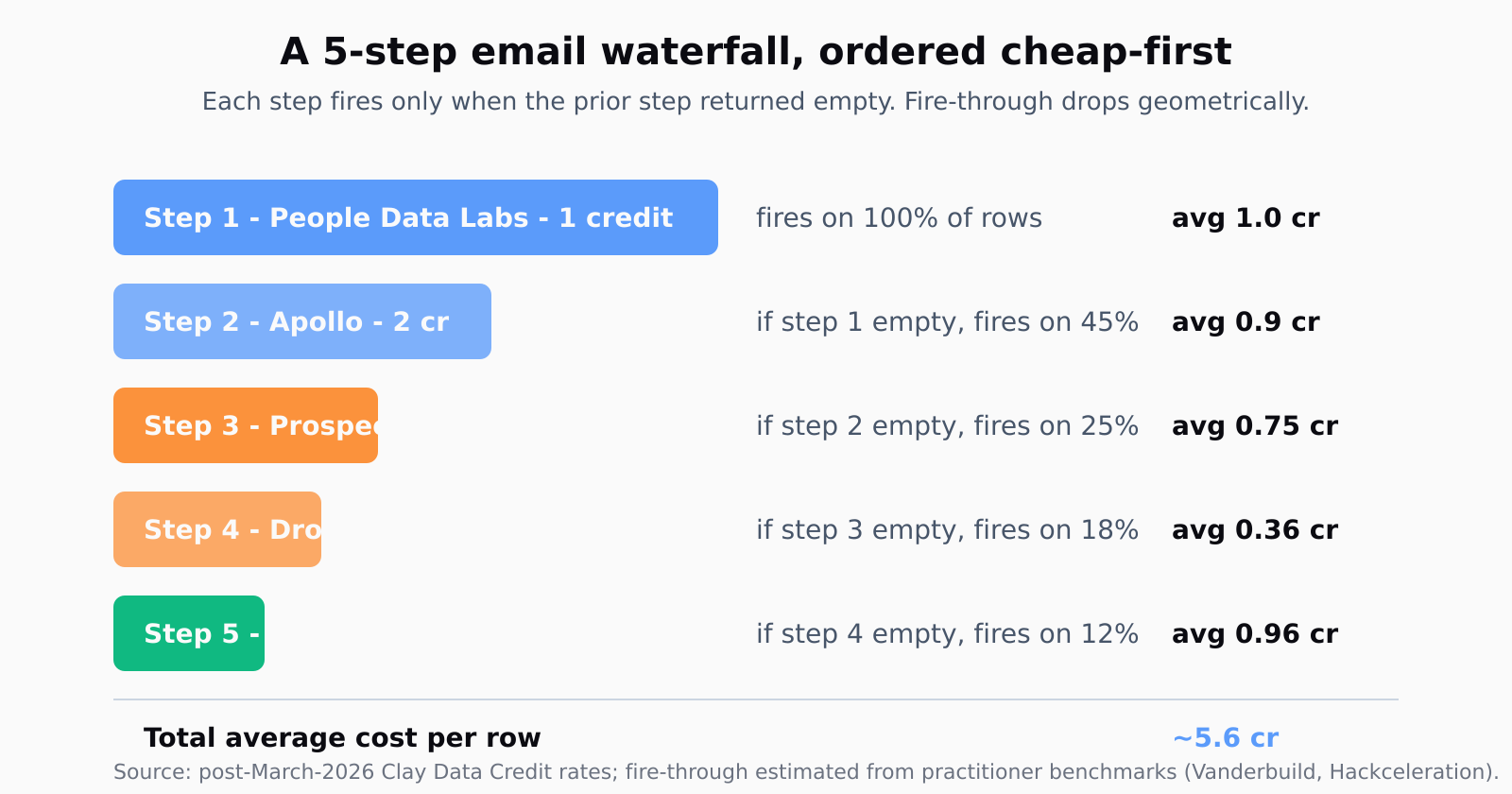
The first provider in your waterfall fires on every row. The fifth provider fires on maybe 15-25% of rows - the ones the first four missed. Premium providers like Lusha for mobile numbers or LeadMagic for personal email burn 8-15 Data Credits per successful hit; bulk providers like People Data Labs and Apollo burn 1-3. If you put Lusha at step 1, you pay Lusha rates on the 80% of rows that Apollo would have handled for less.
My default order for an email-finding waterfall, post-pricing-change:
People Data Labs first (cheapest bulk person+company), Apollo second (strong US mid-market coverage, 2 credits typical), Prospeo or Hunter third (domain-pattern emails, good for tech orgs Apollo missed), Dropcontact fourth (GDPR-compliant EMEA emails), and LeadMagic fifth as the premium catch-all. For a mobile waterfall I run a separate sequence: Apollo mobile -> ContactOut -> Datagma -> Lusha -> Hexa. _Never_ combine email and mobile in one waterfall - the conditional logic gets tangled and the success conditions are different (a row with email but no mobile should not trigger the mobile-only providers).
The exact rate card moves around. Hackceleration's tested four-layer recipe used Hunter (1), Apollo (2), Prospeo (3), Clearbit (5) and hit 78% on 200 LinkedIn prospects against Apollo-alone's 42%. The shape generalizes: price dictates position, not vendor loyalty or sales rep claims.
Step 2: Wire conditional logic so premium providers only fire on miss
This is the part most teams skip and the part that does all the cost work. Every step after step 1 needs a "Run only if [previous step's email field] is empty" condition on the column itself. In Clay this is the Run Settings -> Run only if field on the enrichment column - point it at the prior step's output column with an is empty check.
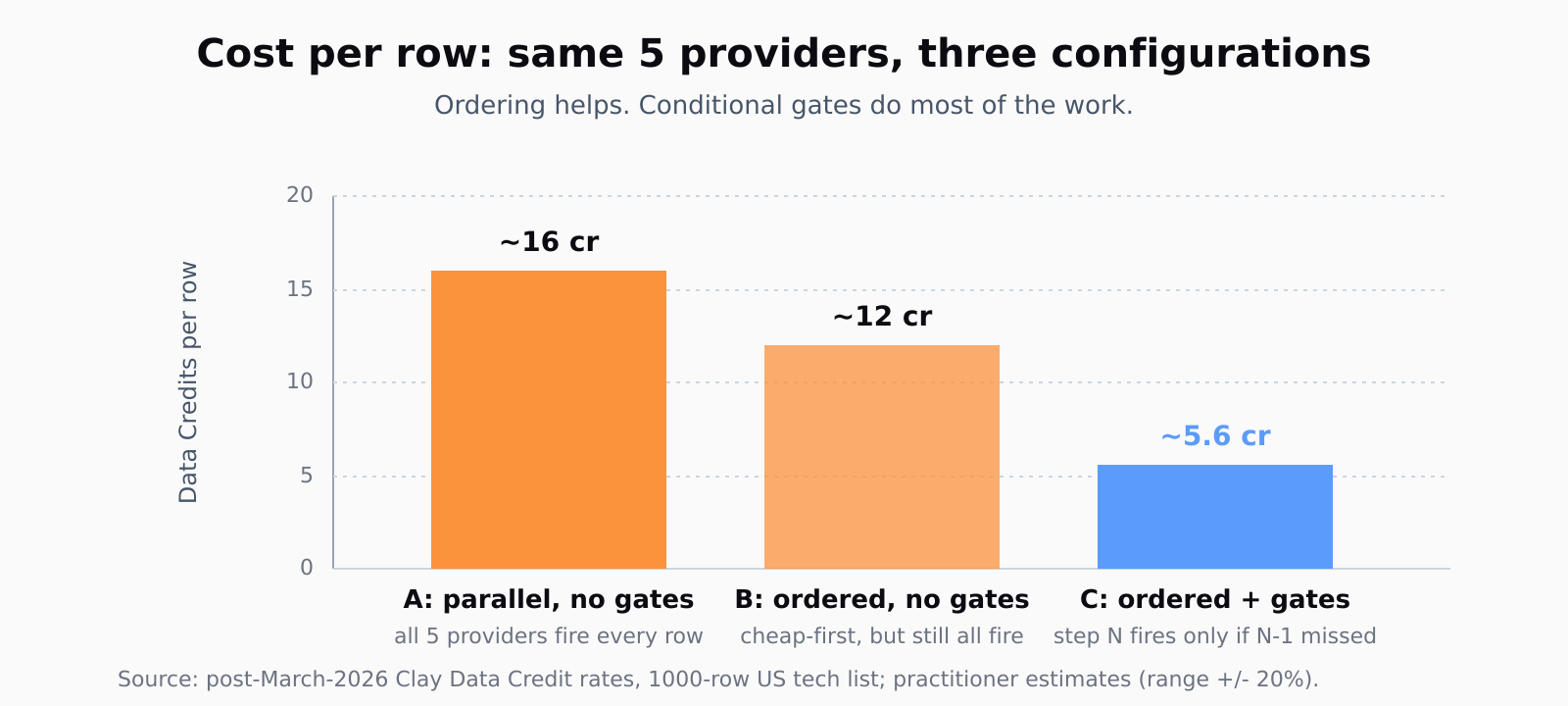
Without that gate, every row runs every provider regardless of whether earlier providers already returned a hit. A 5-step waterfall on a 1,000-row list with no conditional logic costs 5,000 provider calls. The same waterfall with conditional logic costs about 2,000-2,500 calls (every step has lower fire-through than the last, geometric decay roughly 50-70% per step). On the Launch plan's 2,500 Data Credits, the difference between configured and unconfigured is enriching one list per month or enriching one list per week.
Two gotchas. First, the condition must check the actual email-output column, not a status column - Clay's status columns can read "success" when the provider returned a row with no email, and the next step then skips a row it should have caught. Second, if you are merging columns at the end with a Formula, make the formula coalesce in waterfall order (PDL email, fall back to Apollo email, fall back to Prospeo, etc.) - otherwise the "final email" column picks whatever provider happened to come back last and you lose the verification trail.
Step 3: Cap the waterfall at five steps
Past five providers the marginal hit rate per provider drops below 5%, and every step adds about 30-60 seconds of run time and one more layer of "did this miss because the provider doesn't have the data, or because the API timed out" debugging. The 7-layer recipe in the Vanderbuild guide is impressive but the gain from steps 6 and 7 is roughly 3-5 percentage points - 88% to 92%, say - and the credit cost goes up about 40%. For most ICPs five is the sweet spot.
The exception is when steps 1-5 are saturated on the same kind of data - all five are email-finders trained on US tech profiles, say - and your list has 30% EMEA. Then you swap one step for an EMEA-native provider (Dropcontact, Kaspr) rather than adding a sixth. _Specialization beats addition._
This is the same tradeoff we wrote about when surveying the best AI lead generation tools earlier this year - past a certain point, more sources means more debug surface, not more leads.
Step 4: Verify match quality before pushing to CRM
An email that returns from a waterfall is not yet a deliverable email. Catch-all domains, role-based aliases, recently-deactivated mailboxes - your provider hit-rate is not your deliverable rate. Add a verification step at the end: Debounce, NeverBounce, or Scrubby (the latter handles catch-alls specifically). The verification step is one cheap call on every populated row, runs in about 200ms, and typically rejects 8-15% of waterfall hits as undeliverable.
Push the verified-only rows to your CRM. Push the rejected ones to a separate table for a future re-enrichment pass (data decay is real - the Vanderbuild guide cites 22.5% annual decay, which roughly matches the 2% per month I see in our own lists). Re-running the waterfall on rejected rows three months later catches roughly half of them.
Building a waterfall in a tool with a spreadsheet UI is one shape of the problem. Doing the same thing from a chat brief is another - we built Leadex around a BYOK enrichment model with no per-contact markup precisely because the math on a waterfall changes when there is no platform tax on top of provider costs. The provider order is still the lever; you just stop paying twice for it.
Step 5: Re-enrich every 90 days and track the credit-per-row trend
Every Clay table I look at six months later has the same problem: nobody has re-run the waterfall, the emails are 20% bounced, and somebody is asking why reply rates are down. The fix is calendar discipline, not provider choice. Schedule a re-enrichment of any production list every 90 days, and watch the credit-per-row metric per run.
If credits-per-row creeps up over consecutive runs, the cheap providers are losing coverage on your ICP and you need to re-shuffle order. If it drops, the cheap providers are catching more (often because a vendor added new data sources) and you can drop one of the later steps. Treat the waterfall like a portfolio, not a fixture. For teams without a RevOps engineer to babysit this, the Clay alternatives we surveyed handle the re-enrichment cadence automatically; for teams with one, Clay's flexibility wins as long as someone reviews the credit-per-row chart monthly.
One more habit worth borrowing: for any provider you depend on - Apollo especially - keep a one-screen note on the Apollo alternatives you would swap in if pricing or API quality shifted. The waterfall is supposed to make you provider-agnostic; that only works if you have actually compared the swap-in.
FAQ
How many providers should I use in a Clay waterfall?
Five is the sweet spot for email-finding on most ICPs. Steps 1-5 cover roughly 85-90% of a typical US tech list; steps 6 and 7 add 3-5 percentage points at about 40% more credit cost. Specialize the slots for niche ICPs (EMEA, healthcare, public sector) rather than adding more steps.
What is a realistic match rate for a 5-step Clay waterfall?
85-95% on US-based tech and SaaS roles, 65-75% on niche industries (industrial, government, very small businesses). If you are landing under 60% on a US tech list, the order is wrong or the input data (LinkedIn URL, company domain) is dirty. Re-check your name and company-name normalization first; that fixes about a third of low-match-rate complaints.
How much does a 5-step waterfall actually cost per row?
Roughly 5-7 Data Credits per row on average, post-March-2026 pricing, assuming conditional logic is wired correctly. Without conditional logic the same waterfall runs 15-25 credits per row. The difference is purely the gate.
Should I run email and mobile waterfalls separately?
Yes. The provider list is different (mobile-strong vendors like Lusha, ContactOut, Hexa do not specialize in email; email-strong vendors like Prospeo and Hunter do not return mobile), the credit cost is different (mobile is 3-5x more expensive per hit), and the success conditions are different. Treat them as two pipelines on the same row.
How often should I re-enrich a list?
Every 90 days for active prospecting lists, every 30 days for any list you are actively sequencing. B2B contact data decays at about 2% per month - emails bounce, people change jobs, companies get acquired. A six-month-old list has roughly 10-15% rotten data even before deliverability checks.