
How to Fix Outreach's Sequence Max Activations Exceeded Error
Outreach fails with max activations exceeded when throttle caps are hit. Raise limits and rescue prospects stuck in Pending or Failed.
If you run Outreach sequences with exact date/time steps - the kind where the first email is scheduled to fire at 9:00 on a specific day - there is a familiar moment when you drop a fresh batch of prospects into the sequence and Outreach refuses the whole load. The error is either "Validation Failed: Sequence max activations exceeded" or "Oops...Cannot add a prospect to the sequence: Sequence max activations exceeded", and on first encounter it reads like a platform bug. It is not a bug. It is Outreach's throttle cap for exact date/time sequences doing exactly what it is configured to do, and the fix is a setting, not a support ticket.
Outreach documents the cause plainly in its support article on the max activations error: the error is caused by exceeding the exact day/time sequence's maximum add limitation. The resolution in the same article is one sentence - remove or increase the limit, then try adding the prospects again. The article is short because the mechanism lives elsewhere, in the sequence throttles configuration. That is where the interesting behavior starts, because the throttle does more than reject adds. It also decides whether the prospects you already added sit quietly in pending or flip to Failed days later.
What the max activations error is actually telling you
Exact date/time sequences are different from relative-dated sequences. In a relative sequence, Outreach computes each step's delivery time from the moment the prospect was added, so the platform can gate adds over time without breaking anything. An exact date/time sequence commits to a fixed moment, which means Outreach has to know up front how many prospects it will be asked to schedule. That is the number the throttle caps: the maximum number of prospects that can be added to the sequence.
When you exceed it, you get the validation failure at add time. The prospect is never enrolled, nothing is half-queued, and no email goes out - the add itself is rejected. That distinguishes this error from the quieter failure modes in the same tool, like the pending states that come from the standard throttle dials, which I will get to in a moment.
Where the limit comes from: Outreach's sequence throttles
The throttle settings live per sequence under Settings, in the section labeled Throttle Newly Added Prospects. For exact date/time sequences this is the simple case: the throttle is a single field holding the maximum number of prospects that can be added, and Outreach is explicit about what happens when you exceed it. From the sequence throttles configuration guide:
If you try to add more prospects to the sequence than the throttle allows, you'll receive an error that says, "Max activations exceeded". You'll need to increase this number before you can add additional prospects to the sequence.
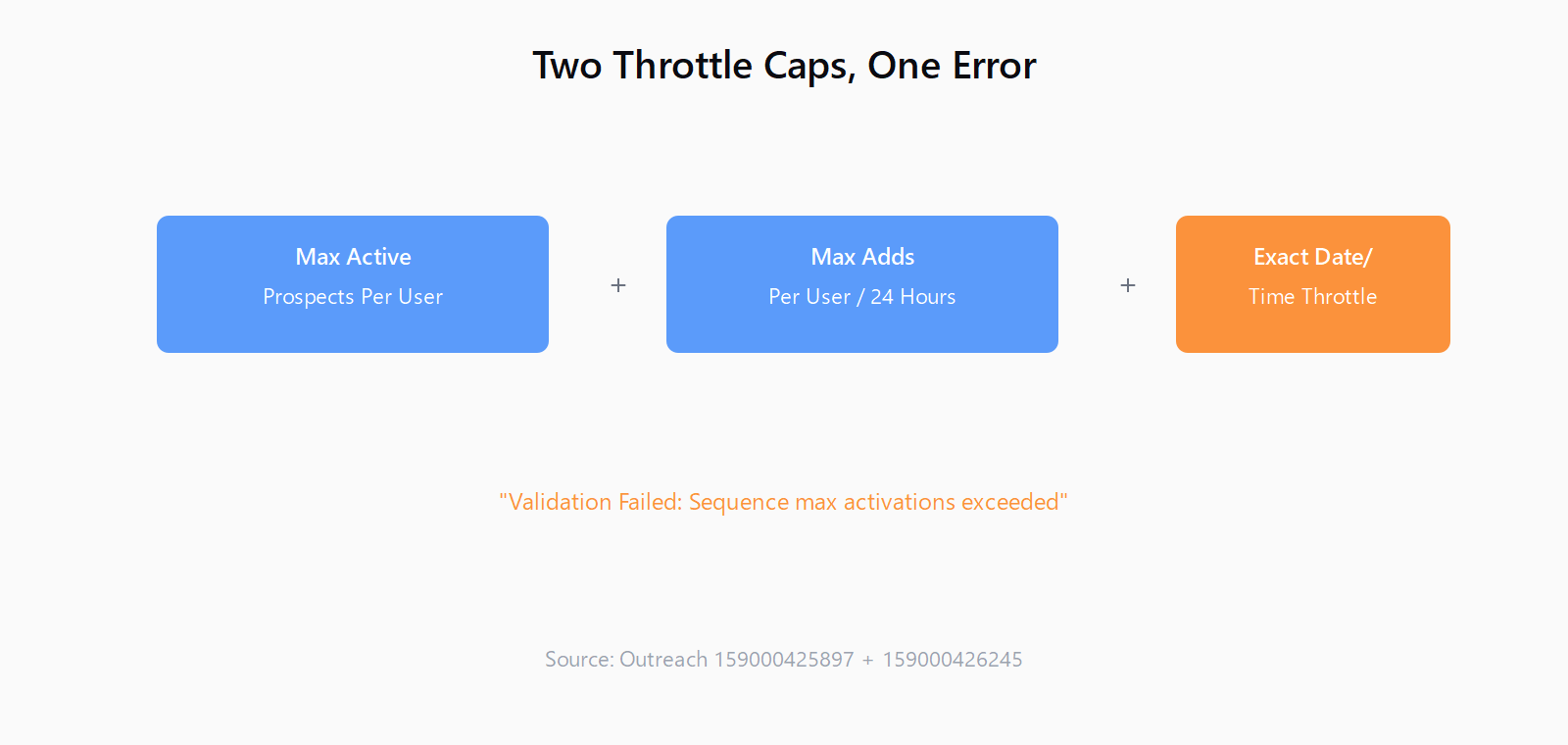
For relative-dated sequences, the throttle machinery is richer and it is where the pending and Failed states come from. There are two dials. Prospect Throttling, enabled by default, limits how many prospects can be added to the sequence at once. Auto-Activate Prospects, also defaulting to yes, controls whether gated prospects are activated automatically as capacity opens up or stay in pending until someone moves them manually. Beneath those sit two numeric limits: Max Active Prospects Per User, the number allowed to move through the sequence at a given time, and Max Adds Per User Every 24 Hours, the number activated and added to the first step within a rolling day.
Outreach's own example shows how the two numbers interact. If the max active limit is 50, you can add 100 prospects, but only 50 will be actively moving through the sequence; the other 50 wait and activate as the first 50 finish or exit. If the max adds per 24 hours is 50 and you load 200 prospects, the 200 are gated, with 50 added every 24 hours until all of them have completed the sequence. The two settings are checked together - Outreach looks at the active count, then adds pending prospects up to the max active threshold, stopping if the 24-hour add limit is reached first.
Here is the part most operators discover the hard way, and it is worth quoting verbatim from Outreach's own documentation:
We will try to put throttled prospects in a pending state, so that they can automatically resume on the next available window/opening, but when there is a very large amount of throttled prospects in pending, we will eventually put them into a Failed state due to the backlog. This is a safety guardrail to prevent potential bottlenecking.
That one paragraph explains the two behaviors that generate most support tickets. Pending means the throttle is holding the prospect for a future window - the sequence states overview lists the pending reasons as an unavailable delivery time in the assigned schedule, the daily throttle limit being met, the max active prospects being met, or auto-activation being disabled. Failed, in this specific case, does not mean the email bounced or the send failed. It means Outreach parked the prospect out of the queue because the pending backlog got too large. That distinction changes how you rescue the batch.
How to fix the error and get the batch added
For the max activations error itself, the fix is two steps. Open the sequence, click into sequence settings next to the master sequence toggle, find the Throttle Newly Added Prospects section, and either increase the maximum number of prospects that can be added or disable the throttle entirely. Then add the prospects again. If you raised the number to clear the immediate batch, that is fine for a one-off, but an unlimited or oversized throttle on an exact date/time sequence removes the pacing guardrail that exists precisely so a single mass-add does not schedule thousands of sends on one date - the same reason you set daily sending caps in cold email infrastructure in the first place.
Before you raise it, look at what the number actually was. The default is not always visible in the add dialog, so open the throttle settings and read the field. If the sequence was created by a teammate or an admin who configured throttles defensively, the cap may be deliberately low - a sequence meant to pace adds at 25 per day will throw the max activations error the moment someone loads a 400-row list. Matching the throttle to the real batch size is the correct fix; disabling it is the lazy one.
How to rescue prospects stuck in pending or Failed
Once prospects are in pending because the throttle met its limits, the system is supposed to resume them automatically on the next available window. The failure case is scale: when the pending backlog is large enough, Outreach moves the overflow to Failed as a guardrail, and nothing will auto-resume those from there. The recovery procedure is to temporarily increase the sequence throttling limits, then remove those prospects from the sequence and re-add them back. Tag the prospects before you remove them, so you can find them again - Outreach's documentation is explicit about this step, and skipping it means rebuilding the list by hand afterward.
For a smaller number of stuck prospects, manual activation is faster and does not require touching the throttle at all. Open the sequence, go to the Prospects tab, click the More Options ellipsis next to the pending prospect, select Activate, and confirm. Refresh to verify the prospect activated in the sequence as configured. The manual path is the one documented in Outreach's guide to resuming pending prospects, and it works on prospects that are merely waiting for a delivery window as well as ones blocked by a throttle limit.
There is a real judgment call buried in here about what the Failed state actually means before you react to it. Hover over the Failed label in the sequence to see the failure reason - a throttle-backlog failure needs a very different response than a bounce or a "prospect contacted too recently" rejection. I have seen teams respond to a wall of Failed prospects by deleting and re-sourcing the whole list, when the throttle had simply parked a batch that was added faster than the sequence's pace allowed. That is the same class of mistake as treating prospects stuck in pending in an Apollo sequence as a data problem when it was a mailbox problem - reading the state as a verdict instead of a status.
The pacing lesson is the one that carries over to the whole stack. A sequence throttle exists to flatten bursts into a sustainable rate, and the same logic applies to how a list enters the pipeline at all. This is the seam Leadex sits on: research runs produce a batch of verified prospects with source URLs and timestamps, and how that batch is paced into your sending tool determines whether you see clean enrollment or a backlog that trips every guardrail the platform has. For teams building lists ahead of a sequence rather than inside one, Leadex handles the research and enrichment side, leaving the throttle tuning to the sequence tool where it belongs.
One last habit worth stealing: after you rescue a batch, set the throttle back to a sane number rather than leaving it disabled. The pending-to-Failed guardrail is Outreach's attempt to protect deliverability from an over-sized backlog, and a disabled throttle on an exact date/time sequence quietly removes the only pacing control that sequence has. A sequence that paces adds also interacts with follow-up scheduling in ways worth auditing - the same calendar-vs-business-day arithmetic that decides whether follow-ups fire on weekends applies to how much of a delayed batch gets squeezed into the next window.
FAQ
What does "Sequence max activations exceeded" mean in Outreach?
It means you tried to add more prospects to an exact date/time sequence than its throttle allows. Outreach rejects the add at enrollment time. Increase the throttle limit or remove it, then add the prospects again.
Where do I change the max activations limit in Outreach?
Open the sequence, click into sequence settings next to the master sequence toggle, find the Throttle Newly Added Prospects section, and set the maximum number of prospects that can be added. For exact date/time sequences this field is the activation cap.
Why are my prospects stuck in pending in an Outreach sequence?
The throttle is holding them for a future delivery window. Pending reasons include the daily add limit being met, the max active prospects limit being met, no available delivery time in the assigned schedule, or auto-activation being disabled. Pending prospects should resume automatically when capacity opens.
Why did my pending prospects move to a Failed state?
When the pending backlog grows very large, Outreach moves overflow prospects to Failed as a safety guardrail against bottlenecking. It is not a bounce or send failure. Increase the throttle limits temporarily, tag the prospects, remove them, and re-add them.
Can I manually activate a pending prospect instead of waiting?
Yes. Open the sequence, go to the Prospects tab, click the More Options ellipsis next to the pending prospect, select Activate, and confirm. Refresh to confirm the prospect activated as configured.