
How to Fix HubSpot Breeze Prospecting Agent Targeting Wrong Personas After ICP Definition Changes
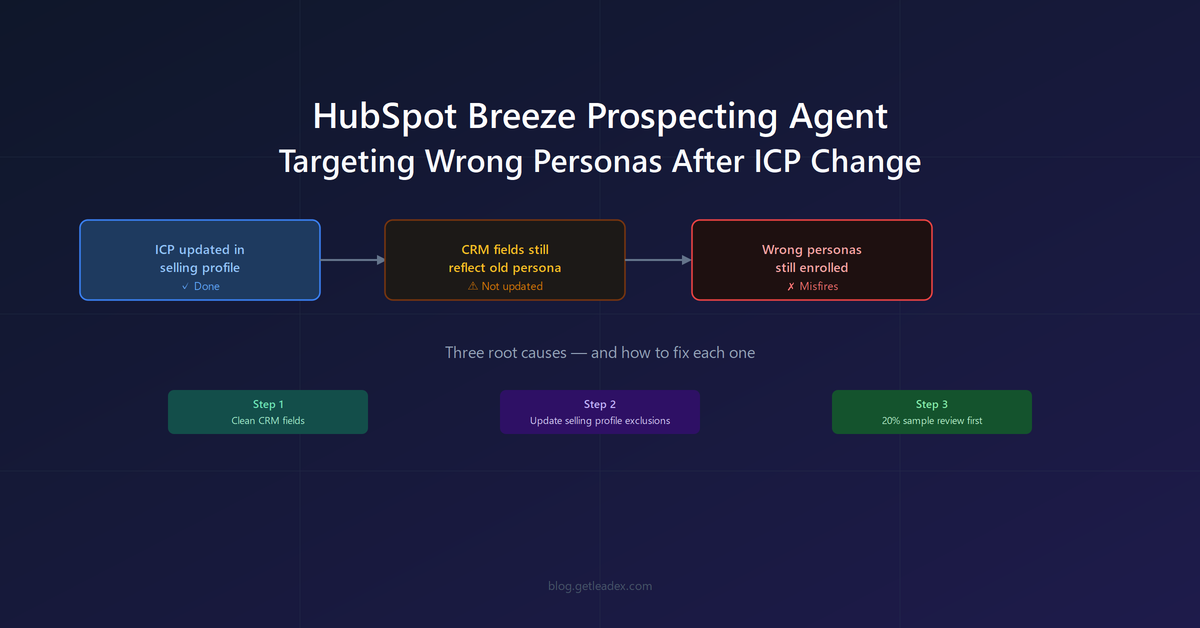
The most common report from teams that updated their ICP definition in HubSpot and then let the Breeze Prospecting Agent run looks the same: meetings start booking, but the job titles are wrong. The persona you removed from the criteria is still showing up in enrolled contacts. Updating the ICP settings in the agent is not enough on its own, because the agent does not re-qualify existing contacts against the new definition. It reads from the CRM fields on the contact record - job title, industry, company size - and those fields may reflect what the contact was when they were last enriched, not what they are now.
This is not a bug in Breeze's reasoning. It is a data-layer problem that looks like an AI problem. The agent does what you told it to do; the issue is that the inputs it is reading from - the contact properties in your CRM - have not been updated to match the ICP change you made in the selling profile. The gap between "I changed the ICP" and "the agent is now targeting the right people" requires three separate steps, and updating the selling profile is only one of them.
Our sales reps called us on some of the targeting early, and they were right. Breeze was going after some of the wrong people for the wrong reasons. When we dug in, most of those cases traced back to our own CRM: job titles that had changed, companies that had restructured, contacts who had moved on. Data hygiene problem, not a Breeze problem.
That is from Rivetline's case study running Breeze on 1,000 old leads, one of the more honest published accounts of the agent in production. The same finding applies when the data quality issue is not a stale CRM record but a fresh ICP change: the agent does not retroactively re-screen contacts that are already enrolled or already past the research phase. If you changed your ICP to exclude a job title and contacts with that title were already researched, the agent proceeds.
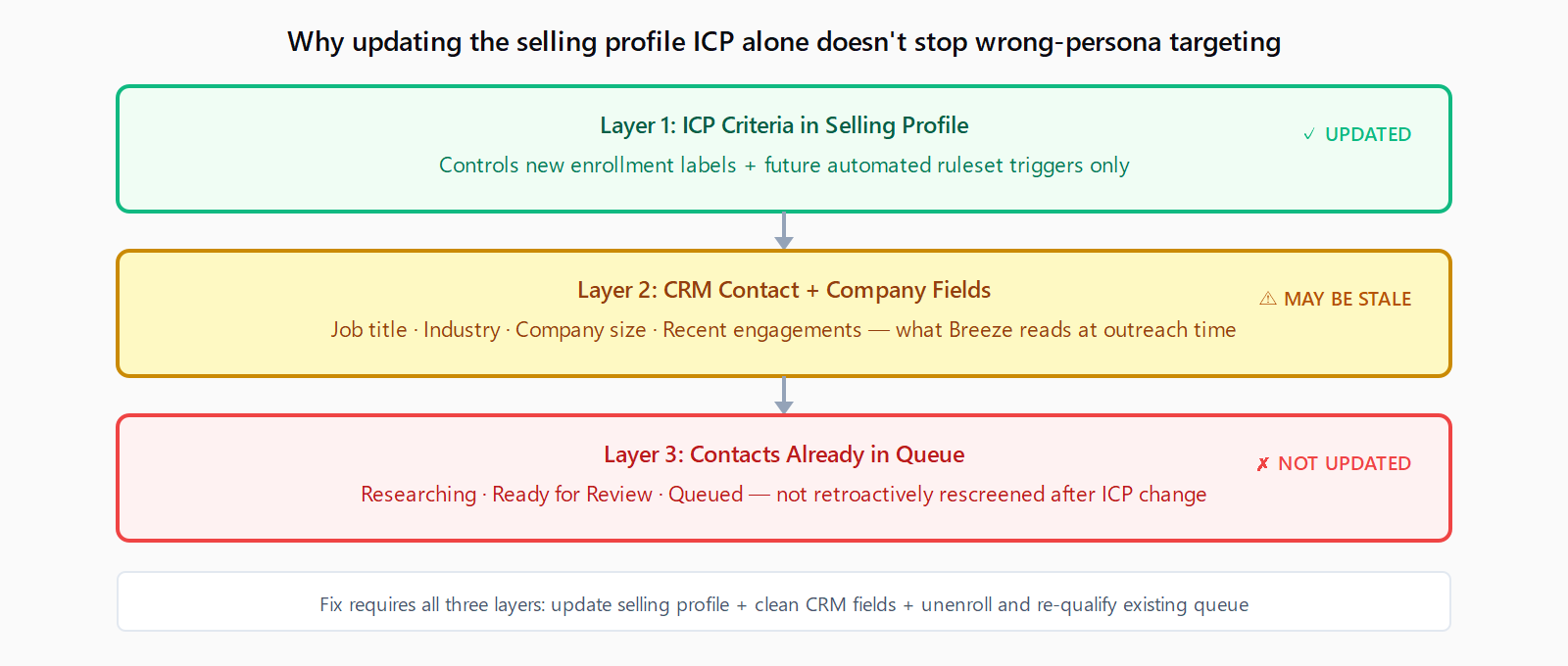
Why updating ICP Criteria in the selling profile is not enough
The Breeze Prospecting Agent uses two sources to qualify contacts for enrollment. First, the ICP Criteria you set in the selling profile - industry, company size, geography, persona - which controls the Matches ICP and Target persona labels shown in the manual enrollment view. Second, the actual CRM property values on each contact and company record, which the agent reads when researching and personalizing outreach. When those two sources disagree, the CRM field tends to win at the outreach stage.
A practical example: you remove "Operations Manager" from your target personas in the selling profile. Contacts with that title who are already queued or in the Researching status continue through the pipeline because the agent began researching them under the old ICP. Contacts with that title who were enrolled under automated rulesets before the change are also unaffected - the ruleset fires on the enrollment trigger, and the agent uses the selling profile active at enrollment time. Contacts not yet enrolled will be filtered correctly going forward, but the backlog does not re-screen. For Breeze Agents tier and feature access setups where automated enrollment is running continuously, the lag between ICP change and clean targeting can span days of new enrollments.
Step 1: Clean the CRM fields Breeze reads from
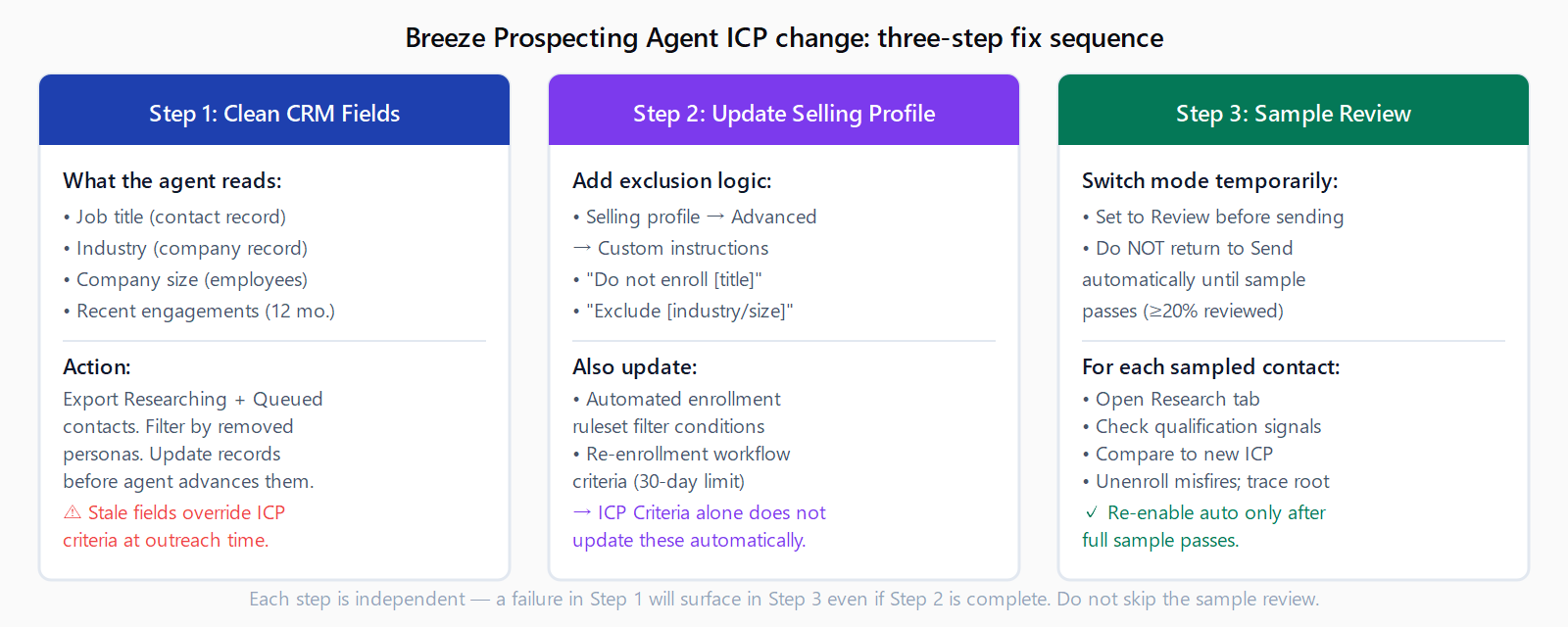
Before re-enrolling contacts under the new ICP, audit the contact and company properties the agent uses for qualification. The primary fields are job title, industry (on the company record), company size (number of employees), and HubSpot's lifecycle stage. If any of these are stale - a contact who moved roles, a company that was reclassified, an industry field populated from an outdated enrichment pass - the agent will qualify or disqualify based on the old value regardless of what your selling profile says.
The fastest fix is a targeted export: pull all contacts currently in the Researching, Ready for Review, and Queued statuses in the Prospecting Agent enrollment view. Filter by the job titles and industries you are removing from the ICP. Manually update those contact records before the agent advances them to the outreach stage. For contacts already in the In Progress status, unenroll them from the agent, update the contact record, and re-enroll only the ones that now qualify under the updated ICP.
This is also the right moment to deal with the broader enrichment problem. If your CRM has contacts whose job titles have not been refreshed in 12 or more months, those records will produce persona drift throughout any agent run - not just after ICP changes. Leadex handles contact-level re-enrichment via BYOK provider connections so that job title and firmographic fields stay current without routing every lookup through HubSpot's credit system.
Step 2: Update ICP Criteria with explicit negative keywords and disqualification examples
The default ICP Criteria setup in the selling profile accepts positive definitions: the industries you target, the company size ranges, the job titles you want. After an ICP change, the agent is better constrained by adding explicit exclusion logic to the Advanced settings in the selling profile, not just removing the positive inclusion.
In the selling profile, go to Advanced → Custom instructions. Add explicit negative examples such as "Do not enroll contacts with the title Operations Manager" or "Exclude contacts at companies with fewer than 50 employees." The Rivetline case study noted it took "a few rounds of negative keywords and exclusions before the output tightened up" - this is consistent with how the agent handles the gap between enrollment-time ICP matching and outreach-time personalization decisions. The selling profile description field is also read during the personalization step; updating it to reflect what the new ICP excludes - not just what it includes - gives the agent clearer disqualification signals when it is composing outreach for borderline contacts.
For teams running automated enrollment rulesets, add the excluded personas as filter conditions in the ruleset itself, not only in the selling profile. The ruleset is the enrollment gate; the selling profile is the outreach guide. Both need to reflect the new ICP. Note the HubSpot filter limit in enrollment criteria - if your exclusion list is long, you may need to split criteria across multiple rulesets or use a workflow-based enrollment trigger to avoid hitting the 250-filter cap.
Step 3: Run a 20% sample review before returning to full autonomy
After updating the CRM fields and the selling profile, switch the selling profile back to Review before sending mode temporarily. Do not return to Send automatically until you have manually reviewed at least 20% of the contacts the agent has researched under the new ICP. This sample review is the cheapest way to catch residual misfires before they turn into booked meetings with the wrong personas.
In the Enrollments view, filter by the Researching and Ready for Review tabs. Sort by enrolled date to see the most recent batch under the new ICP. For each contact in the sample, check the Research tab to see what signals the agent used to qualify them, then compare against your updated ICP definition. If the agent is still pulling in disqualified personas, the issue is either in an unchanged automated ruleset, a stale company industry field that survived the Step 1 cleanup, or a custom instruction that needs to be tightened. Fix the root cause in the source, unenroll the mismatched contacts, and run another sample before flipping back to autonomous mode.
The ongoing review cadence for auditing Breeze Prospecting Agent drafts covers the steady-state case; the 20% post-ICP-change sample is a one-time step, not a permanent operational mode.
What to watch for with automated enrollment rulesets
Automated enrollment rulesets fire on triggers - a form submission, a contact property change, a workflow action - and enroll contacts that match the ruleset criteria at that moment. They do not re-screen contacts that were already enrolled before the ruleset was updated. If you changed your ICP and updated the ruleset, contacts that entered the queue before the change are not affected. To handle the backlog, unenroll all queued contacts, apply the updated filters manually to identify which ones still qualify, and re-enroll only those.
One edge case: if you use a workflow to automate re-enrollment after the 30-day adaptive enrollment limit, verify that the workflow's enrollment criteria also reflect the new ICP. A re-enrollment workflow configured before your ICP change will continue pulling in contacts under the old definition until you update the workflow filter conditions to match. The 30-day limit and its re-enrollment workflow are separate from the selling profile; changes to one do not propagate to the other.
FAQ
Why does Breeze still target the wrong personas after I updated my ICP in the selling profile?
The selling profile ICP Criteria controls which contacts show the Target persona label during manual enrollment and which new automated enrollments are triggered. It does not retroactively re-qualify contacts already in Researching, Ready for Review, or Queued status. Those contacts were screened under the previous ICP and will continue through the pipeline under it. To fix this, unenroll the mismatched contacts, update the underlying CRM fields, and re-enroll only contacts that pass the new ICP.
What CRM fields does Breeze Prospecting Agent use to qualify and personalize outreach?
The agent reads job title, industry (company record), company size, recent engagements from the past year (form submissions, page views, calls, meetings, notes, email opens), and any enrichment data connected to the contact or company record. It also reads the selling profile's selling information, custom instructions, and call-to-action configuration. Stale values in any of these fields can override what you set in the ICP Criteria.
How do I add negative keywords to Breeze's ICP Criteria?
The ICP Criteria panel in the selling profile accepts positive filters only - the industries, sizes, and personas you want to include. For exclusions, go to the selling profile's Advanced settings and add explicit disqualification instructions in the Custom instructions field. For example: "Do not enroll contacts with the title VP of Operations" or "Exclude companies in the nonprofit sector." Test the instructions using the preview function in the Advanced panel before saving.
Does the 30-day adaptive enrollment limit affect this issue?
Yes, indirectly. Contacts enrolled under the old ICP that hit the 30-day adaptive limit are automatically unenrolled. If your re-enrollment workflow does not filter for the updated ICP, those contacts will be re-enrolled under the old definition. Update the workflow filter criteria to match your new ICP before the first batch of 30-day expirations triggers re-enrollment.
Can I use exclusion lists to filter out wrong personas?
Yes. In Agent Setup → Exclusion Lists, you can add a contact list that the agent will never enroll. This is the most reliable gate for a set of contacts you want to permanently exclude - more durable than ICP Criteria, which updates on each selling profile save. Build a list of contacts matching the persona you removed from your ICP, add it as an exclusion list, and the agent will skip them on future enrollment attempts regardless of how the selling profile is configured.