
How to Audit HubSpot Breeze Prospecting Agent Drafts Before You Send
A three-check audit loop for HubSpot Breeze Prospecting Agent drafts: signal source, bridge claim, and link descriptions. Why the review tab matters more under outcome-based pricing.
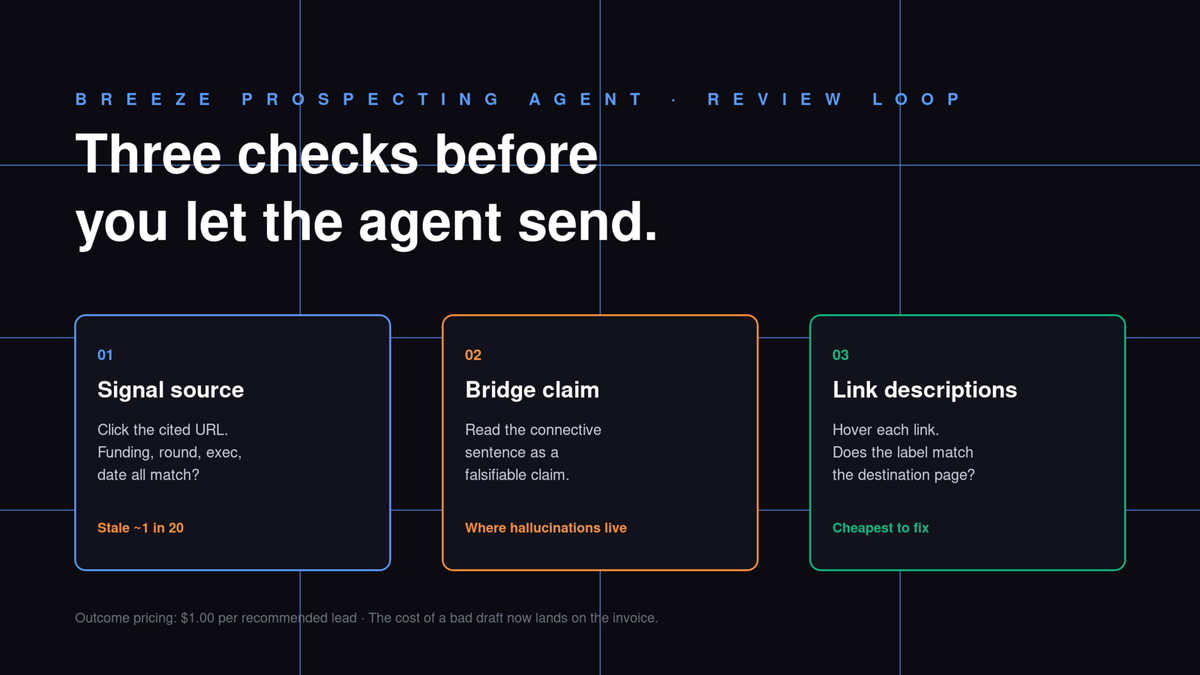
HubSpot moved Breeze Prospecting Agent to outcome-based pricing on April 14, 2026, billing $1.00 (100 credits) per lead the agent recommends for outreach. That changes the math on autonomous mode: the cost of a hallucinated email no longer just lands in someone's inbox, it lands on your invoice. Which is exactly why the "Review before sending" tab is the part of the product I'd refuse to skip on any new selling profile.
For context: Breeze Prospecting Agent watches HubSpot CRM contacts for buying signals (funding rounds, job postings, technology adoption), pulls fresh contacts from ZoomInfo, Apollo, and Surfe, and drafts personalized emails. You pick semi-autonomous ("Review before sending") or fully autonomous ("Send automatically") per selling profile. The official line on the ramp is to start in review mode and graduate when the drafts hold up - which sounds reassuring until you try to define "hold up." HubSpot's own CCO Jon Dick framed the pricing change in plain language:
Outcome-based pricing removes that risk. You pay when it works, full stop.
"Full stop" is doing a lot of work in that sentence. A draft Breeze sends that fails to book a meeting is now a billed line item; a draft you edit before sending isn't penalized differently. (This is the inverse of how most AI SDR tools in this category price themselves - seat-based or per-email - so the audit calculus is genuinely different for Breeze.) The financial incentive to leave humans in the loop has, if anything, gotten stronger, not weaker. Tyler Samani-Sprunk's weekend test of the agent caught it mischaracterizing a reviews URL as a service overview page "in several instances" and drawing nonsensical connections between prospect company details and service offerings. His conclusion was direct: "It is not ready for fully autonomous mode, at least not until you've dialed in your prompts and targeting."
Here is the audit loop I run on every new selling profile before flipping that switch. The interface is small; the discipline is the thing.
Open the draft from Enrollments, Ready for review
Drafts live in the Prospecting Agent under Enrollments. Click the Ready for review tab, then a contact's name to open the draft. The agent shows you what it found about the company, the signal it fired on, the suggested call-to-action, and the email body in one stacked view. If you're a Super Admin, opt your account into the Prospecting Agent Daily Digest beta - a 9 AM summary of pending drafts with direct links - so the queue doesn't drift out of sight. The daily digest is the difference between auditing 12 drafts on Tuesday and auditing 47 on Friday, which is the moment people stop reading carefully and start rubber-stamping.
Open the first draft. The agent's reasoning is in the right rail: the signal name (e.g., "Series B announcement, $40M"), the source URL it scraped, and the connective claim about how that signal relates to your offering. Do not start by reading the email. Start by reading the signal.
Check the signal-to-prospect connection
The agent's job is to argue that this signal makes this prospect a good fit for your service. That argument is where the hallucinations live. Three things to verify, in order:
First, the signal source. Click the URL the agent cited. If the cited URL is a TechCrunch funding announcement, confirm the funding amount, the round, and the named executive match. If it's a job posting, confirm the role title and the hiring location. About one draft in twenty in my testing pointed at a stale or wrong page (I believe the underlying source is the third-party signal vendor caching one extra week than the public site).
Second, the connective claim. The agent often writes something like, "Saw you just raised your Series B and are hiring across go-to-market - congrats. Many [your category] teams hit a snag here around X." Read that bridge phrase as a falsifiable claim. If the prospect's hiring is for engineering and the connection invokes go-to-market, the bridge is fabricated. This is the failure mode Samani-Sprunk flagged: the agent draws a connection that doesn't survive a careful read.
Third, the URL of any artifact the email links to. The agent sometimes labels a customer reviews page as a "service overview" or a pricing page as a "case study." It almost never gets the URL itself wrong - it gets the description of what's at the URL wrong. Hover every link in the draft; if the description and the destination disagree, edit one or the other. This is where my eight-signal taxonomy reading list, which I cover in why one trigger is never enough, becomes load-bearing - Breeze fires on a single signal per draft, so the connective claim has nothing to corroborate it.
Edit with the Breeze icon, not a full rewrite
Once you've checked the signal and the connective claim, the email body is usually fine - the agent is good at tone and length. What it cannot do is invent context it didn't pull. If the signal is right but the bridge sentence is wrong, the Breeze icon in the corner of any text field opens an inline edit prompt: "tighten the second paragraph," "drop the line about hiring," "swap the CTA to a 15-minute call." Use it. Rewriting the whole email by hand defeats the agent's job; refusing to edit at all defeats yours.
The one exception is the subject line. Breeze's subject lines lean on the signal name verbatim ("Saw the Series B - quick question"), which works once and tires fast across a campaign. Rewrite subject lines manually until you've shipped enough drafts to know which patterns your buyers actually open.
Decide when to flip to fully autonomous
The graduation criterion HubSpot suggests is "when drafts hold up." That's the right shape but the wrong unit. Track three numbers per selling profile over a two-week review window: the share of drafts where you changed nothing (the send-as-is rate), the share where you edited the bridge sentence, and the share where you killed the draft entirely. Stax's prospecting-agent rollout reportedly hit a 3% edit rate inside the first month, which is the kind of signal that earns a flip - though I'd hold the kill rate below 1% before flipping, since under outcome pricing every false-positive draft is a billed dollar.
The catch is that send-as-is only measures the agent's fluency, not its targeting. A draft can read perfectly and still pitch the wrong company. Cross-reference the send-as-is set against reply-rate and meeting-booked data after 30 days; if those drafts are reply-rate-equivalent to your manually-written sequences, the profile is ready. If they read well but underperform on replies, the agent is hallucinating credibly - the harder failure to catch.
That gap - between an email that reads right and a target that is right - is exactly the seam Leadex closes from the other side. Breeze pulls contacts from ZoomInfo, Apollo, and Surfe; Leadex builds the upstream list from an open-web brief, so the contact pool fed into the agent is shaped by what your buyer actually looks like, not by whatever the data vendor has in cache. The downstream review tab gets cheaper when the upstream targeting is sharper. Pair that with the prospecting prompts you'd use to brief any agent, and the audit loop above becomes a sampling check rather than a save-the-budget exercise.
One last note on the daily digest: opt every Super Admin in, but only one person per selling profile should actually click through. Two reviewers create two queues of in-flight edits and the agent stops learning whose taste to mimic. Pick the owner, give them the queue, and read the weekly send-as-is numbers together on Friday.
FAQ
How is Breeze Prospecting Agent billed under outcome-based pricing?
HubSpot charges $1.00 (100 Breeze credits) per lead the agent recommends for outreach, billed when the recommendation is generated. Drafts killed in review before sending still count if the agent generated the recommendation; the unit is the recommendation, not the email.
What's the difference between semi-autonomous and fully autonomous mode?
Semi-autonomous ("Review before sending") parks every draft in an Enrollments queue for human review; fully autonomous ("Send automatically") emails the prospect without a review step. The mode is set per selling profile, not per account, so different profiles can run on different ramps at the same time.
Where does Breeze get the contact data it uses?
Breeze pulls fresh contacts from HubSpot's data partners - ZoomInfo, Apollo, and Surfe - and watches existing CRM contacts for buying signals like funding rounds, job postings, and technology adoption. The signal source is shown in the right rail of every draft so reviewers can verify it.
What's the Prospecting Agent Daily Digest beta?
A 9 AM email summary of pending review drafts with direct links into the Enrollments queue. Super Admins opt their account in from the Prospecting Agent settings. The digest is what keeps the review queue from drifting; auditing 12 drafts on Tuesday is doable, auditing 47 on Friday is when rubber-stamping starts.
When is it safe to flip a selling profile to fully autonomous?
When two weeks of review data show send-as-is rates above ~95% and kill rates below 1%, and the send-as-is drafts post reply-rates equivalent to your manually-written sequences over a 30-day window. Fluency alone isn't enough - credible-but-wrong drafts pass the read-test and still burn budget under outcome pricing.