
How to Use HubSpot's AI Duplicate Management Dashboard
Cross-object detection isn't cross-object merging - here's what HubSpot's Manage Duplicates dashboard actually does, and where it stops.
HubSpot's Manage Duplicates dashboard (Data Management > Data Quality > Manage Duplicates) has been quietly picking up features all year - bulk merge, custom duplicate rules, a similarity score, an audit log - and the documentation was last updated on June 22, 2026. It's the kind of tool most HubSpot admins half-know: they've clicked "Manage duplicates" once, merged a pair, and moved on. The dashboard does more than that now, and it does one specific thing differently than most people assume, which is worth getting right before you run a bulk cleanup on a database that took years to pollute.
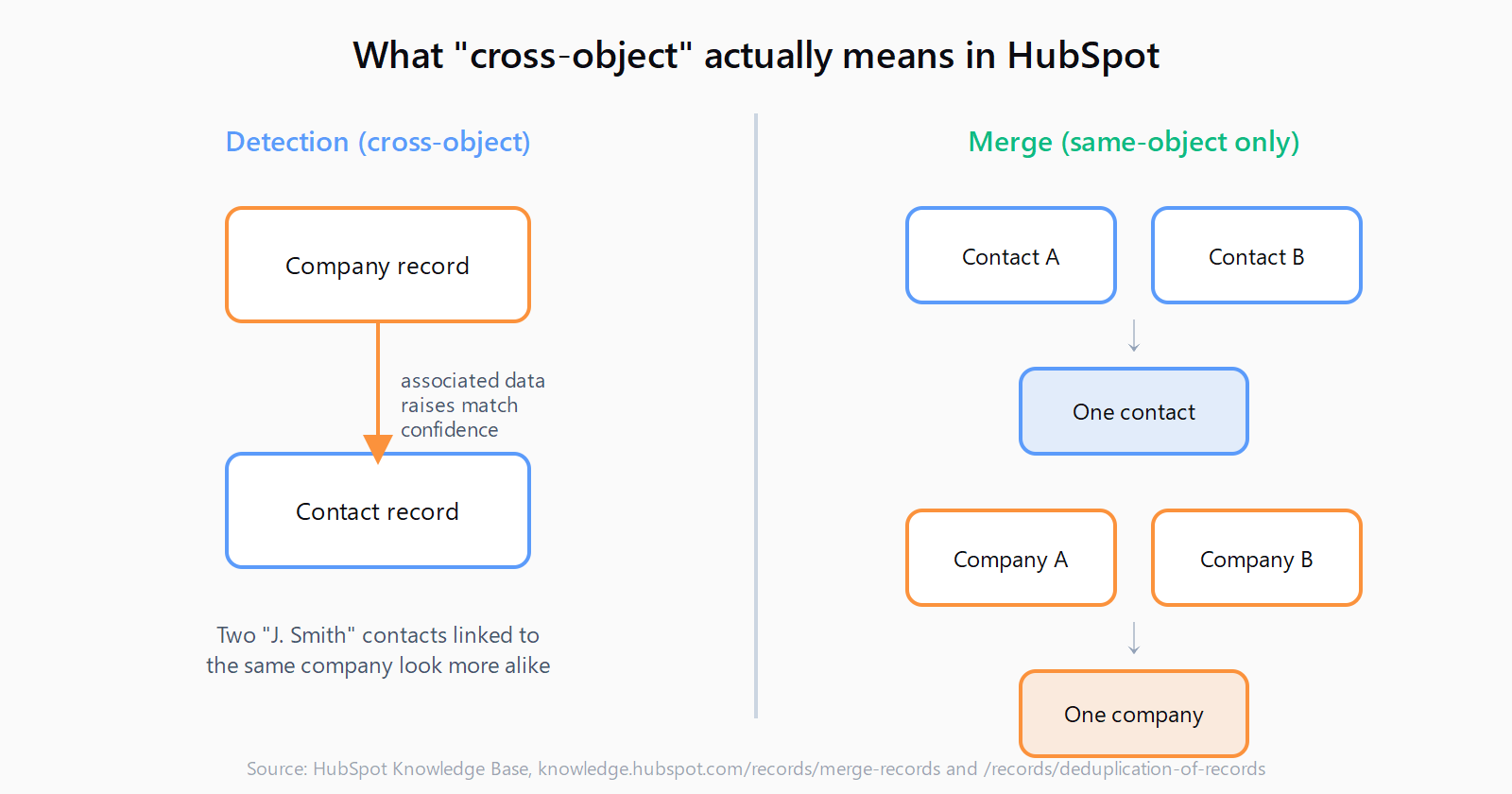
The name people use for this feature - "cross-object duplicate management" - is doing a lot of work it can't actually cash. Cross-object detection is real: the matching model reads company data to help decide whether two contact records are the same person. Cross-object merging is not a thing HubSpot supports at all, and that distinction is the difference between a clean afternoon and a support ticket.
How to open the duplicate management dashboard
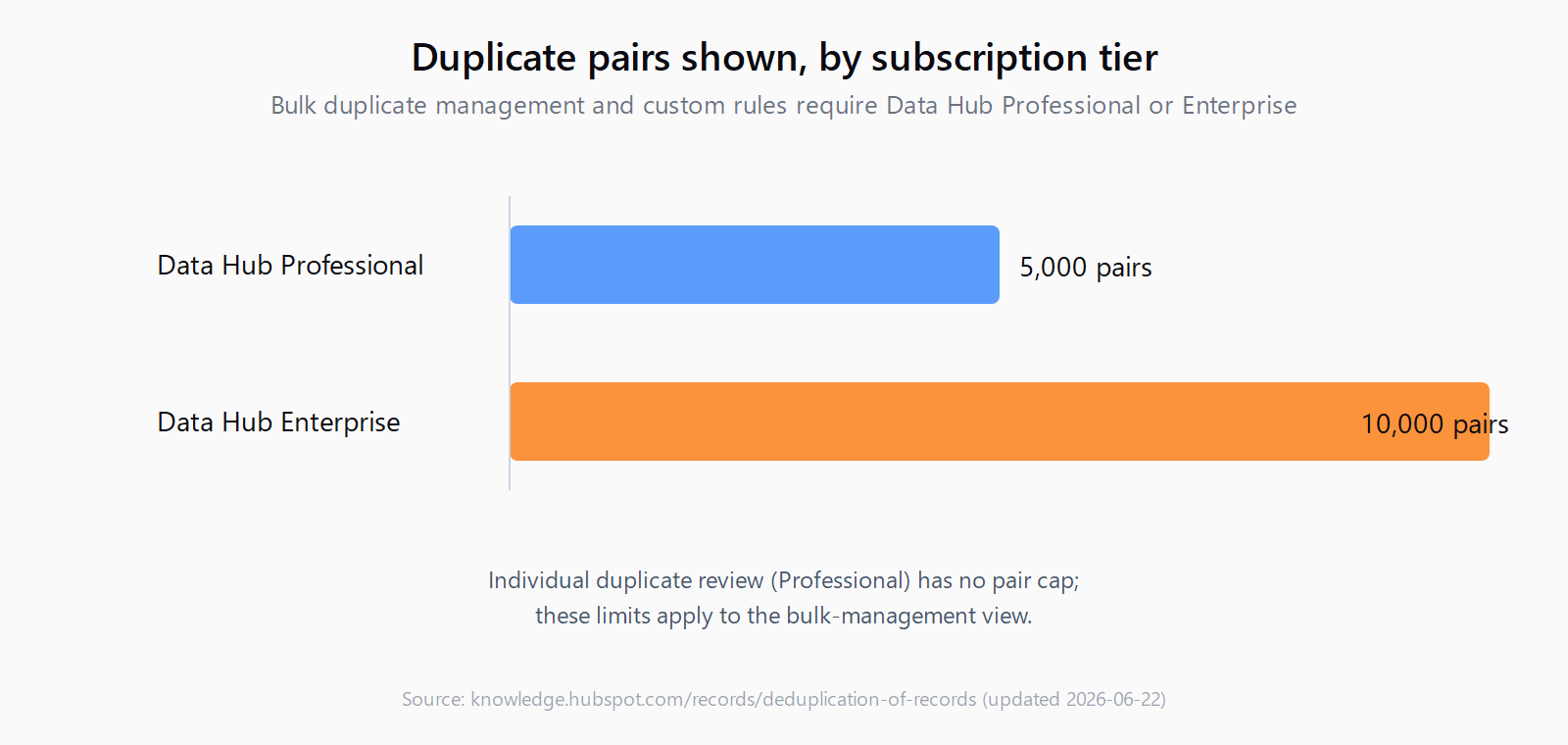
In your HubSpot account, click More, then Data Management > Data Quality (or navigate there directly if More doesn't show up in your nav). Click the Manage Duplicates tab and you'll see a summary of duplicate issues by object, plus a table of suggested pairs with a "last checked for duplicates on" timestamp - HubSpot's model recalculates as new records land and otherwise scans once a day. A Professional subscription gets you the individual duplicate manager; Data Hub Professional shows up to 5,000 duplicate pairs and Enterprise shows up to 10,000, along with bulk management. You also need Data quality tools access plus Edit permissions on the object you're reviewing - a rep with contact edit rights but no company access can review contact duplicates but not company ones.
How to review and merge a single duplicate pair
Click Review next to a pair and HubSpot opens a side-by-side comparison. You pick which record survives, or cherry-pick individual property values from each side, then click Merge. If the pair isn't actually the same company or person, click Cancel and then Reject in the table - rejected pairs drop out of the queue permanently unless one of the two records later gets merged into something else, at which point it can resurface. The underlying matching model looks at first name, last name, email, IP-derived country, phone number, zip code, and company name for contacts, and domain, name, country, phone, and industry for companies. Every accept or reject is training signal; HubSpot's own writeup of the tool is blunt about why they built it:
You haven't been shy about this pain - finding and merging duplicates is the second highest vote-getter [on our ideas forum.]
That's Ari Plaut, Director of Product Marketing at HubSpot, in the post that introduced the tool back in February 2025. Eighteen months on, the backlog it was built to clear (I'd guess) is still the same one: contacts created by three different form fills, companies duplicated by a domain typo, records that a CSV import didn't quite match.
How to bulk-merge and configure custom duplicate rules
Select the checkboxes next to several pairs, click Review at the top of the table, and pick a merge criterion from the dropdown - most recent engagement, oldest engagement, created first, created last, or most recently updated. Click Merge all and every selected pair collapses under that rule in one pass. It's genuinely useful for clearing a backlog of a few hundred obvious pairs, less useful for anything where property-level judgment matters, since bulk mode doesn't let you cherry-pick fields the way single-pair review does.
If you're enrolled in the custom rules beta, Actions > Manage rules lets you define up to two rules per object, each keyed on up to three properties, so an ops team can catch duplicates the built-in model misses - two deals with the same external order number, say, on an object where the default model doesn't run at all. There's also an audit log under Actions > View history that records auto-merges and rejections, which is the first place to look when a rep asks why a contact they were tracking disappeared.
How to tell what "cross-object" actually covers
Here's the part that trips people up. HubSpot's own merge documentation is unambiguous: "you can merge two records of the same object into one record" - contacts merge with contacts, companies merge with companies, deals with deals. There is no merge action that takes a duplicate contact and a duplicate company and produces one record; that would make no sense given how differently the two objects are shaped, but it's a question support forums get asked constantly, usually by someone who assumed "cross-object" meant "any object into any object."
What cross-object actually means here is narrower and more useful: the model uses associated object data to disambiguate matches within a single object. Two contacts named "J. Smith" with different emails look uncertain on their own; if both are associated with the same company record, that shared association raises the match confidence. The detection reaches across objects even though the merge stays inside one. Once you know that, the dashboard's behavior stops being surprising - it also explains why fixing bad company records first (duplicate companies created by bad enrichment field mapping are a common source) tends to clean up contact-level suggestions afterward, since the model is reading company data as part of its contact match.
Where the native tool hits its ceiling
Merges are permanent - "it is not possible to unmerge records" - and HubSpot caps how much history a single record can carry: "you cannot merge records if they've been included in a combined total of 250+ merges." Deals and tickets aren't covered by the native detection model at all, only contacts and companies, and portals that sync to Salesforce sometimes find the merge button greyed out entirely because the sync layer owns record identity. Third-party tools like Koalify exist specifically to cover that gap - bulk merges past the native ceiling, deals and custom objects, workflow-triggered dedup - which tells you the built-in tool is aimed at steady maintenance, not a one-shot cleanup of a database that's been drifting for years. If your duplicate count spans multiple objects and thousands of rows, plan for a mixed approach: native tool for contacts and companies, something else for the rest.
This is the same seam we think about with import hygiene generally, since a lot of what shows up in the duplicates dashboard traces back to how records got created in the first place - three sequential imports, an enrichment tool writing slightly different company names, CRM table drift from a workflow nobody re-checked. Leadex dedupes before anything reaches the CRM: research and enrichment happen in the same chat, the agent checks for existing matches, and only a deduped CSV or direct HubSpot push lands on the other end - a plan you approve before it runs, not a queue you triage after the fact (plan preview is the actual mechanism). It doesn't replace HubSpot's own dashboard for records that predate the switch, but it does mean fewer new duplicates showing up in that queue next month.
Worth comparing this to how Salesforce handles the same problem, since the two platforms diverge more than people expect: Salesforce's fuzzy match duplicate rules run at write time and block or flag before a duplicate is even saved, where HubSpot's model runs after the fact and surfaces suggestions for a human to clear. Neither approach is strictly better - write-time blocking catches more but produces more false positives to tune away, after-the-fact review is gentler but lets a backlog accumulate between checks.
FAQ
Can HubSpot merge a contact and a company into one record?
No. HubSpot only merges two records of the same object type - contacts with contacts, companies with companies, deals with deals. The duplicate model uses associated-object data (like company details) to help match contacts more accurately, but the merge action itself never crosses object types.
What subscription do I need for the duplicate management dashboard?
A Professional or Enterprise subscription lets you manage individual duplicates. Bulk merging, custom duplicate rules, the audit log, and displaying more than the base number of duplicate pairs all require Data Hub Professional or Enterprise.
How many records can I merge at once in HubSpot?
Bulk merge lets you select multiple pairs and apply one merge criterion across all of them in a single action, but a record can't participate once it has been part of a combined total of 250 or more merges - at that point HubSpot blocks further merges into it.
Can I undo a merge in HubSpot?
No. Merges are permanent. For contacts and companies, you can sometimes reconstruct a separate record using a secondary email address or domain that was preserved on the merged record, but there's no native unmerge action.
Does the duplicate dashboard cover deals and custom objects?
Not by default - the built-in ML matching model only runs on contacts and companies. Deals, tickets, and custom objects need a custom duplicate rule (currently in beta, up to two rules per object) or a third-party tool if you need ongoing coverage there.