
How to Audit Apollo Bounce Logs Before They Blacklist Your Domain
Apollo's June 2026 Deliverability Suite update adds a searchable bounce log with a remove-from-sequences action - here's how to use it before a bounce trend becomes a blacklist problem.
Apollo shipped a bounce logs view inside its Deliverability Suite settings in June 2026, and it closes a gap I've been annoyed about since writing up Apollo's email verification tiers: there was never one place to see why a sequence's emails were actually bouncing. You'd get an aggregate bounce rate number on a mailbox and had to guess whether it was one dead domain or a slow reputation slide.
The new view sits under Deliverability Suite settings on paid Apollo plans (I) and gives you a searchable, filterable log of bounce events with recipient, mailbox, sequence, bounce category, bounce reason, and SMTP details attached to each row, plus high-level bounce metrics and activity charts over time. Apollo's own release notes describe it plainly:
A new bounce logs view in the deliverability suite's settings gives paid teams a dedicated place to track and remediate bounce activity across mailboxes, recipients, sequences, and domains.
That's from Apollo's Release Notes 2026, and the companion Deliverability Suite documentation walks through the same feature. Why this matters now specifically: Gmail and Yahoo's bulk-sender rules mean a rising bounce rate isn't just a wasted send anymore, it's a reputation signal that compounds toward inbox placement problems and, eventually, blacklisting. I wrote about the complaint-rate side of the same enforcement wave in staying under Gmail's 0.3% spam complaint ceiling on Apollo sequences, and bounce rate is the correlated signal that gets you there faster than almost anything else. Google's own sender guidance is direct about it - Gmail Help says to keep spam rates under 0.10% and never let them hit 0.30%.
How to Find the Bounce Logs View Inside the Deliverability Suite
The bounce logs view lives in Settings under the Deliverability Suite section, not inside individual sequence reporting where bounce data used to be scattered. If you've read Apollo's deliverability score docs before, this is the same settings area, just with a new tab. It's gated to paid teams, which is worth flagging early: if you're on a lower Apollo tier, the aggregate mailbox-level bounce percentage is still visible, but the row-level log with SMTP detail is not.
Once you're in, the default view is the activity chart, bounce counts over a rolling window, which is a fine place to notice a spike but a bad place to diagnose one. The actual diagnostic work happens one level down, in the log table.
How to Filter Bounce Logs by Category, Reason, and SMTP Detail
Each row in the log carries the recipient, the sending mailbox, the sequence it came from, a bounce category (hard, soft, blocked, and a few provider-specific variants), a bounce reason in plain language, and the raw SMTP response code and text. That last field is the one that actually tells you what happened - a 550 5.1.1 ("mailbox does not exist") means the record was bad before you ever sent to it, while a 421 or a rate-limit response means the receiving server throttled you, which is a sending-behavior problem, not a data problem.
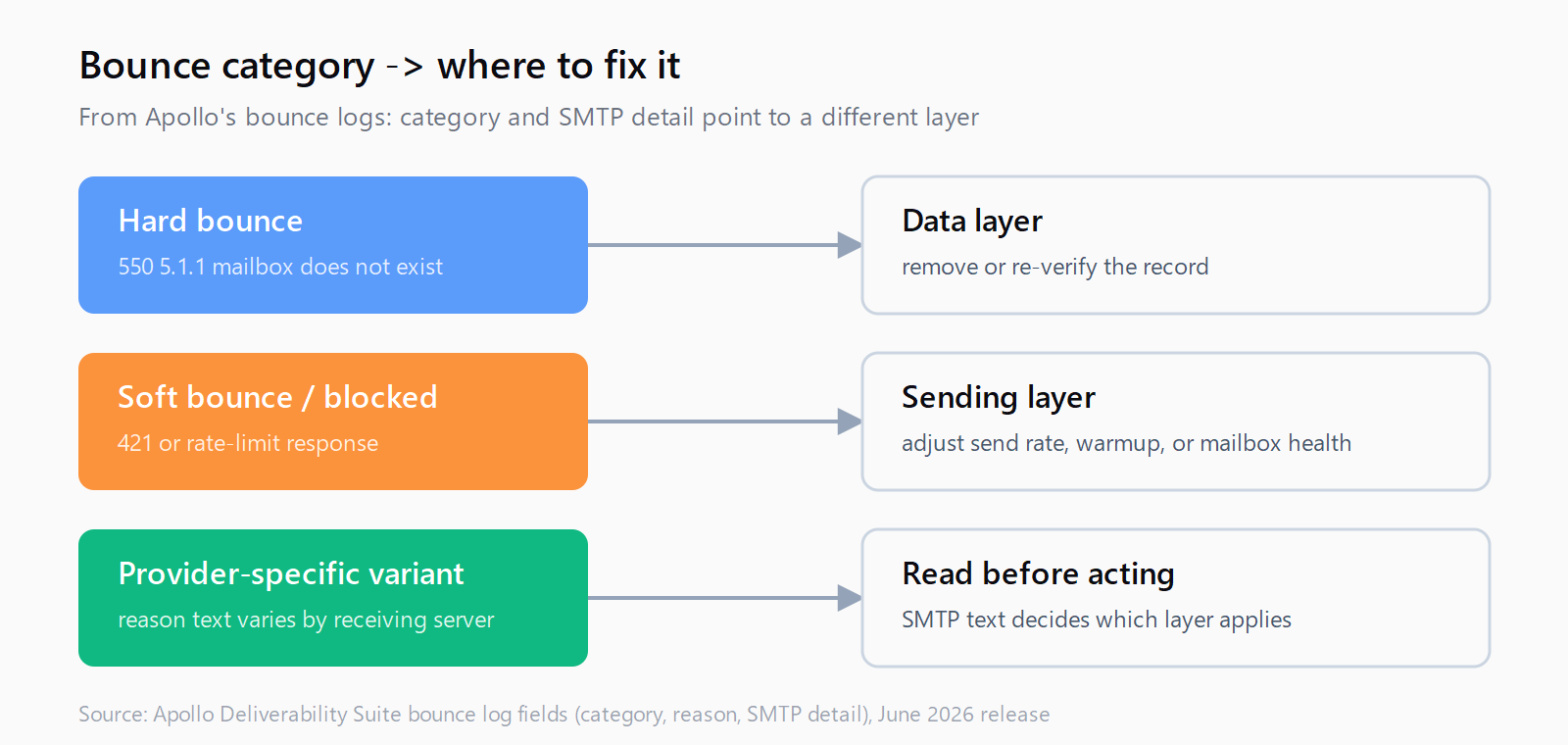
As of July 2026 this is the only Apollo view that ties a bounce's SMTP response directly to the sequence and mailbox that produced it, so filter by sequence first if you're chasing a specific campaign's numbers, then by bounce category to separate hard bounces (dead addresses, fix at the data layer) from soft bounces and blocks (fix at the sending layer). This is the same split I described when writing about Apollo's waterfall accuracy mode for pre-send verification - the bounce logs view is the after-the-fact mirror of that pre-send check, and running both catches more than either alone.
How to Track Bounce Activity Trends Before They Cross the Blacklist Threshold
The activity chart over time is more useful than it first looks if you treat it as a leading indicator rather than a scoreboard. A domain's hard-bounce rate creeping from 1% to 3% over a week, well before it crosses any hard blacklist threshold, is the window where you still have options: pause the offending list segment, swap in a cleaner data source, or slow send volume on the mailbox in question. Wait until the number is bad enough to trigger an ESP-side block and you're doing damage control on a warmed domain instead.
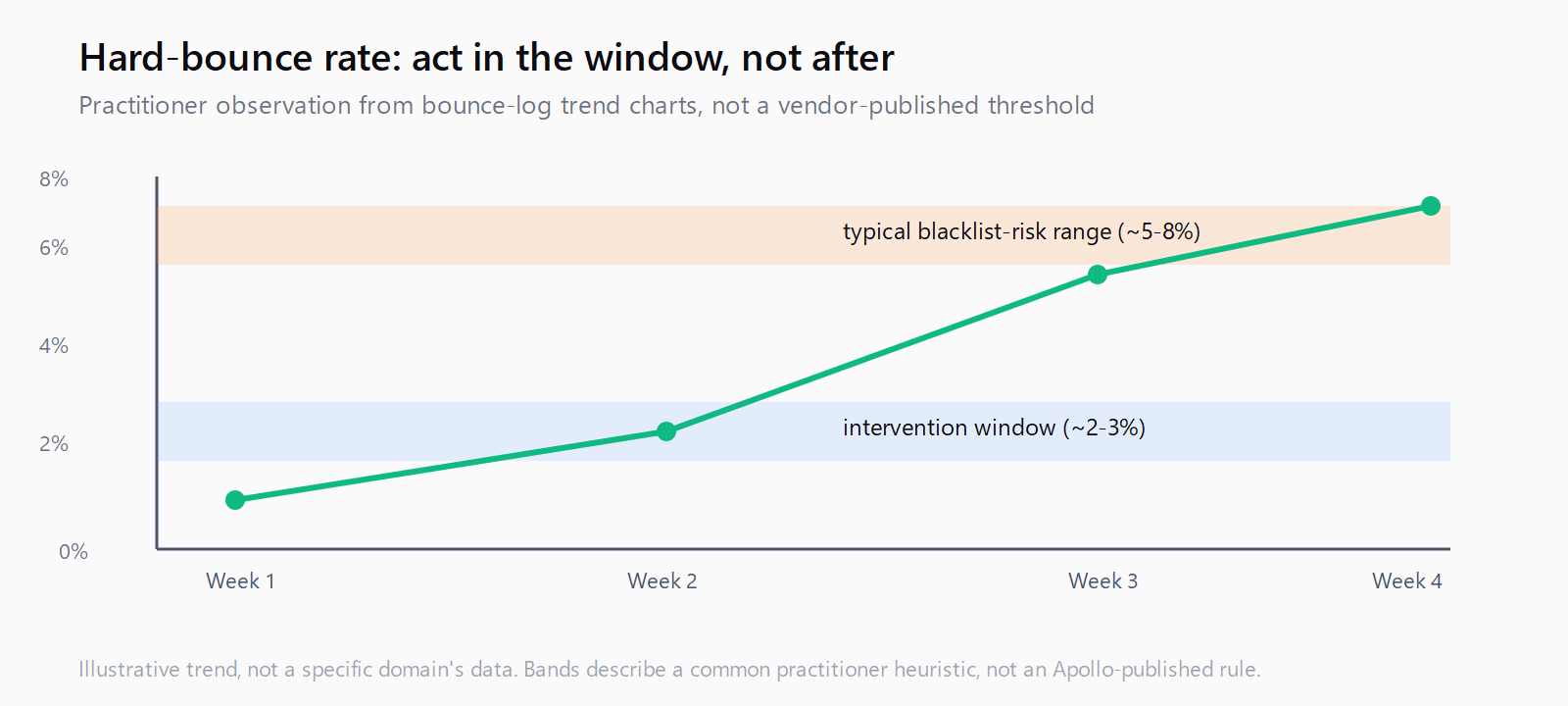
(I've watched teams treat this exact chart as a vanity metric they check once a month. It's not - it's the earliest signal you get before a domain's reputation problem becomes visible anywhere else, including in reply rates, which lag bounce data by days.)
Set a routine around it rather than relying on memory: pick one day a week, filter the activity chart to the last seven days, and compare the hard-bounce line against the prior week. A flat or declining line means whatever list hygiene you're already running is holding. A line that's climbing two weeks running is worth a segment-level breakdown - by list source if you're pulling from more than one provider, by sequence if the spike tracks a specific campaign launch, or by mailbox if it's isolated to one sender rather than the whole domain. Isolating which of those three it is changes what you fix; treating every spike as a domain-wide emergency means you'll over-correct on sending volume when the actual problem was one bad list import.
Counterpoint worth sitting with: none of this replaces a hard blacklist check against something like Spamhaus. Postmaster and Deliverability Suite dashboards track a provider's internal view of your reputation, not the public DNSBL entries that actually get you dropped wholesale by receiving servers. The two correlate, a rising internal bounce trend often precedes a blacklist hit, but they're separate systems, and Apollo's bounce logs only cover the former.
This is exactly the kind of "verify before it costs you" discipline that sits at the seam between prospecting and sending - the seam Leadex is built around on the research side, where a plan preview runs before any enrichment spend happens rather than after a bad batch has already been pushed downstream.
How to Remove Bounced Contacts From Sequences Without Leaving the Log
The part of this release that actually saves clicks is the remove-from-sequences action built directly into the bounce log. Previously, clearing hard-bounced contacts out of an active sequence meant leaving the deliverability view, finding the sequence, finding the contact, and removing them manually, one context switch per bad record. Now you can select bounced rows in the log itself and pull them out of whatever sequence they're still enrolled in.
For hard bounces this should be closer to automatic than not: a dead mailbox isn't going to un-die, and letting a sequence keep hitting it just adds bounce weight to the domain sending it. Soft bounces and throttling blocks deserve a second look before removal - those addresses may still be reachable once the underlying sending issue (rate limit, temporary block) clears, and pulling them prematurely just means re-sourcing contacts you already had.
FAQ
Does the Apollo bounce logs view replace email verification before sending?
No. It's a monitoring and remediation layer for bounces that already happened. Verification tiers and waterfall accuracy mode reduce how many bounces occur in the first place; the bounce logs view tells you what to do about the ones that get through anyway.
Is the bounce logs feature available on Apollo's free plan?
No, it's part of the paid Deliverability Suite. Free and lower-tier plans still show an aggregate bounce percentage per mailbox but not the row-level log with SMTP detail.
What bounce rate should trigger action in the log?
Apollo doesn't publish a hard number tied to this feature, but the industry convention most ESPs and mailbox providers work from treats a hard-bounce rate climbing past roughly 2-3% on a domain as the point to intervene, well before any provider-side blacklist threshold.
Does removing a contact from a sequence in the bounce log also suppress them from future sends?
The remove-from-sequences action pulls the contact out of the sequence they were enrolled in when they bounced; it doesn't automatically create a permanent suppression entry, so check your suppression list settings separately if you want that contact blocked from future sequences too.
How is a bounce category different from a bounce reason in Apollo's log?
Category is the coarse bucket (hard, soft, blocked, and provider-specific variants); reason is the plain-language explanation tied to the underlying SMTP response, which is what tells you whether the fix belongs on the data side or the sending side.