
How to Use Apollo's Bounce Logs to Audit Sequence Bounces
Apollo's new Deliverability Suite bounce logs give paid teams a searchable, filterable audit trail for hard and soft bounces - here's how to use it before a sequence bounce spike costs you your sending domain.
I wrote up Apollo's waterfall accuracy mode a few weeks ago as a fix for bad source data feeding into your bounce rate. Apollo's June 1, 2026 release adds a different piece to the same problem: a dedicated Bounce Logs view inside the Deliverability Suite settings, built for watching bounces as they happen rather than diagnosing them after the fact.
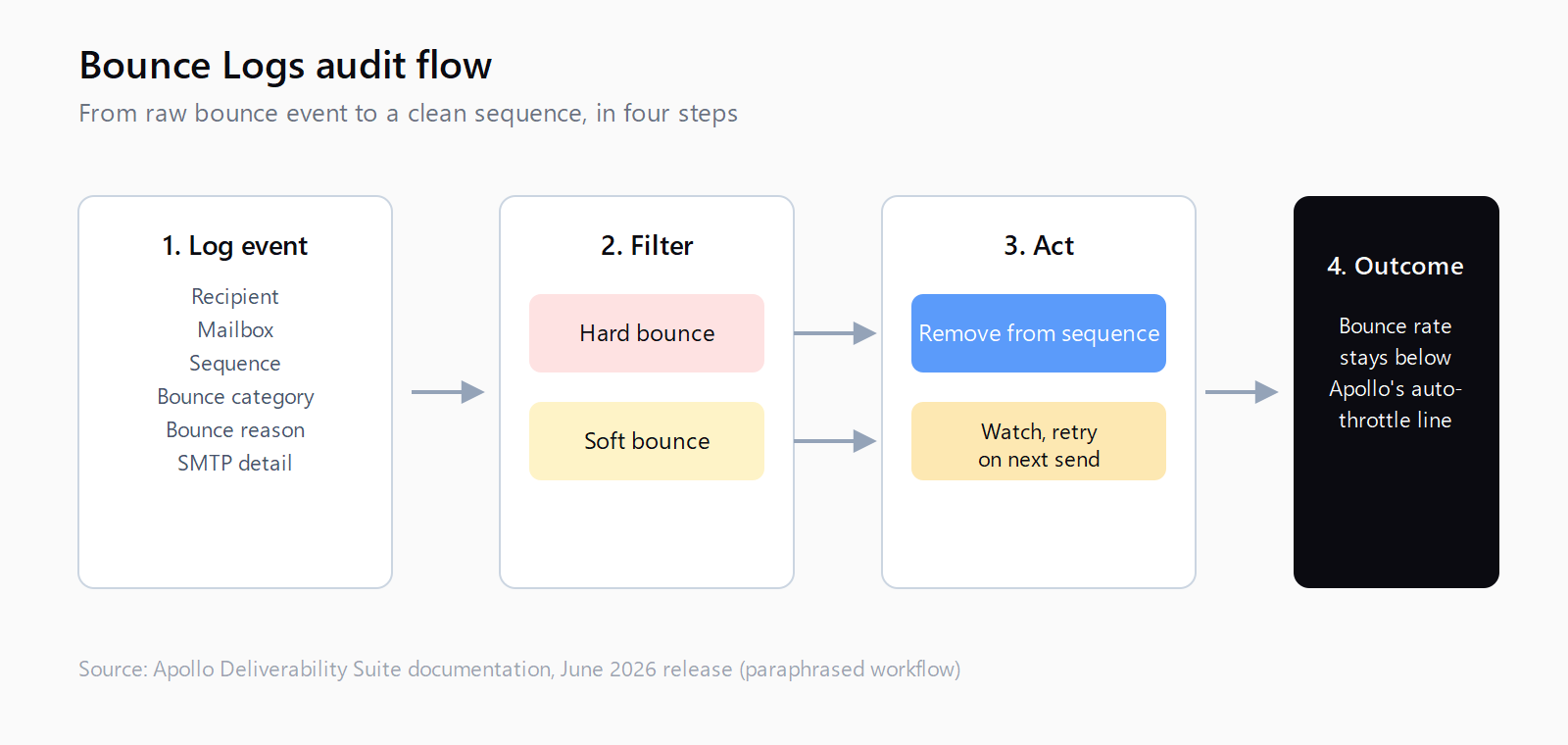
The feature is paid-teams only, and it centralizes what used to be scattered across sequence reports and mailbox health pages: a searchable, filterable log of bounce events, with each row carrying recipient, mailbox, sequence, bounce category, bounce reason, and SMTP detail, plus a set of activity charts showing bounce volume over time across mailboxes, recipients, sequences, and domains (Apollo Release Notes 2026, corroborated independently via Releasebot's Apollo changelog tracker, which lists the same release date and feature set).
High-level bounce metrics and activity charts over time
That's the framing Apollo itself uses, and it's the right one (I believe) - a log by itself is forensic, but the charts turn it into something you can glance at daily without opening every sequence report. My one problem with a feature like this is that it's still opt-in attention: nothing forces you to look at it before your domain reputation has already taken a hit, which is exactly the gap the workflow below is meant to close.
How to find Apollo's new Bounce Logs view
The view lives under Settings, inside the Deliverability Suite section Apollo introduced for identifying and resolving sending issues, alongside the inbox placement and blocklist diagnostics that shipped in the same wave. If your team is on a paid Apollo plan and you don't see it, check that the account owner has the Deliverability Suite enabled - it's a settings toggle, not a separate purchase, but it isn't on by default for every workspace.
How to filter bounce events by category, reason, and SMTP detail
The log's filters are the actual audit tool. Bounce category splits hard from soft, which matters because a hard bounce (mailbox doesn't exist, domain doesn't resolve) should trigger removal immediately, while a soft bounce (mailbox full, server temporarily unavailable) often clears on retry. Bounce reason narrows further - invalid recipient, blocked by receiving server, spam complaint - and the SMTP detail column gives you the raw response code, which is the thing you actually want when a mailbox provider is telling you something specific (a 550 5.7.1 reads very differently from a generic 421 rate-limit response).
Filter by sequence first if you're auditing a specific campaign, then by domain if you're trying to figure out whether one receiving provider is unhappy with you specifically. A cluster of hard bounces concentrated on one domain, arriving inside a short window, is the pattern that precedes a blacklist decision - it's worth building a habit of scanning for that shape weekly, not just when a sequence's numbers already look wrong.
How to run the remove-from-sequences flow before a bounce spike compounds
The log's most useful button is the one built directly into it: a remove-from-sequences flow you can trigger on filtered results without leaving the page. Sequence bounces that continue after the first hard bounce are the mechanism that turns a data-quality problem into a reputation problem - every additional send to a dead address after the first failure is a signal to the receiving mailbox provider that your list hygiene is bad, and providers weight recent signals more heavily than your historical average.
The practical move: filter to hard bounces from the last 24-48 hours, sort by sequence, and remove in batches rather than waiting for Apollo's own bounce-rate throttling to kick in. Throttling is a backstop, not a strategy (to be fair, Apollo's automatic pause exists for exactly this reason) - by the time a sequence auto-pauses, you've usually already sent enough bad mail to move the needle on sender reputation with whichever provider is on the other end.
How to read the bounce activity charts as an early-warning signal
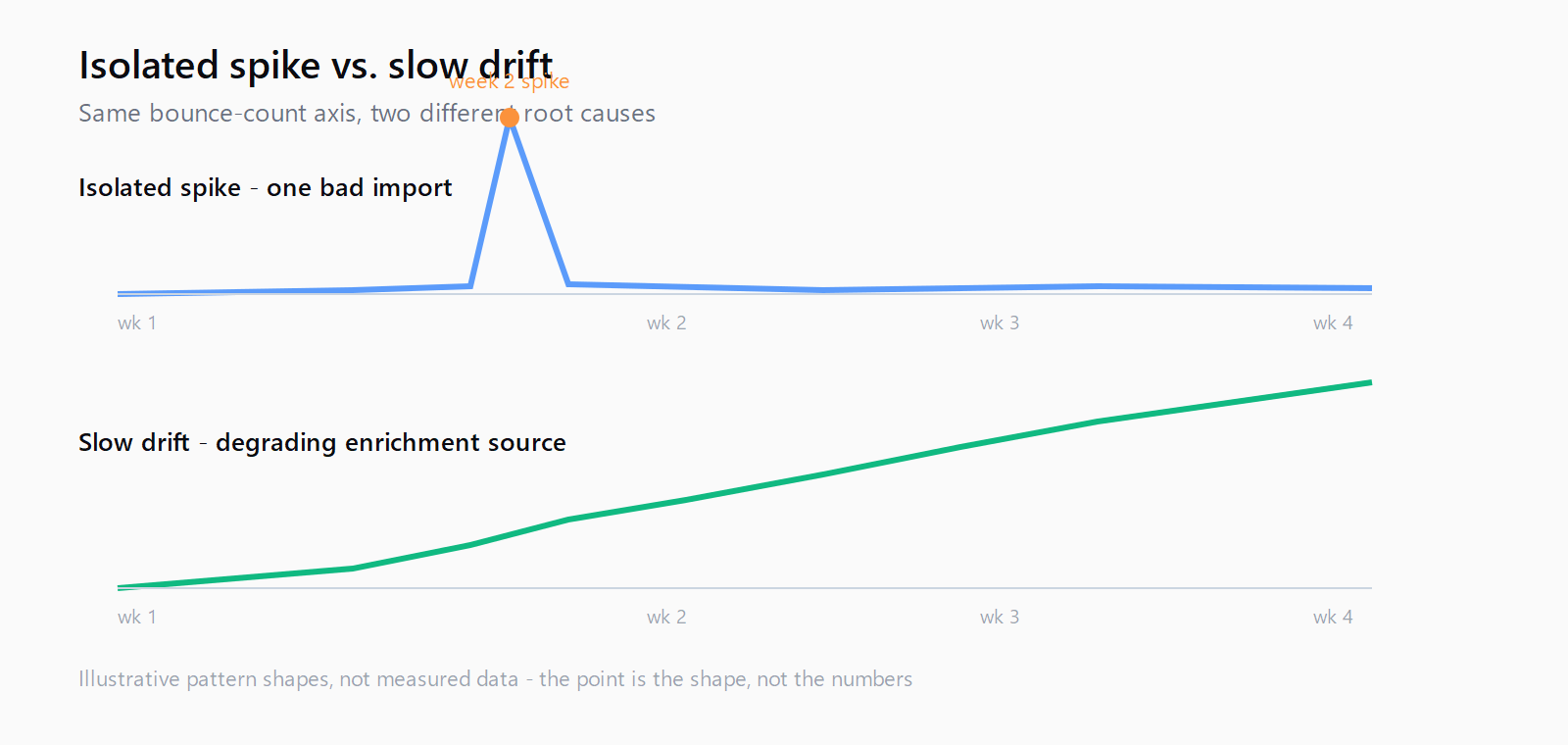
The activity charts are where this shifts from reactive to preventive. A flat baseline with an isolated spike usually traces back to one bad list import or one sequence that pulled from a stale source; a slow upward drift across weeks usually means your enrichment source itself is degrading, which is a different fix entirely (that's the waterfall accuracy mode territory linked above, not a bounce-log problem). Watching the trend line, not just the daily count, is what catches the slow-drift case before it becomes a blacklist event - by the time your overall bounce rate crosses a hard threshold, most receiving providers have already started throttling or blocking your domain quietly, without telling you.
The stakes here are concrete, not abstract: Google's bulk sender guidelines, in force since June 2024 and still the operative threshold as of July 2026, require anyone sending 5,000+ messages a day to Gmail addresses to keep their user-reported spam rate below 0.3% or lose delivery eligibility (Google's Email sender guidelines FAQ). Bounces don't count toward that spam-rate number directly, but a list full of dead addresses is usually also a list that generates spam complaints, since recipients who never opted in are the same recipients likely to hit "report spam" instead of unsubscribing.
This is exactly the kind of monitoring-versus-enrichment split we think about at Leadex, because the platform sits at the seam between discovery and enrichment - a chat brief turns into a research plan, contacts get enriched through your own connected providers with no per-contact markup, and a deduped CSV lands wherever you push it. Apollo's bounce logs solve the "is my list going bad" question for teams already inside Apollo's sending stack; if the actual issue is upstream, at the sourcing step, that's a different tool's job.
One more distinction worth making explicit: Apollo's email verification tiers stop bad addresses from entering a sequence in the first place, while the bounce logs catch what got through anyway - a good address that went stale, a catch-all domain that started rejecting, a mailbox that got deactivated last week. Verification is the front door, the bounce log is the smoke detector; you want both running, not one instead of the other.
None of this is Apollo-specific in principle. The same domain-reputation math applies everywhere you send from a warmed-up sending domain, which is why Gmail's DMARC bounce rejections and Apollo's own bounce handling are two symptoms of the same underlying risk: receiving providers judging your domain on recent sending behavior, not on your intentions.
FAQ
What counts as a bounce in Apollo's Deliverability Suite?
The Bounce Logs view separates hard bounces (permanent failures - invalid address, nonexistent domain) from soft bounces (temporary failures - full mailbox, server unavailable), and records a bounce reason and SMTP response code for each event so you're not guessing from the category alone.
Is the Bounce Logs view available on all Apollo plans?
No. It's part of the Deliverability Suite, which is scoped to paid teams; free and lower-tier Apollo accounts don't get the dedicated log or the associated activity charts.
Does removing a contact from a sequence undo a hard bounce?
No - it stops future sends to that address inside that sequence, which is what prevents the bounce from repeating and compounding, but it doesn't reverse the reputation signal Apollo or the receiving provider already recorded for the first failed send.
How often should I check the bounce logs?
Weekly at minimum for active sequences, and immediately after any large list import - most reputation damage comes from a concentrated spike in a short window, which the activity charts surface faster than a sequence-level bounce-rate number would.
What's the difference between Bounce Logs and Apollo's automatic bounce-rate throttling?
Throttling is a backstop that pauses a sequence once its bounce rate crosses a threshold Apollo sets; the Bounce Logs view is a proactive audit tool that lets you catch and remove bad addresses before a sequence's bounce rate gets anywhere near that threshold.