
How to Fix Clay's 'Found 0 Objects' and hs_object_id Errors
Two named Clay-to-HubSpot write failures - the 'Found 0 objects' source error and duplicate-creating updates - traced to hs_object_id, with the Lookup-first fix.
You built a Clay waterfall that fills missing emails and domains, the table looks clean, and then the HubSpot push does nothing useful. Either the source import comes back empty with "Found 0 objects," or the Update action runs, reports success, and quietly leaves your CRM untouched - or worse, spawns a second copy of a contact you already had. Both failures trace back to how Clay talks to HubSpot's object model, and both have a concrete fix. This is a write-back problem, not an enrichment problem, so the usual "check your credits" advice does not apply.
I have watched this exact sequence break for three different teams in 2026, and the error messages are unhelpful enough that people assume the integration is down when it is actually doing precisely what they told it to. Clay's HubSpot integration sits behind the Growth plan ($495 per month billed monthly, per Jorge Macias of The GTM Engineering Company), so it is worth getting the sync right rather than blaming the spend.
Why does Clay return "Found 0 objects" when syncing from HubSpot?
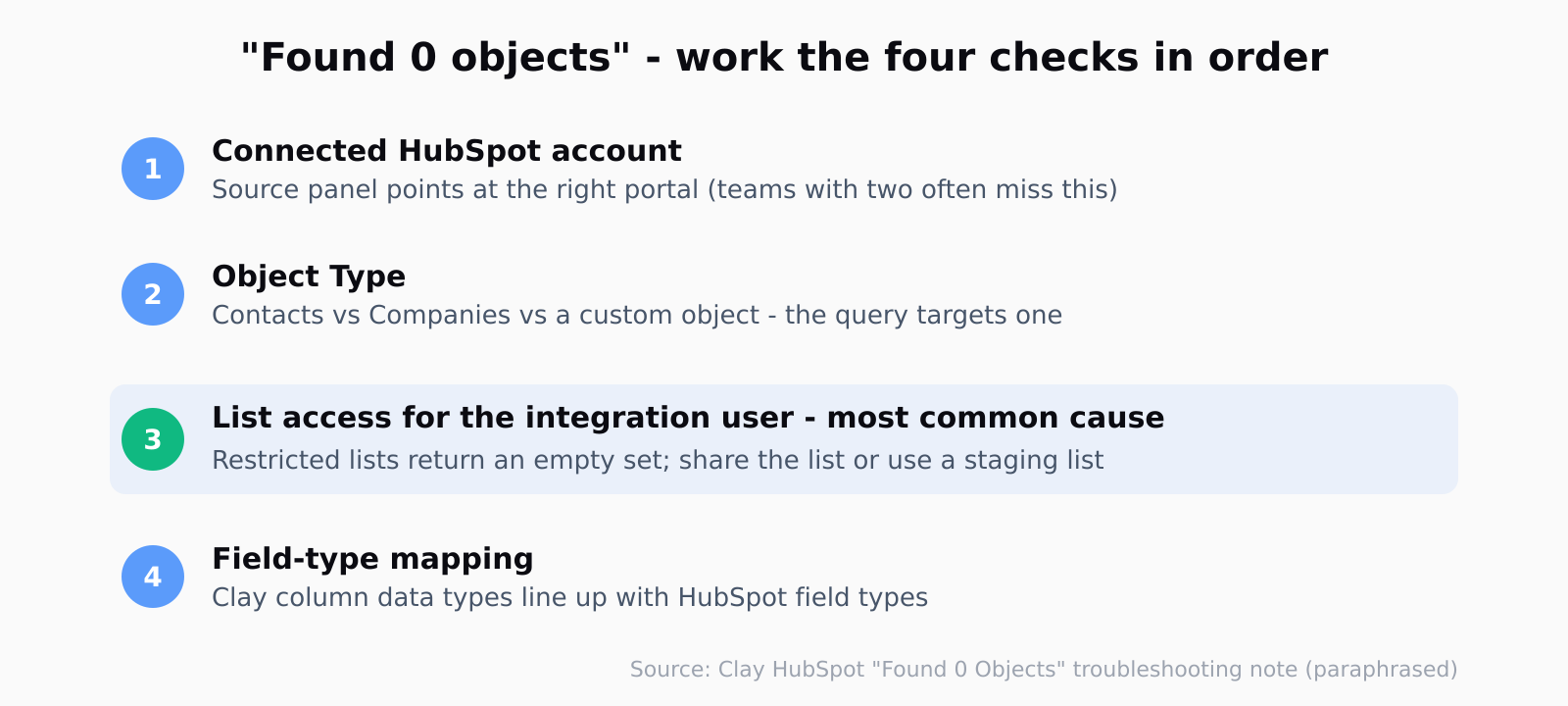
"Found 0 objects" appears on the source side - when you pull a HubSpot list into Clay as the table's starting data - and it almost always means Clay queried the wrong place, not that the place is empty. Clay's own troubleshooting note for the error walks through the same four checks I end up running every time: confirm the connected HubSpot account in the Source panel (teams with two portals routinely authorize one and import from the other), confirm the Object Type matches what you want (Contacts versus Companies versus a custom object), confirm the integration user can actually see the list, and confirm the field types you mapped line up with HubSpot's.
The list-visibility one is the sneaky failure. HubSpot lets a list owner restrict a list to specific users or teams, and Clay inherits whatever the connected user can see. If your integration user is not on the access list, the query returns an empty set and Clay reports "Found 0 objects" - which reads like a data problem but is a permissions problem. The fix is to share the list with the integration user, or stage everything through one "Clay Sync" list that the integration user owns. Verify scopes too: the OAuth connection needs read scopes such as crm.objects.contacts.read and crm.lists.read, and a non-admin who skipped them will hit silent empties.
Why your Update action skips records or creates duplicates
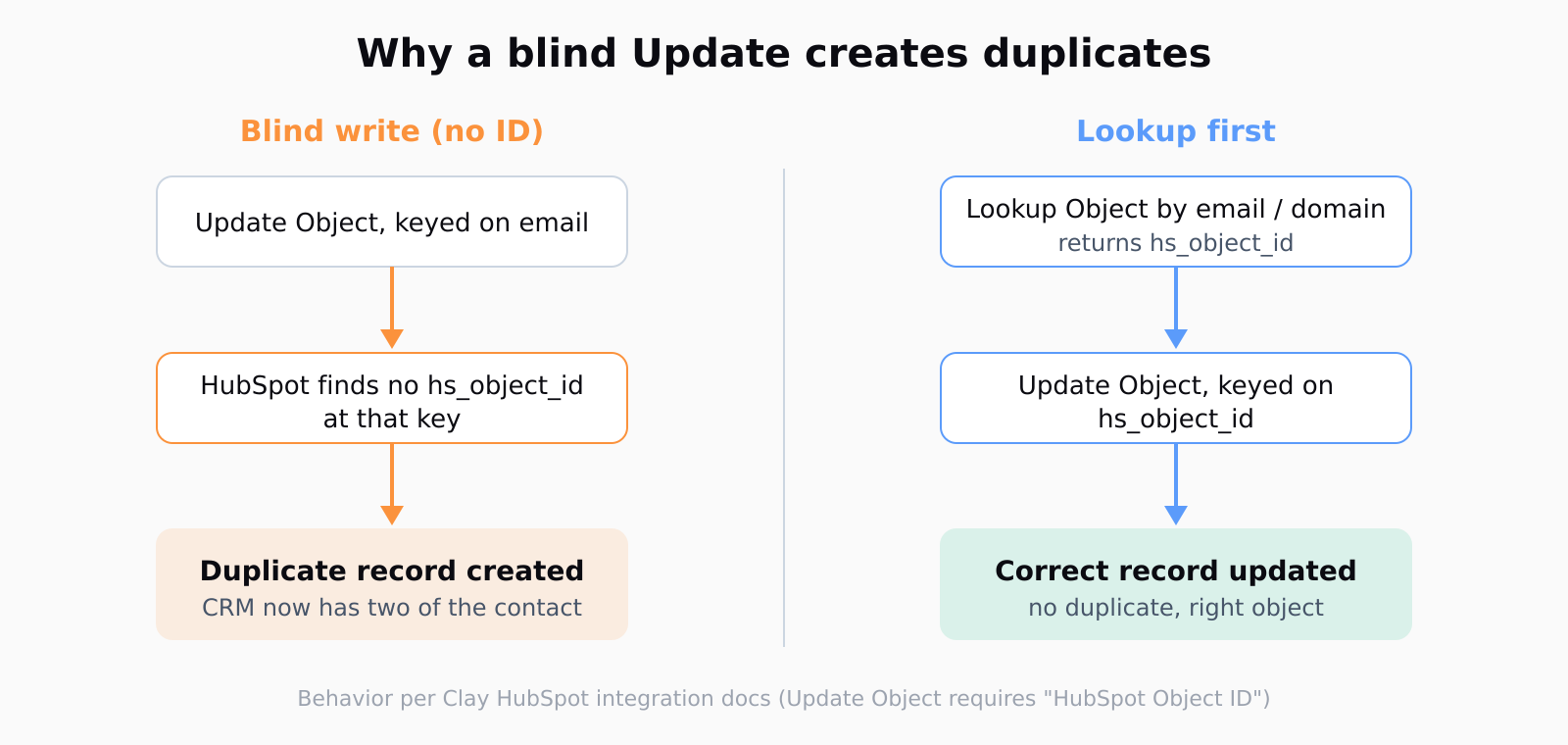
The second failure is the more expensive one, because it corrupts data instead of just stalling. HubSpot identifies every record by an internal numeric key called hs_object_id. Clay's Update Object action requires that ID as its "HubSpot Object ID" input - it is not optional, and it is not the email or the domain. If you wire an Update action and feed it an email address hoping HubSpot will figure out the match, one of two things happens: the update no-ops because there is no object at that ID, or, if you used a Create-or-update shaped action without a real ID, HubSpot writes a brand-new record. That is where the duplicate contacts come from. Clay is not auto-detecting the existing record for you; nothing in the Update action does a fuzzy match by email.
If you send an update request to HubSpot without the hs_object_id, the API may create a duplicate record instead of modifying the existing one. That bloats your CRM with redundant entries and breaks reporting. Always use Clay's Find Record action before Update Record.
That is Jorge Macias again, and it is the cleanest one-sentence statement of the trap I have found. The duplicate is not a Clay bug - it is the documented behavior of asking HubSpot to write a record you never looked up. (!) The same structural mistake shows up in Salesforce, where I have written before about how duplicate rules fail silently on Salesforce API loads; the CRM is different but the root cause - writing without a real match key - is identical.
The fix: run a Lookup, branch, then Update or Create
The reliable pattern is three steps, and it is worth building once as a reusable column stack. First, run a Lookup Object (a "Find Record" step) that searches HubSpot by email for Contacts or domain for Companies and returns the matching hs_object_id. Second, branch on whether that lookup returned an ID - Clay's conditional logic lets you check if the ID column is populated. Third, when the lookup found an ID, run Update Object with that hs_object_id as the "HubSpot Object ID" key; when it found nothing, run Create Object instead, or flag the row for manual review.
This "search then create-or-update" branch is the whole game. It means every write targets a record you have already confirmed exists, so updates land on the right object and creates only fire for genuinely new contacts. The Lookup step is also where you set Remove blank values from results to keep the returned payload tight. Test the branch on a batch of five to ten rows before you run it across a few thousand - a mis-mapped ID column on a full table is a long afternoon of HubSpot cleanup, and the failure is silent until you go looking for the duplicates.
One detail people miss: the Lookup has to match on something HubSpot treats as unique. Email works for Contacts; domain works for Companies, but only if your domain column is a clean root domain with no http://, no www., and no trailing path. A waterfall that emits "https://acme.com/" instead of "acme.com" will quietly miss the match and route the row to Create, and now you have a duplicate company. Normalize the join key before the Lookup, not after.
Stop empty Clay columns from overwriting good HubSpot data
Even with the branch correct, a careless Update will overwrite good CRM fields with blanks. If an enrichment column came back empty for a given row and you map it into the Update, HubSpot dutifully writes the empty value over whatever was there. The guard is the "Ignore blank values" setting on the Update action - turn it on and Clay skips any column that is empty for that row, so a half-populated enrichment run tops up missing fields without erasing the ones you already trusted. This is the difference between an enrichment that improves your CRM and one that degrades it.
We think about this seam a lot, because Leadex lives exactly where discovery meets enrichment and CRM write-back - you describe an ICP in plain English, approve the plan, and the deduped result lands in HubSpot. Automatic deduplication before export is the default rather than a column you have to remember to wire, and the same "match before you write" discipline that fixes a Clay sync is baked into how the push works. The lesson generalizes past any one tool: never write to a CRM on a key you have not confirmed is unique.
If you would rather see the same idea inside HubSpot's own tooling, the matching logic that powers HubSpot's own prospecting agent drafts leans on the same object-ID resolution under the hood - the lookup is just hidden from you. When you build the sync yourself in Clay, the lookup is explicit, which is more work and also more honest about what is actually happening.
FAQ
Why does my Clay HubSpot sync return "Found 0 objects"?
Because Clay queried a place that looks empty to the connected user. Check the HubSpot account selected in the Source panel, the Object Type, and - most often - whether the integration user has access to the list you are importing. Restricted-list visibility is the most common cause; share the list with the integration user and the rows appear.
How do I stop Clay from creating duplicate HubSpot records on update?
Run a Lookup (Find Record) step first to retrieve the existing record's hs_object_id, then feed that ID into the Update Object action's "HubSpot Object ID" field. Updates sent without a real hs_object_id are what create duplicates, because HubSpot falls back to writing a new record.
What is the best way to update existing HubSpot records using Clay?
Use the two-action sequence: Lookup Object to find the hs_object_id by email or domain, then Update Object keyed on that ID. Add a conditional branch so rows with no match route to Create Object instead, and enable "Ignore blank values" so empty columns do not overwrite existing data.
What HubSpot permissions does Clay need to sync?
The user who authorizes the OAuth connection needs Super Admin rights or the specific scopes - read and write on contacts, companies, and lists. A non-admin connection often fails silently mid-sync or returns empty results, so connect with an admin and a stable integration user that does not leave when an employee does.
Why did my Update overwrite good HubSpot data with blanks?
Because the Update action mapped an empty Clay column onto a populated HubSpot field. Turn on "Ignore blank values" in the Update action so Clay skips empty columns for each row, topping up missing fields without erasing the ones already in your CRM.