
Why Agentforce Lead Nurturing Emails Stop Sending: A Checklist
Agentforce Lead Nurturing agents fail quietly to the Activity Timeline. Here is how to read the error string and map bounces, opt-outs, the daily caps, and EAC access to the right fix.
If you turned on an Agentforce Lead Nurturing agent, watched it send for a week, and then noticed the outbound just stopped, the first thing worth knowing is that the agent almost never fails loudly. It writes the reason to the prospect's Activity Timeline and moves on. That is the same quiet-failure pattern we hit with a Salesforce sync that fails without raising an error - no banner, no alert, just a number that stops climbing.
Salesforce renamed the feature this year. What used to be Agentforce SDR is now Agentforce Lead Nurturing, and most practitioners still search both names. The rename matters here only because the troubleshooting doc lives under the new label while the community threads (and your muscle memory) still say SDR. Underneath, the failure surface is the same one Salesforce now publishes as a flat error-reference table: roughly twenty distinct strings, each with a cause and an admin action. This post walks the four that actually bite - bounces and opt-outs, daily caps, the hourly LLM limit, and the Einstein Activity Capture access problem - in the order they tend to surprise people.
The key thing to internalize before any of the fixes:
When errors happen, the agent halts outreach and displays an error in the prospect's Activity Timeline.
- Salesforce Help, Troubleshoot Agentforce Lead Nurturing Email documentation
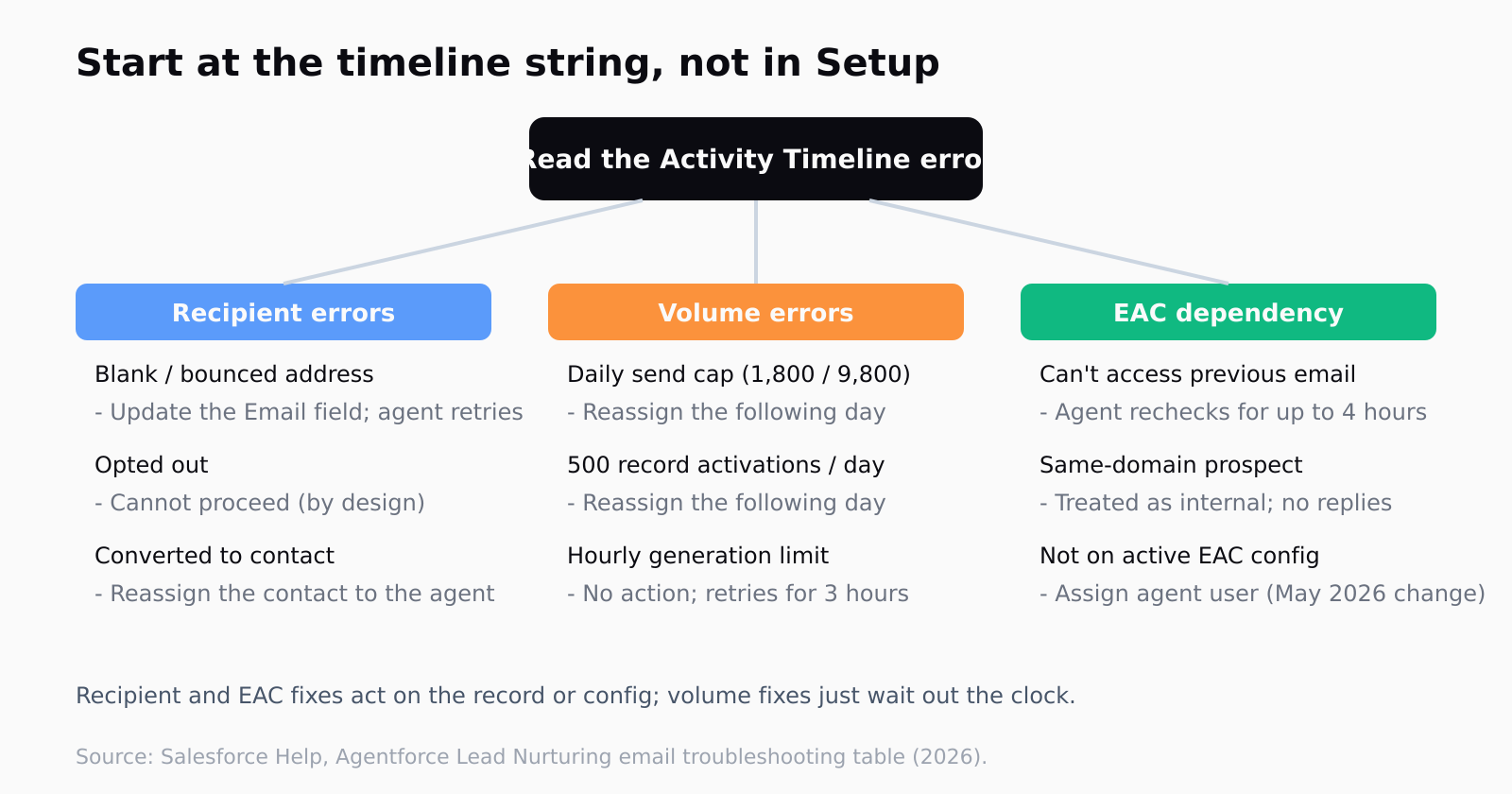
That is where every diagnosis starts. Not in Setup, not in a system log - on the timeline of the individual lead or contact the agent gave up on. If you are not looking there, the agent is functionally silent.
Why did the agent stop on a bounce, blank, or opt-out address?
Three of the most common halts are about the recipient, not the agent. The error strings are specific. "The lead's email address is blank" means the Email field on the record is empty (the agent does not invent an address, which is correct behavior). "Previous emails sent to this address have bounced. Update the email address" means an earlier send hard-bounced and the agent will not keep hammering a dead inbox. And "The lead has opted out of emails" fires when the Email Opt Out checkbox is set on the record.
The first two are fixable: update the Email field on the lead or contact, and if you have assignment rules in place, the agent retries automatically once the record changes. The opt-out is not fixable, and it should not be - the documented action is "None", because outreach cannot proceed against a contact who has opted out. That is the system doing exactly what compliance requires. If you are tempted to clear the checkbox to force a send, don't.
One adjacent gotcha lives in the same family: "This lead has been converted to a contact. Send email from the contact record instead." If someone manually converted the lead mid-sequence, the agent loses its handle on it. The fix is to reassign the resulting contact to the Lead Nurturing agent so it picks the thread back up.
How do the 1800 and 9800 daily caps actually work?
This is the limit most teams trip without realizing there was a limit. Per the Considerations doc, each Lead Nurturing agent can send up to 1800 emails a day on a Gmail account and 9800 emails a day on a Microsoft Exchange account. Hit the ceiling and the agent stops sending for the rest of the day, surfacing "You've reached the limit of 1800 daily Lead Nurturing emails sent." The cap is per agent, and it exists to keep the connected mailbox from getting flagged as a spam source - which is a real risk, not a theoretical one.
The documented action is blunt: reassign the prospect the following day to restart engagement. There is no override slider. If you are routinely hitting 1800, the answer is not to fight the cap but to read it as a signal that you have pointed one agent at more volume than a single human mailbox should plausibly carry. Splitting across more agents (you get up to 20 by default) or moving to an Exchange account for the higher 9800 ceiling are the two real levers.

There is a second, sneakier quota stacked on top: record activations. "Your daily record activation limit for Lead Nurturing has been reached" fires at 500 records activated per day, separate from the email count, and there is a concurrent ceiling of 25,000 active records at once. So an agent can be under its email cap and still refuse new work because it is out of activation budget. Two different limits, two different error strings, same outcome on the timeline.
What does the hourly LLM limit mean for your sequence?
"The hourly Lead Nurturing email generation limit has been reached" is a different animal from the daily send cap. This one is about the language model doing the drafting, not the mailbox doing the sending, and the quota is shared across other Salesforce services in your org. The agent does not give up - it retries hourly for three hours - so the right response is usually to wait rather than to touch anything.
I find this one is the easiest to misread, because the symptom (no email went out) looks identical to a bounce or a cap. The tell is the timeline string. If it names generation rather than sending, the agent is throttled on LLM capacity, the work is queued, and a frantic admin reconfiguring email accounts is solving the wrong problem. This is the broader pattern with where autonomous AI SDRs quietly hit their limits: the failure is real, but it is a capacity boundary, not a misconfiguration.
We think about this seam a lot, because Leadex lives at the boundary between finding the right accounts and acting on them - and the moment an agent touches a record, you want to know exactly why it did or did not act. Leadex attaches a URL and a timestamp to every row it returns, which is the same auditability instinct: a send that did not happen should leave a reason you can read, not a gap you have to guess at. If you want the shape of that, the plan preview the agent shows before it touches the web is the closest analog - you approve the reasoning, then watch it execute.
Why is Einstein Activity Capture the hidden dependency?
The error that sends the most people down the wrong path is "We couldn't access the previous email in this thread." It looks like a permissions bug. It is actually Einstein Activity Capture not having captured the prior message in the thread yet - the agent needs that context to draft a coherent reply, so it waits and rechecks for up to four hours before giving up. If you read the timeline at minute three and panic, you are reacting to a window that often closes on its own.
EAC is the hidden dependency under the whole feature, and 2026 made it sharper. As of a May 2026 configuration change, users who are not assigned to an active EAC configuration lose EAC features entirely, including the automatic email logging the Lead Nurturing agent reads from. There is also a quieter rule worth knowing: if a prospect's email domain matches the agent user's own domain, EAC treats the prospect as an internal user and the agent will not send replies at all. Two coworkers testing the agent on each other's addresses will see exactly nothing and find no obvious error, which is its own special frustration.
The practical move is to confirm three things before you assume the agent is broken: the agent user is on an active EAC configuration, Activity 360 Reporting is off (the troubleshooting doc notes the thread-access error is less likely when it is disabled, and the Considerations doc says Lead Nurturing is disabled outright when Activity 360 is active), and the agent user's email account is connected and not shared with any other user. Most "the agent does nothing" reports resolve at one of those three checks - the same discipline as auditing a prospecting agent's drafts before they go out rather than after a campaign has gone quiet.
FAQ
Why is my Agentforce SDR agent not sending emails at all?
Check the prospect's Activity Timeline first - the agent writes the reason there. The most common silent halts are a blank or bounced Email field, an enabled Email Opt Out checkbox, a hit daily send cap (1800 Gmail or 9800 Exchange), or Einstein Activity Capture not being active for the agent user. The error string on the timeline tells you which one.
What is the daily email limit for an Agentforce Lead Nurturing agent?
Each agent can send up to 1800 emails a day on a Gmail account and up to 9800 a day on a Microsoft Exchange account. When it hits the cap it stops for the day, and the documented fix is to reassign the prospect the following day. A separate limit caps record activations at 500 per day.
What does "We couldn't access the previous email in this thread" mean?
It means Einstein Activity Capture has not yet captured the prior message the agent needs to draft a reply. The agent rechecks for up to four hours, so it often resolves on its own. It is less likely to occur when Activity 360 Reporting is disabled in Einstein Activity Capture setup.
Why does the agent skip prospects at my own company domain?
If a prospect's email domain matches the Lead Nurturing agent user's domain, EAC treats that prospect as an internal user and the agent will not send replies. This trips up teams testing the agent on coworker addresses, since no obvious error appears.
Is the hourly generation limit the same as the daily send cap?
No. The daily cap is about the mailbox sending volume. The hourly generation limit is about the language model drafting the email, and that quota is shared with other Salesforce services in your org. The agent retries hourly for three hours, so the usual response is to wait rather than reconfigure anything. (See also: budgeting Agentforce SDR usage.)