
How to Troubleshoot Gong's Salesforce Sync When Fields Stop Updating
Gong fields not appearing in Salesforce after a call? Walk sync windows, integration-user field permissions, and CRM export config before opening a ticket.
A rep finishes a discovery call, hangs up, and the Opportunity record in Salesforce sits unchanged. No new Task, no MEDDPICC field update, no call recording link. Gong's app status says "connected." The Slack panic begins.
I have watched this scene play out at four different companies in the last year, and every time the diagnosis lands on the same three suspects: integration-user permissions, export configuration in the Gong workspace, and the sync timing windows that Gong publishes but almost nobody reads. The fix is usually not in Gong. It is in Salesforce, in a setting that was correct on day one and broke when somebody tightened field-level security a quarter later.
Before opening a Gong support ticket, work through the checks below in order. The order matters because each step rules out one suspect, and skipping the first two is how teams end up paying for a "premium support" escalation that turns out to be a profile permission a sysadmin can fix in ninety seconds.
Confirm the sync window before declaring it broken
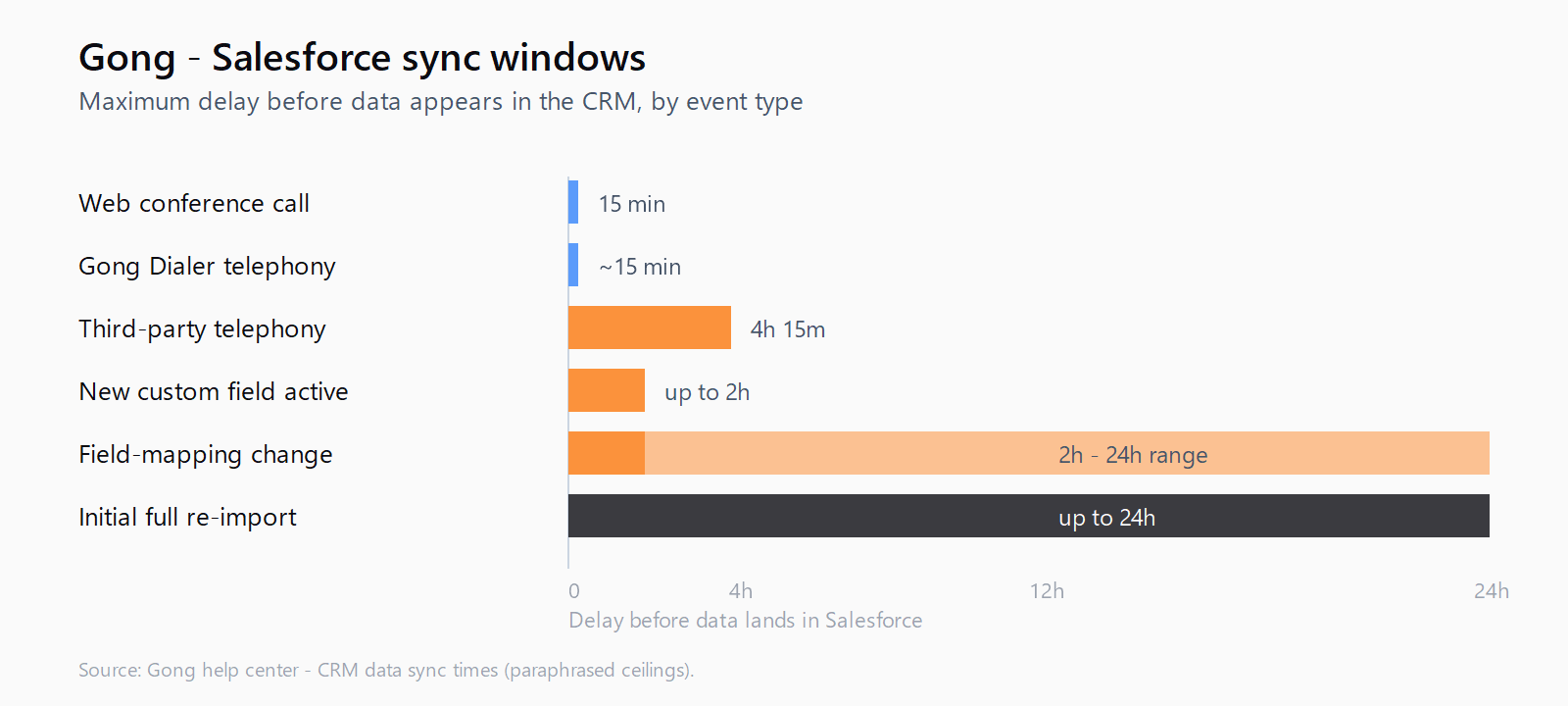
Gong publishes a CRM data sync times table that is the single most useful document for ruling out a phantom outage. A web conference call lands in Salesforce within fifteen minutes. A telephony call routed through Gong Dialer or Gong Connect exports immediately, but a call from a third-party dialer is a different beast.
up to 4 hours to import the call from the telephony system, and then up to 15 minutes to export the call to the CRM
That four-hour-fifteen-minute ceiling is the most common false alarm I see. A rep wraps a call at 9:15 and a manager pings the channel at 9:45 because the Activity timeline is blank. The integration is working. It just has not arrived yet. The same table notes that newly configured custom fields take "up to 2 hours" to start populating, and field-mapping changes can take between two and twenty-four hours to propagate. If a field was added to Gong's CRM configuration this morning, do not panic until tomorrow morning.
Set a baseline: pick three calls from the previous business day, confirm each is in Gong, and check whether each has a corresponding Activity in Salesforce. If the older calls are syncing and only the most recent one is missing, the problem is timing. If the older calls are also missing, it is not.
Audit the integration user's field-level permissions in Salesforce
The Gong integration runs as a Salesforce user. If that user cannot see a field, Gong cannot write to it, regardless of what the Gong admin UI claims. This is the failure mode behind roughly half of the "fields stopped updating" tickets I have triaged, and it is the failure mode Salesforce duplicate rules failing silently taught me to look for first: silent permission gaps that pass every health check until a write actually happens.
In Salesforce, go to Setup, find the integration user under Users, and open their assigned Profile or Permission Set. Walk through field-level security on Opportunity, Contact, Lead, and Task - the four objects Gong writes to most often. Any field listed in Gong's CRM Configuration page that shows as "No Access" on the integration user's profile is a silent failure. Gong's own troubleshooting guide is blunt about this:
Our Gong users can't see the fields we use [...] Make sure those users have access in Salesforce to the fields you use. If not, contact your Salesforce admin.
The fix is to grant Read/Edit on every Gong-mapped field via the integration user's profile, save, and wait one sync cycle. If the field was added inside the last hour, Gong's own page warns that a "missing field" alert can take up to an hour to clear even after permissions are fixed.
Verify the CRM Configuration page exports what you think it exports
Each Gong workspace has its own CRM Configuration page, and each page has three independent toggles that control which call types export to Salesforce: meeting invites, conference calls, and telephony system calls. I have seen all three turned off in production because a Gong admin in a different time zone clicked through a checklist a year ago and never turned them back on.
Open Settings, find your Salesforce integration, and confirm each call type your team actually uses is checked under Export. If your team books Zoom meetings, the "Conference calls" box has to be on. If reps use Aircall or a third-party dialer, "Telephony system calls" has to be on. Per-workspace, not global - multi-region teams have hit this exact trap when EMEA's workspace had telephony export off and AMER's had it on.
While you are on that page, double-check the currency amount field mapping. Gong's CRM and deal board sync FAQs note that the deal value shown in the deal board comes from a specific Salesforce field you have to nominate; if your team renamed Opportunity.Amount to a custom currency field two months ago, the deal board will look right but the totals will be off.
Inspect failed writes and validation-rule rejections
This is the step nobody runs first and everybody should. When Gong tries to write to Salesforce and the write fails - because a validation rule rejected it, or because the integration user does not have permission, or because a required field is missing - the cell flashes red briefly in the Gong deal board and disappears. The FAQ documents it cleanly:
If we can't sync the change to your CRM, the cell is briefly shown in red, and then you'll see a message letting you know what the issue was.
That message is the diagnosis. Open the affected Opportunity in Gong's deal board, click the cell that should have synced, and look for the inline error. Common causes: a required field on the Opportunity is blank, a validation rule on Stage transitions is firing on a write the rep did not realize they were making, or a field is marked read-only on the integration user's profile but editable for human users.
Most CRM tooling lives in the seam between discovery and revenue capture - exactly the seam Leadex is built to close, by showing the research plan before the agent touches the web rather than waiting for the next sync window to find out something silently failed. The reason teams cite "URL + timestamp per row" as a feature is the same reason Gong's red-cell error is the most useful piece of UI in the whole product: you cannot fix a silent failure.
Re-sync the integration only as a last resort
Gong support will sometimes ask you to disconnect and reconnect the Salesforce integration. Do not lead with that. Reconnecting forces a full re-import of every object, which can extend processing to the "up to 24 hours" window the sync-times page warns about for initial operations, and during that window the deal board can show stale or partial data to the entire sales floor. Auditing the configuration first - same discipline as auditing an AI agent's drafts before trusting them - saves a day of confused dashboards more often than not.
If you must reconnect, do it Friday afternoon. The Monday-morning surprise of an admin who forgot to re-grant the integration user a permission set is real, and it is worse when the sales team is on the phones.
FAQ
How long should I wait before opening a Gong support ticket?
Wait at least four hours and fifteen minutes for telephony calls from a third-party dialer, and at least fifteen minutes for web conference calls. For newly configured custom fields, wait at least two hours after the field was added. Opening a ticket before those windows close is the most common reason support sends back a "this is expected behavior" reply.
Why are custom fields populating later than standard fields?
Gong's sync-times page lists "up to 2 hours" for newly configured field imports, and field-mapping changes can take "between 2-24 hours" to propagate. Standard fields like Opportunity.Amount are part of the baseline schema and sync within the normal call-export window; custom fields require an extra configuration-propagation step.
What is the difference between Gong's CRM sync and the deal board sync?
The CRM sync moves data between Salesforce and Gong (calls out, opportunities in). The deal board sync is a separate process that refreshes the cached pipeline view used in Gong's Forecast product, and it can lag the underlying CRM by up to thirty minutes. A field that updated in Salesforce ten minutes ago will appear in Gong's deal board before it appears as a refreshed total at the top of the tab.
Can validation rules in Salesforce silently block Gong writes?
Yes. Validation rules apply to writes from the Gong integration user the same way they apply to human users. The write fails, Gong shows a red cell with the rejection reason, and the cell reverts. If the rep does not notice the red flash, the write is lost. Add dependent fields to the deal board so the validation context is visible at write time.
Does the Gong integration user need full administrator access in Salesforce?
No, and granting it is a security mistake. The integration needs field-level Read and Edit access on the specific objects and fields Gong writes to - Opportunity, Contact, Lead, Task, and any custom objects in the CRM Configuration page - plus API access. A dedicated Permission Set scoped to those objects is the cleaner pattern than reusing a sales-manager profile.