
How Salesloft Rhythm Reprioritizes Your Day (and What to Configure First)
Salesloft Rhythm only ranks the signals you have already piped in. A practitioner walkthrough of signal sources, weighting, and cadence restructure before launch.
Salesloft Rhythm is the company's bet that the right sequence of seller actions is no longer a thing a manager designs in a flowchart, but a thing a model picks every morning from a queue of buyer signals. The pitch is appealing. The configuration burden, less so.
The team I sat with last month had Rhythm enabled for three weeks and was on the verge of switching it off. Reps were not trusting the queue. The top task was usually a discovery follow-up on an account that had clicked one email two months ago, and the rep knew the account was dead. The manager assumed Rhythm was broken. Rhythm was not broken. Rhythm was working with the only signals it had been given access to, which was the click-through data and not much else. Email tracking was on. Calendar integration was off. Call logging was wired through a Zoom recorder that never made it back to Salesloft. The model was doing its best with the data it had, and the data it had was a quarter of what the marketing page promises.
This is the configuration story nobody writes about. The Salesloft Rhythm product page claims 25% close-rate increases and 39% fewer activities to schedule a meeting; those numbers come from teams whose signal sources were lit up correctly on day one, and if you turn on Rhythm without doing the underlying plumbing first, you will spend a quarter wondering why the AI is dumb.
The Prioritizer AI Agent translates buyer signals into prioritized workflows for each seller. [...] Rhythm captures and unifies buying signals including website activity, content views, upsell/cross-sell opportunities, engagement signals, buyer intent scores, product usage changes, and customer health scores.
Read that list again. Every item is a signal that has to exist before Rhythm can use it. The product does not generate signals out of thin air. It ranks the ones you have already piped in. Below is the configuration sequence that turns Rhythm from a curiosity into something reps actually trust.
Configure every signal source before enabling Rhythm for reps
The order matters more than the steps. If you turn Rhythm on for the SDR floor while half the signal sources are dark, the queue's first impression is permanently bad and reps will revert to working their old cadences in parallel, which defeats the whole experiment.
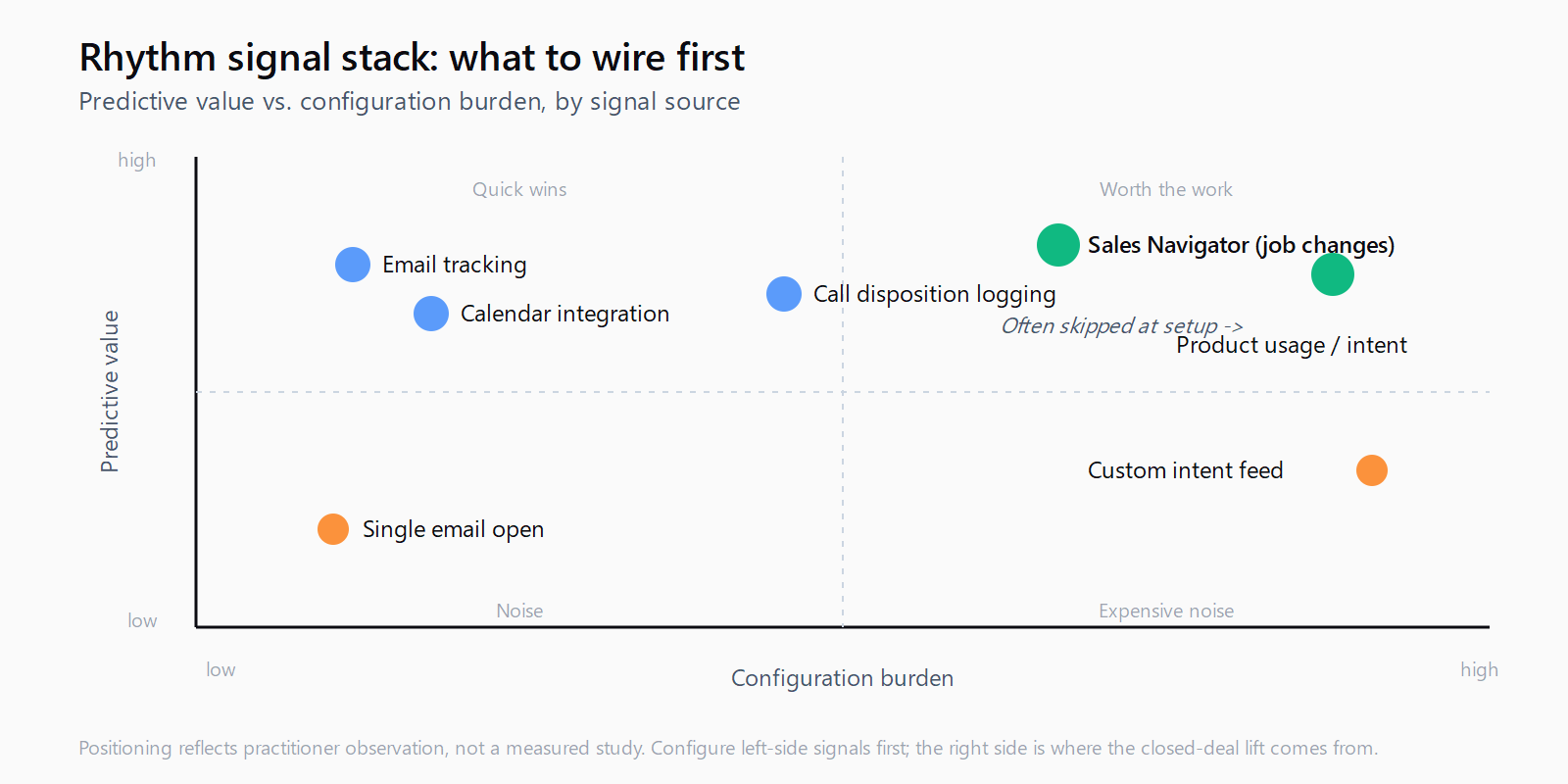
Email tracking is the floor: every cadence step needs Salesloft's tracking pixel and reply detection enabled, including replies into shared inboxes. Calendar integration has to cover all rep calendars, not the optimistic half; a Rhythm task that surfaces because somebody declined a meeting is only useful if Rhythm knows the meeting was declined. Call logging needs to push outcomes back, which means either Salesloft Dialer or a third-party telephony integration that writes call disposition into the activity timeline, not just a recording link.
LinkedIn Sales Navigator integration is the one most teams skip because the licensing math is annoying, and it is also the one most likely to make Rhythm look smart on day one. Job changes, role changes, and engagement on LinkedIn posts are exactly the kind of signal that beats a stale email click for top-of-queue ranking. The same logic that tracking customer champion job changes demands of any prospecting workflow applies here: without that signal source, your queue is sorting on yesterday's data.
Customize signal weighting to match your motion
Rhythm's default weights are tuned for a generic mid-market SaaS motion. If your reps sell to enterprise procurement, the default weight on a single content view is too high; if they run a high-velocity SMB motion, the weight on multi-stakeholder engagement is too low because most of your deals are single-buyer. Out of the box, neither motion gets the right queue.
Open the Rhythm admin under Settings, find the Signal Library, and walk through each signal type asking two questions: how predictive is this signal of a closed deal in our historical data, and how often does it fire. A signal that is highly predictive but rare (a champion job change at a tier-one account) should weight heavier than a signal that fires constantly with low predictive value (a single email open).
This is where most teams get stuck because the weighting interface is a slider and not a calculator, and there is no public guide on what good weights look like for which motion. The cheapest reliable shortcut is to pull last quarter's closed-won deals from Salesforce, identify the three signals that were present on most of them within ninety days of the first meeting booked, and bias the weights toward those three. It is not science, but it is closer to your motion than the factory defaults.
Restructure linear cadences to leave room for Rhythm to insert tasks
This is the step that breaks most existing workflows. Linear cadences are step-by-step plays: day one email, day three call, day five LinkedIn, day seven email. They work the same for every contact in the cadence. Rhythm wants to insert tasks dynamically based on signal fires, which means a cadence built as a rigid seven-step sequence has no slack for Rhythm to slot in a "this account just clicked your pricing page" priority task at hour two.
The pattern that works is to convert cadences from prescriptive sequences into structured slots: every other day, a slot of either "outreach step from the cadence" or "Rhythm-priority task." Reps work whichever has the higher score that morning. This is documented in Octave's writeup on Rhythm as one of the five setup steps, and it is the one most teams skip because rewriting cadences feels like throwing away work. It is not. The cadence content stays; the wrapper around it is what changes.
This pattern is the same seam Leadex sits in: rather than ranking a fixed queue of touches, the agent drafts a research plan you approve before it touches the web, and the plan reflects the brief you typed that morning. Different surface, same principle - the human picks the motion, the model picks the slots. The thing both products force teams to confront is that "AI prioritization" without a configured pipeline of inputs is just a random number generator with a confident UI.
Train reps on what to do when the queue surprises them
Reps trained on linear cadences read a Rhythm queue as a worse cadence. They open Rhythm, see five tasks for accounts they have never touched, and assume the system is wrong. They are not wrong. The system is acting on signals they cannot see, which is a coaching problem, not a product problem.
Every Rhythm task surfaces with a contextual reason ("priced page viewed twice this week," "champion changed roles," "no activity for 45 days on a stage-3 deal"). Train reps to read the reason before deciding the task is wrong. The first two weeks of Rhythm usage should include a daily fifteen-minute team huddle where one rep walks through their morning queue out loud and names the reason for each task. After two weeks, reps stop second-guessing the queue and start working it. Skip that ritual and you will see exactly the failure mode I opened the post with: reps assume Rhythm is broken because they cannot see what it is seeing.
Audit the queue weekly for surfaced-but-not-actioned tasks
The metric to track is not Rhythm completion rate. It is Rhythm dismissal rate by signal type. If reps are dismissing 80% of tasks tagged "single email click" but actioning 70% of tasks tagged "champion job change," that is information: the weight on email clicks is too high for your motion, and the weight on job changes is correct. Tune the weights, re-audit in two weeks, and the dismissal rates will converge.
This is the work that turns a queue from a thing reps tolerate into a thing reps trust. It is also the work most teams do not budget for, which is why the signal-stacking discipline matters as much for an AI queue as it does for an outbound waterfall: one signal alone is rarely enough, and the weights between signals are what makes the stack predictive instead of noisy.
FAQ
Which Salesloft plan tier includes Rhythm?
Rhythm is available on Salesloft Advanced and Advanced Plus plans. The Prioritizer AI Agent that ranks signals is part of those tiers; Essentials does not include it. Confirm with your Salesloft AE before assuming your team has access.
What is the difference between a Rhythm task and a cadence step?
A cadence step is a planned action authored by a manager (day three: send template email B). A Rhythm task is a dynamic action inserted into the queue because a buyer signal fired (account viewed pricing page; champion changed jobs). Cadences are the menu; Rhythm is the maitre d' who reads the room.
Can Rhythm see signals from outside Salesloft?
Only through custom integrations. Native signals come from Salesloft's own telemetry (email, calls, calendar, LinkedIn via Sales Navigator). External signals - product usage from a data warehouse, intent data from a third party, customer health from Gainsight - require either a Salesloft-supported integration or a custom signal pushed via API. Without those, Rhythm sees only the activity that flows through Salesloft itself.
How long should I wait before declaring Rhythm a failure?
Eight weeks at minimum, assuming you have done the signal configuration and cadence restructure. The first two weeks reps relearn the queue. Weeks three to six are when weights are tuned. Weeks seven and eight are when the closed-won impact starts showing up in the funnel. Pulling the plug before eight weeks usually means you turned it off before the configuration matured.
Should we keep cadences alongside Rhythm or replace them?
Keep them. Cadences are the content library Rhythm picks from. Replacing cadences with pure dynamic queueing leaves reps with no fallback when no signal fires for an account, and a quiet account is exactly the account that needs a baseline outreach step from a cadence. The two tools are complementary; treating them as an either-or is the most common Rhythm configuration mistake.