
Honor Apollo CCPA Opt-Outs Without Re-Importing Deleted Contacts
Apollo routes a CCPA opt-out to a suppression list - but that only governs Apollo's database. Here's how to stop deleted contacts re-importing from your own stale exports into the CRM.
A CCPA opt-out you process inside Apollo is not the same thing as that contact leaving your outreach. Apollo will dutifully suppress the person in its own database, and you can still email them next week because a three-week-old CSV is sitting in your CRM with their row intact. The gap between "Apollo removed them" and "I removed them" is where most buyer-side compliance failures actually live, and it is entirely on the data buyer to close - the same way the central suppression list is your job, not your ESP's.
Here is the mechanic that trips people up, and as of 2026 - with CPRA enforcement live and DSAR volume climbing across the B2B data brokers - it is the half teams keep getting wrong. When a person opts out through Apollo's CCPA flow, Apollo adds them to a suppression list so the profile cannot be rebuilt on Apollo's side. That suppression does nothing to the copies you already exported. If your sequencing tool re-imports from a stale enrichment file, or a saved Apollo list re-syncs into HubSpot, the deleted person walks right back into an active sequence. This is a how-to for honoring an Apollo opt-out end to end, on Apollo's side and yours, so the contact stays gone.
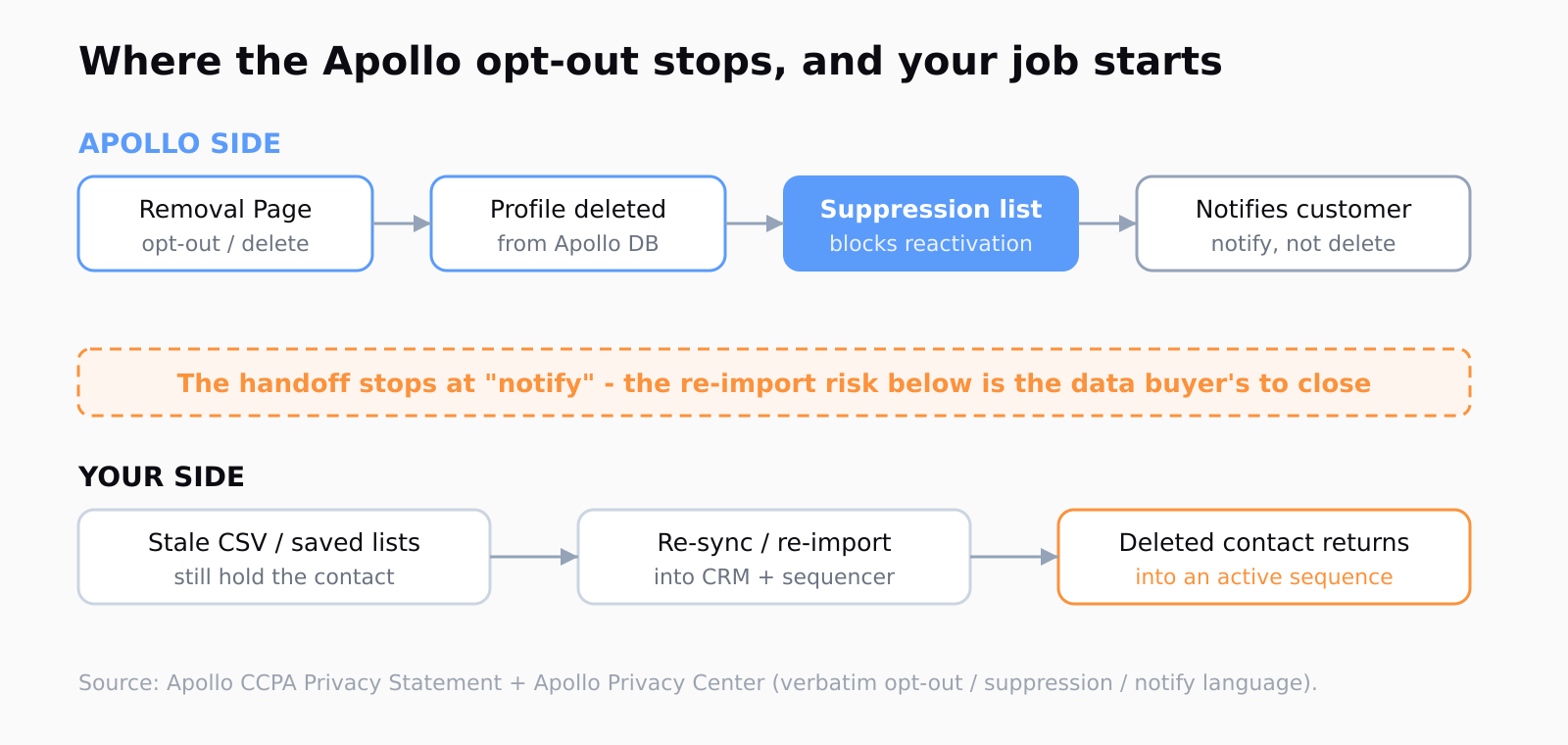
The primary source is unambiguous about the first half. Apollo's CCPA Privacy Statement spells out the opt-out route and the suppression behavior in plain language:
A consumer has the right to opt out of the sale of that consumer's personal information by Apollo by visiting our Removal Page and submitting a request to remove the consumer's profile. [...] we proactively implement a suppression process to ensure that these individuals' information is not inadvertently collected or stored in the future.
How to route an Apollo opt-out to the Removal Page
The opt-out itself happens at Apollo's Removal Page (apollo.io/privacy-policy/remove), or by emailing privacy@apollo.io. The Privacy Center frames the three things a request can cover - you can, in Apollo's words, "object to our processing, opt out of sales, and request deletion of your profile." For a CCPA "do not sell or share" request specifically, the deletion path is the one that puts the record on the suppression list.
What Apollo commits to after a verified request is concrete. The Apollo Privacy Center says "all information contained in your profile will be removed and your record will become unavailable in our products as soon as possible," and then the load-bearing sentence: "We will maintain your information on a 'suppression' list to avoid reactivating your profile in the future." That last clause is the one doing the real compliance work - it is what stops the same email from being re-collected and re-sold the next time Apollo crawls a public source.
Why does an Apollo contact reappear after I opted out?
Two different mechanisms produce a "they came back" complaint, and they need different fixes. The first is source-side: Apollo can re-index a profile from fresh public data - a LinkedIn page, a company team page - even after a suppression entry exists, which is why opt-out guides from removal services like Optery's step-by-step instructions tell people to repeat the process periodically. The suppression list is meant to catch this, but new public records can outrun it.
The second mechanism is the one you own, and it is the more common culprit for a B2B team: the contact never left your systems. Apollo deletes the row from Apollo. It cannot reach into your CRM, your saved exports, your enrichment files, or your sequencer's contact cache and delete the copies you made. Apollo's CCPA statement says it will "notify our customers of the deletion request" - notify, not delete on your behalf. The handoff stops at the notification, and the re-import risk starts there.
How to mirror Apollo suppressions in your own CRM pipeline
The durable fix is to treat every Apollo deletion notification as an input to your own suppression record, not an endpoint. Keep a single canonical do-not-contact list keyed on email and, where you have it, LinkedIn URL. When Apollo notifies you of a deletion, or when you process a CCPA request directly, write that identifier to the list before you touch the CRM, so the suppression survives any later re-import. This is the same discipline as the operational guardrails Apollo leaves to you on the deliverability side - Apollo provides the data surface, you provide the controls around it.
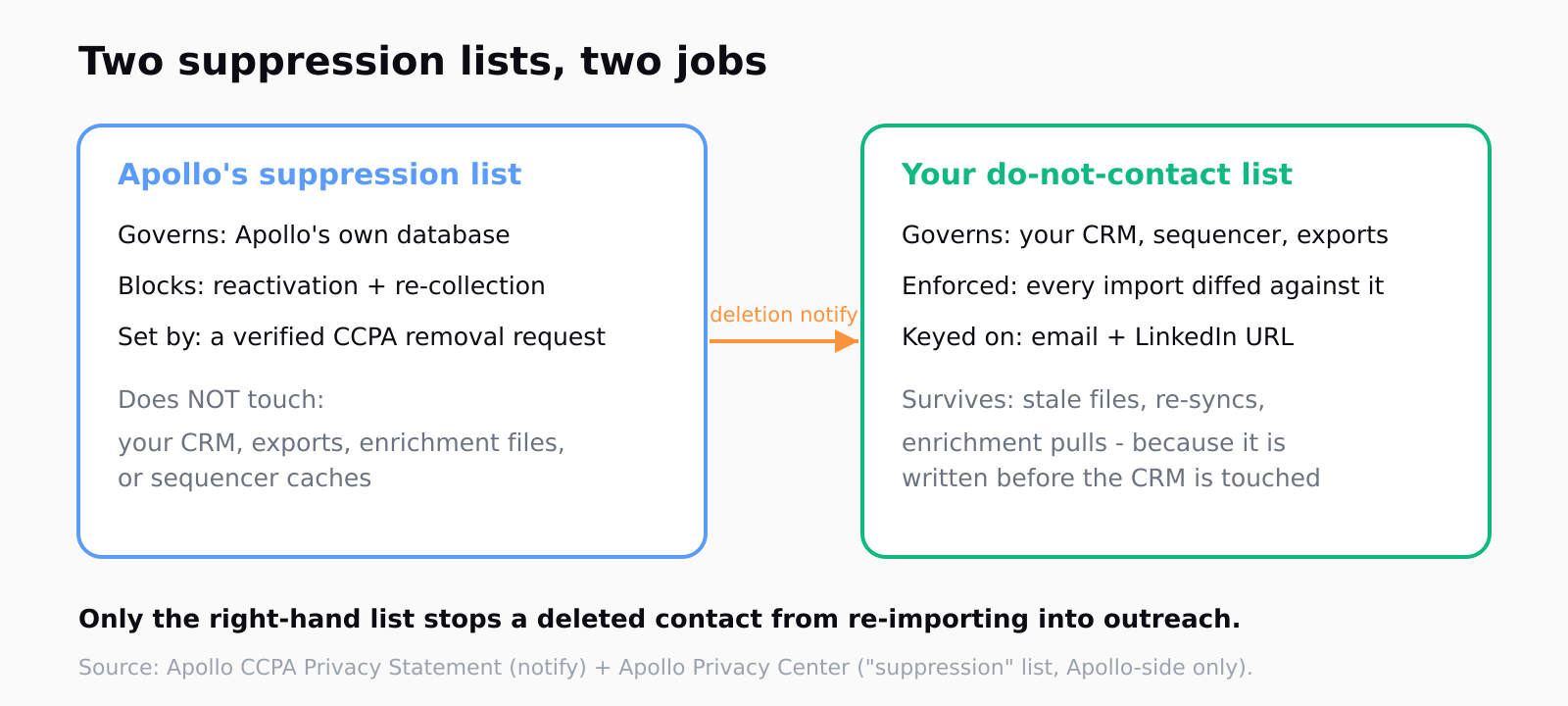
Then make the suppression list authoritative over imports, not the other way round. Every export, re-sync, or enrichment pull should be diffed against the do-not-contact list and the matching rows dropped before they land in an active object. If you only suppress at send time, you are relying on a downstream tool to remember a deletion the upstream file never recorded - and stale files do not remember. The point is to scrub the data before it reaches a rep, the same hygiene step that keeps bad intent signals out of a sequence.
This is exactly the seam Leadex is built to sit at - the join between where contacts come from and where they get enriched. When the discovery and enrichment steps run in one pass and every row carries a source URL and a timestamp, a suppression diff has something to match against, and a re-imported contact can be traced back to the exact export it slipped in through. Apollo enrichment "typically completes in under 60 seconds" per batch in that pipeline, and the suppression check is just one more pass over the same rows before anything reaches a CRM.
How to audit your exports for already-deleted contacts
If you have been running Apollo into a CRM for a while, the deleted-but-re-imported contacts are probably already in your pipeline, and an opt-out you process today does not retroactively find them. Pull a full export of active contacts and join it against every Apollo deletion notification you have received, plus any direct CCPA requests you logged. Anything that matches and is still in an active sequence is a live compliance gap - suppress it, then figure out which import re-introduced it so you can close that source.
The reason this audit is worth the afternoon is that the liability is yours, not Apollo's, once the data is in your system. Apollo's role ends at delete-and-notify; the CCPA obligation to honor the consumer's request travels with whoever is doing the selling or the contacting. A row you exported six weeks ago is a row you are now responsible for, and "Apollo still had them when I pulled the file" is not a defense a regulator will care about.
FAQ
How do I remove my information from Apollo.io?
Submit a request at Apollo's Removal Page (apollo.io/privacy-policy/remove) or email privacy@apollo.io. Apollo says it will remove the profile, make the record unavailable in its products, and add the identifier to a suppression list to avoid reactivating it later.
Does opting out in Apollo delete the contact from my CRM?
No. Apollo deletes the record from Apollo's database and notifies its customers of the deletion request, but it cannot delete copies you already exported into a CRM, sequencer, or enrichment file. Removing those is the data buyer's responsibility.
Why does an Apollo contact reappear after I opted out?
Usually one of two reasons: Apollo re-indexed the profile from a fresh public source, or - more often for a B2B team - a stale export or saved list re-imported the contact into your own systems after the opt-out. The second is the one you control.
Is an Apollo suppression list the same as my CRM suppression list?
No. Apollo's suppression list governs only Apollo's own database. To stop deleted contacts from re-entering your outreach, you need a separate do-not-contact list in your own pipeline that every import is diffed against.
Do I have to repeat the Apollo opt-out periodically?
Possibly. Apollo can re-index a profile from new public data even after a suppression entry, so removal-service guides recommend checking back. For data you have already exported, the suppression lives in your pipeline and does not need re-doing as long as your import diff holds.