
Why Your Agentforce SDR Agent Stops Replying to Leads
Agentforce drafts the outreach but goes silent on replies. The cause is Einstein Activity Capture's internal-domain block, Header-only Email Capture, and Send-as-Seller - here are the fixes.
You stand up an Agentforce Lead Nurturing agent (the feature Salesforce used to call the SDR Agent), point it at a fresh batch of inbound leads, and watch it draft a clean opening email. Then a prospect replies, and the agent goes silent. No error in the chat, no failed-task banner, just nothing. If you have spent any time auditing what an AI prospecting agent actually drafts, you already know the pattern: the model is fine, the plumbing underneath it is not.
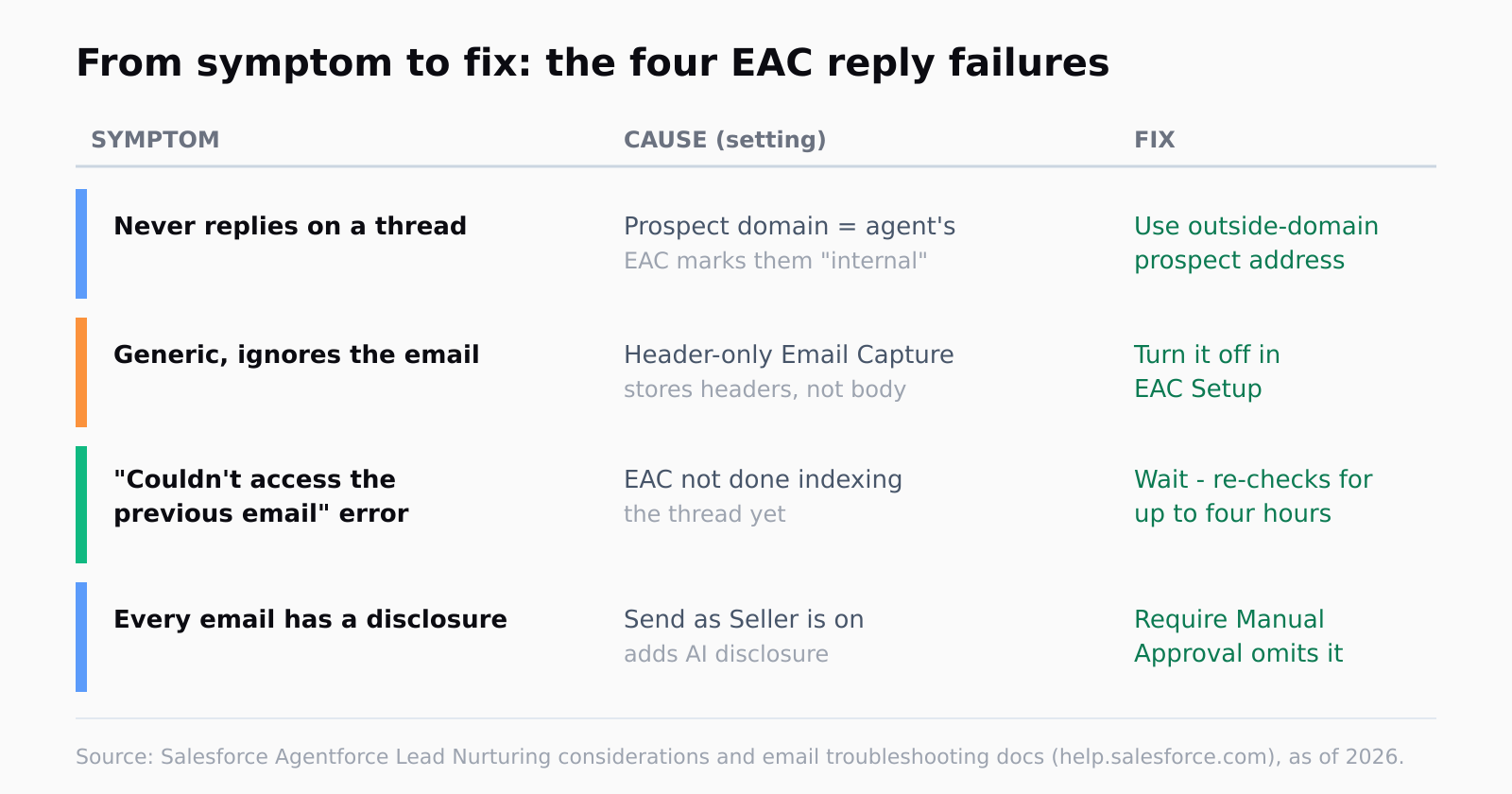
This is a different failure from the one where Agentforce never sends a single email - that one is usually about send caps, bounce thresholds, or opt-out scrubbing. Here the agent can send, it just refuses to reply on an existing thread. The cause is almost always Einstein Activity Capture (EAC), the engine that quietly feeds the agent the email history it needs to respond. As of 2026, Salesforce documents four EAC-related reasons the agent will go quiet, and the single most surprising one catches almost everyone who tests with a teammate's address.
Why does Agentforce stop replying when the prospect shares your domain?
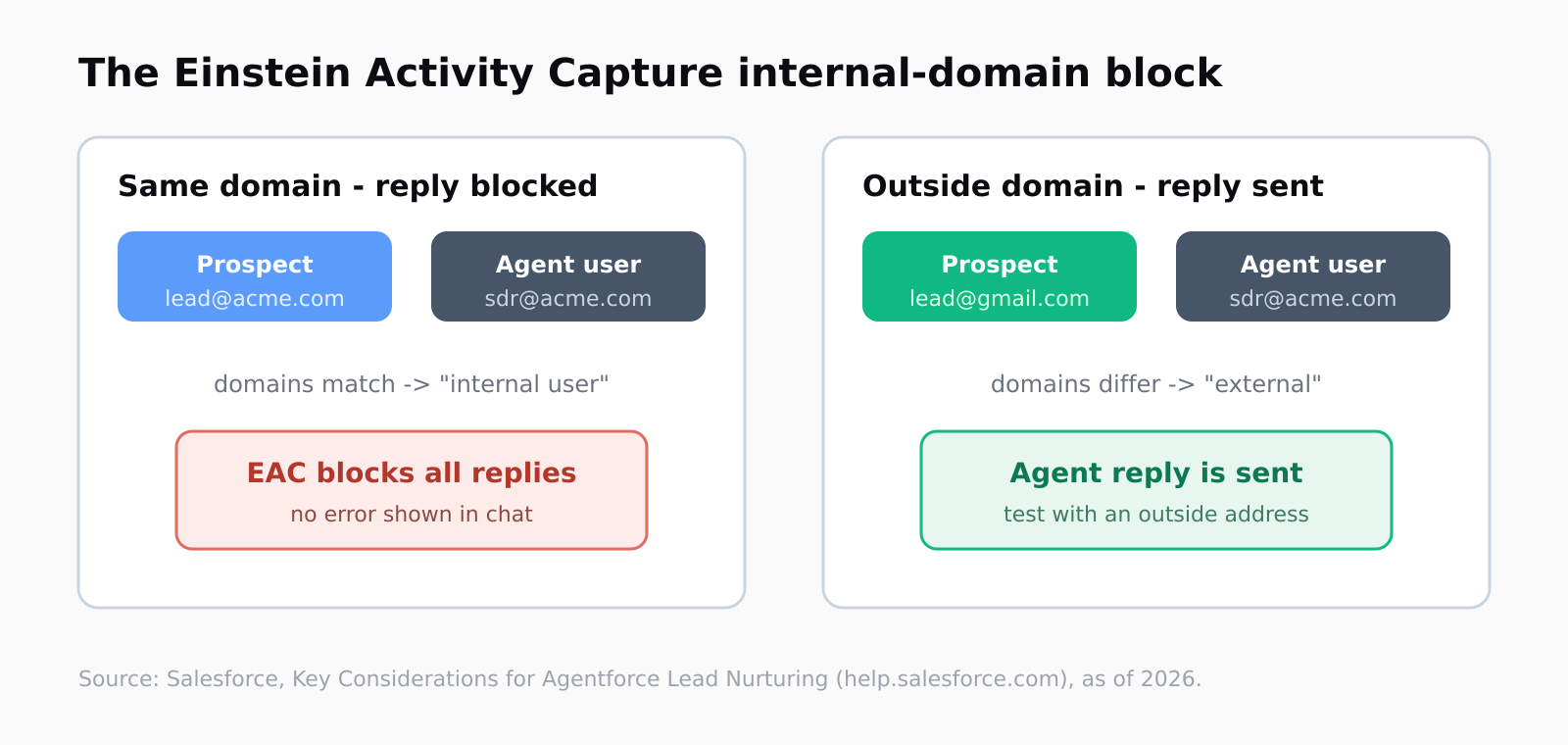
The one that burns the most evaluation runs: if the test prospect's email domain matches the agent user's domain, EAC files the prospect as an internal employee and shuts replies off entirely. Salesforce states it plainly in the Lead Nurturing considerations doc:
If a prospect's email address has the same domain name as the Lead Nurturing agent user record's email address, EAC considers the prospect an internal user. EAC doesn't allow the Lead Nurturing agent to send any email replies to the prospect.
Read that twice, because it is the trap. Most people pilot Agentforce by emailing themselves or a colleague - and a colleague is, by definition, on your company domain. So the agent works in the demo right up until the prospect replies, then EAC silently classifies that prospect as one of your own and the reply never goes out. The fix is to test with an address on an outside domain (a personal Gmail, a burner domain, anything that is not yours), and in production to make sure the agent user's domain is not one a real prospect could plausibly share. There is no toggle to override the internal-user rule, so the only lever you have is the domains involved.
How do I stop Header-only Email Capture from starving the agent?
The second failure is quieter and produces worse output rather than no output. Einstein Activity Capture has a setting called Header-only Email Capture, meant for orgs that do not want message bodies stored in Salesforce for privacy reasons. When it is on, EAC keeps the sender, recipient, and subject line but throws away the body. The agent then has the envelope of the conversation and none of the letter. Salesforce, again from the considerations doc:
When Header-only Email Capture is on, the agent can't use the email subject or body to understand prospect intent or personalize its responses.
So the agent either replies with something generic that ignores what the prospect actually asked, or it declines to reply because it cannot find enough context to act on. If your replies read like they were written by someone who did not open the email, check this setting first - it is in Einstein Activity Capture Setup, and turning it off lets EAC capture full bodies so the agent has the thread to work from. This is the same class of problem as a Salesforce sync quietly dropping fields: the integration reports success while silently withholding the data the next step needs.
What does "We couldn't access the previous email in this thread" mean?
This is the one error Agentforce will actually surface, and it has a less alarming explanation than it reads. The agent tried to reply, asked EAC for the previous message in the thread, and EAC had not finished indexing it yet. Per the email troubleshooting doc, "Einstein Activity Capture hasn't yet captured the previous email messages to the prospect," and the agent "will re-check EAC for previous messages for up to four hours." So the first move is to wait, not to reconfigure - the thread usually resolves itself once EAC catches up.
If it keeps recurring, Salesforce notes the error "is less likely when Activity 360 Reporting is turned off in Einstein Activity Capture Setup." That is a real tradeoff, not a free fix: Activity 360 Reporting is the analytics layer some teams rely on, so disabling it to speed up capture is a decision for whoever owns your activity reporting, not a checkbox to flip blind. I would treat the four-hour re-check as the expected behavior and only touch Activity 360 if a specific high-value thread is stalling past that window (I believe most teams over-rotate on this error before letting it self-resolve).
Should I turn Send as Seller on, and what does it change?
Send as Seller is the setting that decides whose name the email goes out under, and it is worth understanding because it changes the email body itself. With it on, the reply appears to come from the assigned sales rep rather than a generic agent address - which is what most teams want for deliverability and trust. The catch is the disclosure. From the same considerations doc: "When Send as Seller is on, the agent includes an AI disclosure at the beginning of each generated email." That disclosure is there for regulatory compliance, and it is not optional while Send as Seller is on by itself.
There is one way to drop the disclosure: turn on manual approval. Salesforce notes that when Require Manual Approval is on, "generated emails omit the AI disclosure because there is a sales rep reviewing each email" - the logic being that a human has signed off, so the email no longer needs to announce itself as machine-drafted. That is the crux of the whole Agentforce reply path, and it is where a human still has to sit in the loop: full autonomy ships an AI-disclosed email, and removing the disclosure means putting a person back on the approval step. You do not get unsupervised, undisclosed, fully-personalized replies all at once.
We think about this a lot at Leadex because the same tension shows up one stage earlier, at research. Before any list reaches your CRM, Leadex shows you a plan preview you approve before the agent touches the web - so the human-in-the-loop step lands at the point where a mistake is cheap to catch, not after an email has already gone to a prospect on the wrong domain. Different surface, same instinct: let the operator see what the agent is about to do.
FAQ
Why does my Agentforce SDR agent draft emails but never reply to lead responses?
The most common cause is Einstein Activity Capture's internal-user rule: if the prospect's email domain matches the agent user's domain, EAC treats the prospect as an internal employee and blocks all replies. Testing with a teammate on your own domain triggers this every time.
How do I test Agentforce Lead Nurturing without tripping the EAC domain block?
Use a prospect address on an outside domain - a personal Gmail or a domain you do not own - so EAC classifies the prospect as external. There is no setting to override the internal-user rule, so the domains you test with are the only lever.
Why are my agent's replies generic and ignoring what the prospect wrote?
Check Header-only Email Capture in Einstein Activity Capture Setup. When it is on, EAC stores only the subject and headers, not the body, so the agent cannot read what the prospect actually said. Turning it off lets the agent personalize from the full thread.
Does Send as Seller add an AI disclosure to every email?
Yes - with Send as Seller on, the agent adds an AI disclosure at the start of each generated email for compliance. The only way to omit it is to turn on Require Manual Approval, since a human reviewing each email satisfies the disclosure requirement.
How long does the "We couldn't access the previous email in this thread" error last?
The agent re-checks EAC for the previous message for up to four hours, so the thread usually resolves on its own once EAC finishes indexing. The error is less likely when Activity 360 Reporting is turned off in EAC Setup. (See also: Agentforce pricing and cost controls.)