
How to Manage CAN-SPAM Opt-Outs Across Multiple Cold-Email Sending Domains
Running 10+ sending domains? CAN-SPAM's 10-business-day rule applies to the sender, not each domain. A practitioner walkthrough of suppression-list architecture.
The cold-email stack has won the deliverability argument by hiding behind a thicket of sending domains. Buy ten domains, warm them in parallel, rotate sends, and Gmail's spam classifier has a harder time correlating signals across them. The same trick has produced the compliance problem nobody wants to talk about: when a recipient unsubscribes from one of those domains, the other nine do not know.
This is not a grey area. The 10-business-day opt-out rule in CAN-SPAM applies to the sender behind every domain, not to each domain separately, and the FTC has been clear about it since 2003. The statute, at 15 USC 7704:
It is unlawful [...] for the sender to initiate the transmission to the recipient, more than 10 business days after the receipt of such request, of a commercial electronic mail message that falls within the scope of the request.
The scope is the recipient and the sender. A different domain is not a different sender if the same business is behind it. If a contact unsubscribes from outreach sent under acme-sales.com and your acme-revenue.com sequence keeps sending, that is a violation. Penalties as of 2025 sit at $50,120 per email. A 20-domain stack sending one campaign to a single opted-out recipient is a million-dollar exposure on paper, even if the FTC almost never pursues at that scale.
The fix is structural, and the structure that holds up is a single centralized suppression list synchronized to every sending domain before every campaign. The four steps below are how the cleaner teams I have audited actually implement it.
Centralize the suppression list before centralizing anything else
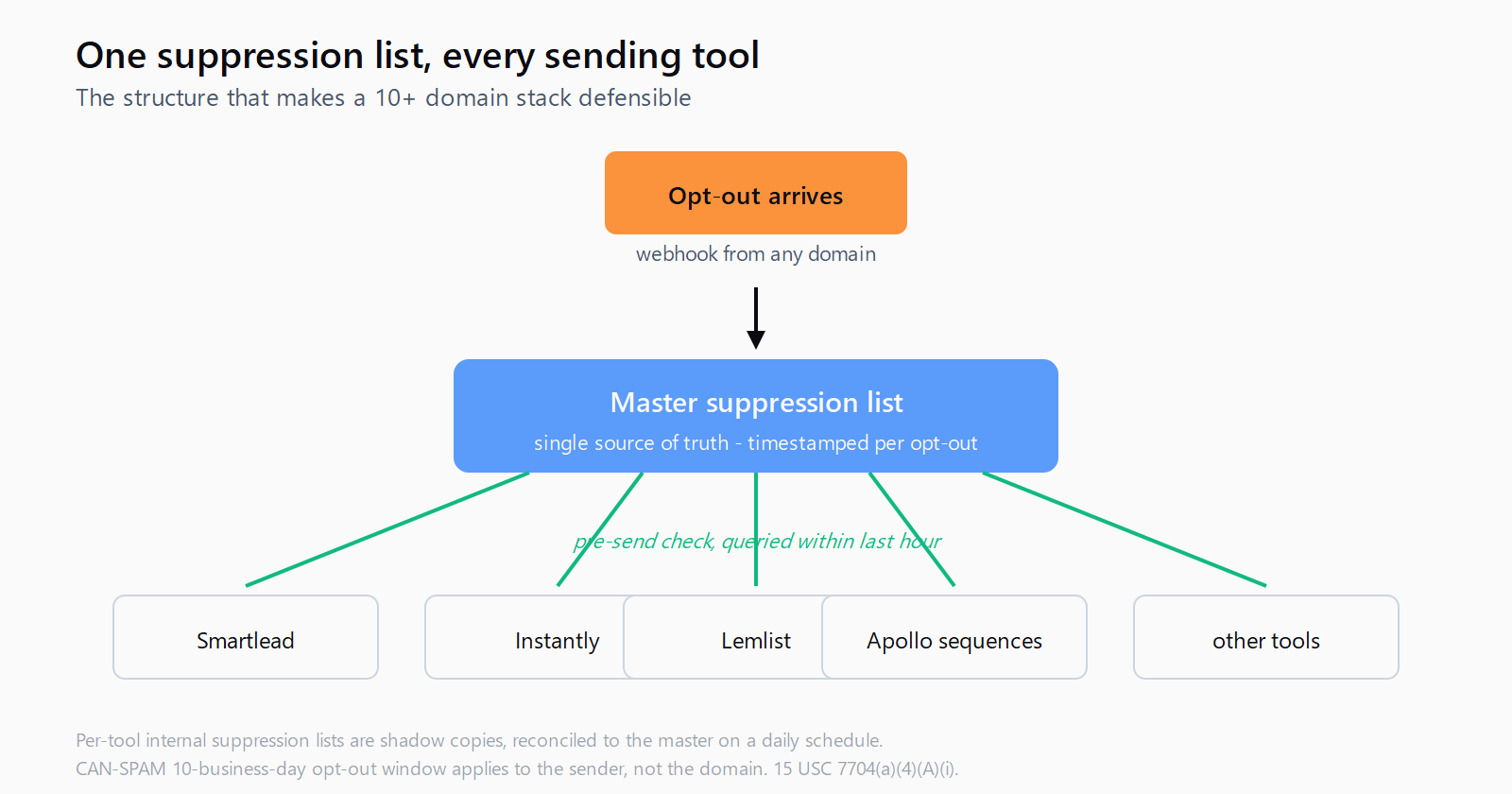
The first instinct of teams running a multi-domain stack is to maintain per-domain unsubscribe files - one CSV per inbox provider, one list per sending tool. This is the architecture you have to dismantle. The list of suppressed addresses needs to live in one place, and every sending tool reads from that one place before each batch.
The place is usually a row in a database, an Airtable, or a Google Sheet wired to a Zapier or Make automation. It does not matter which. What matters is that it has a single canonical source of truth and that every domain, every inbox, and every reseller subscription queries it before a send. The check should be deterministic: lowercased email, no whitespace, exact-match suffix wildcards for domain-level suppressions ("anybody@acme.com opted out").
The pattern is closer to Salesforce duplicate rules failing silently than to a CSV problem: the failure mode is invisible until the moment it matters. A pre-send check that does not actually query the list, or queries a stale snapshot, looks identical to a working one until the regulator-style discovery email arrives.
Sync the list to every sending tool before each campaign batch
"Sync" is doing a lot of work in that sentence. The pattern I see in teams that have actually been audited is a hard pre-flight check that runs as the first step of every campaign launch, fails the launch if it cannot reach the suppression list, and logs the queried timestamp. No campaign goes out unless the suppression list was queried within the last hour.
Three places this breaks in practice. First: sending tools that import a CSV at sequence-creation time and never re-check. Smartlead, Instantly, and Lemlist all let you import a contact list, then run that list across multiple inboxes - the campaign-level suppression filter is the line of defense, and it has to be re-run, not imported once. Second: a domain provisioned this quarter that the operator forgot to wire to the suppression list at all. Audit the connection list every Monday morning. Third: a tool with its own internal suppression list (every sending platform has one) that does not get cross-referenced against the master. Pick the master, and treat every tool's internal list as a shadow copy that must reconcile to the master daily.
This is the same discipline as staying under the Gmail spam complaint ceiling: the failure happens at the seam where multiple tools touch the same recipient list, and the fix is a single canonical view of who not to email.
Honor the 10-business-day window aggressively, not minimally
The statute gives ten business days. Treat it as forty-eight hours. The reason is that the longer your processing window, the more sends you have in flight that were already scheduled before the opt-out arrived. Even if you stop adding the contact to new campaigns the day the opt-out lands, a follow-up scheduled five days ago will go out on day seven and that is a violation if the contact opted out on day three.
The cleaner pattern is: opt-out arrives, suppression list updated within minutes (every modern sending tool exposes a webhook for the unsubscribe link click), and every queued send to that address is cancelled across every connected inbox before the next batch dispatch. Most sending tools do the first step automatically. The second step - cancelling queued sends across tools, not just the one where the click happened - is the one teams skip and the one that produces follow-ups landing after an opt-out.
This matters more under the Gmail and Yahoo February 2024 enforcement, which mandated one-click unsubscribe headers for senders above 5,000 messages per day. Bulk senders who do not honor those headers within two days now see deliverability drops within a week. The compliance argument and the deliverability argument are converging on the same answer.
Treat domain-level opt-outs and corporate suppression as first-class entries
A recipient who replies "remove me and stop emailing my company" is making a corporate-level opt-out request. Treat it as one entry in the suppression list with the domain as the value, not as a series of individual email entries you collect over time. The same applies when a contact unsubscribes from a personal address but is a champion at an account you continue to email through other contacts: the contact's request was personal, but a coaching opportunity exists to update the account-level activity.
Most cold-email tools' suppression UIs do not support domain-level entries cleanly, which is why this step ends up in the wrapper layer (the Airtable, the Google Sheet, the Zapier flow). The wrapper has to support wildcards. Teams that skip this step end up adding fifty individual emails to suppression from the same company every quarter, and the email they miss is always the next executive's address.
The discipline of treating suppression as a single source of truth is the same discipline that makes a chat-native research agent useful at the prospecting end of the funnel. In Leadex the agent surfaces URLs and timestamps per row so the provenance is auditable; in a multi-domain sending stack, the equivalent is the suppression-list timestamp per recipient. Different surface, same principle - if you cannot point to when a record entered the system and from where, it is going to bite you.
Run quarterly audits and keep the evidence
The audit is short. Pick a random sample of fifty contacts who opted out in the last quarter. For each, query every sending tool in your stack and confirm the contact is on the suppression list of each. Log the queries. If any tool is missing the contact, find out why - a webhook that did not fire, a domain that was added after the opt-out but never reconciled, a tool that swapped vendors and never re-imported.
Keep the audit log. The FTC has not publicly pursued a multi-domain B2B sender at scale yet, but the day they do, the difference between a fine and a warning will be whether you can show that opt-outs were processed within the statutory window across every domain. A spreadsheet with timestamps is what makes a compliance program defensible. A vague "we use a tool that handles it" is what makes it indefensible.
FAQ
Does CAN-SPAM apply to B2B cold email?
Yes. The statute covers any commercial electronic mail message, and there is no B2B exception. The FTC has been explicit on this since 2003. Business audiences do not have weaker protections than consumers under CAN-SPAM; the same 10-business-day opt-out window and the same sender-identification rules apply.
If a contact unsubscribes from one of our domains, do the others need to honor it?
Yes, when the same business is behind the domains. CAN-SPAM ties the opt-out obligation to the sender, defined as the entity whose product or service is advertised. Operating a stack of domains under the same business does not create separate senders; the opt-out applies to all of them. If the domains are operated by genuinely separate businesses with separate offerings, that is a different fact pattern, and the operator should expect to defend that distinction if the FTC ever asks.
What counts as a "business day" for the 10-day rule?
The statute uses "business days," which in federal practice means weekdays excluding federal holidays. Ten business days is roughly two calendar weeks. The cautious read is to honor opt-outs within 48 hours and treat the ten-day ceiling as a regulatory hard stop, not an operational target.
Do internal suppression lists in tools like Smartlead or Instantly count as compliance?
They count as one component. They do not count as sufficient on their own, because a per-tool suppression list does not cover the case where a contact gets re-imported through a separate tool or onboarded onto a new domain that was added after the original opt-out. The pattern that holds up is a master suppression list at the business layer, with each tool's internal list reconciled against it on a regular schedule.
What is the actual exposure per violation in 2026?
The CAN-SPAM penalty was adjusted to $50,120 per email for 2025 and is indexed annually. A campaign of 1,000 emails to opted-out contacts is a $50 million face-value exposure. Enforcement at that scale is rare for B2B senders, but settlements and warning letters are not, and reputational cost from a public action can outlast the fine itself.