
Why 11x Alice Leads and Activity Are Not Syncing to Salesforce or HubSpot
Five silent CRM sync failures: API access, object permissions, field-level security, unwritable types, and expired tokens. Fix each one.
The most expensive kind of sync failure in any CRM is the one that looks like success. With 11x's Alice, the pattern is familiar to anyone who has run an AI SDR for more than a month: the sequence dashboard shows emails sent, replies logged, a meeting booked, and the Salesforce lead or HubSpot contact underneath is still sitting at the stage it had two weeks ago, with none of that activity attached. Nothing failed loudly. The connection says healthy. The data just never moved.
I have written before about what 11x's Alice actually automates, and the write-back half of that pipeline is where the silent failures concentrate. 11x now documents the problem explicitly. A troubleshooting page titled Leads and activity are not syncing to my CRM in the 11x help center names five distinct causes, and the framing paragraph is worth quoting whole:
CRM write-back fails for five reasons: missing API access, object permissions, field-level security, unwritable field types, or an expired token from personal credentials. The frustrating property of most of these is that they fail silently - the mapping saves, the connection looks healthy, and no data moves.
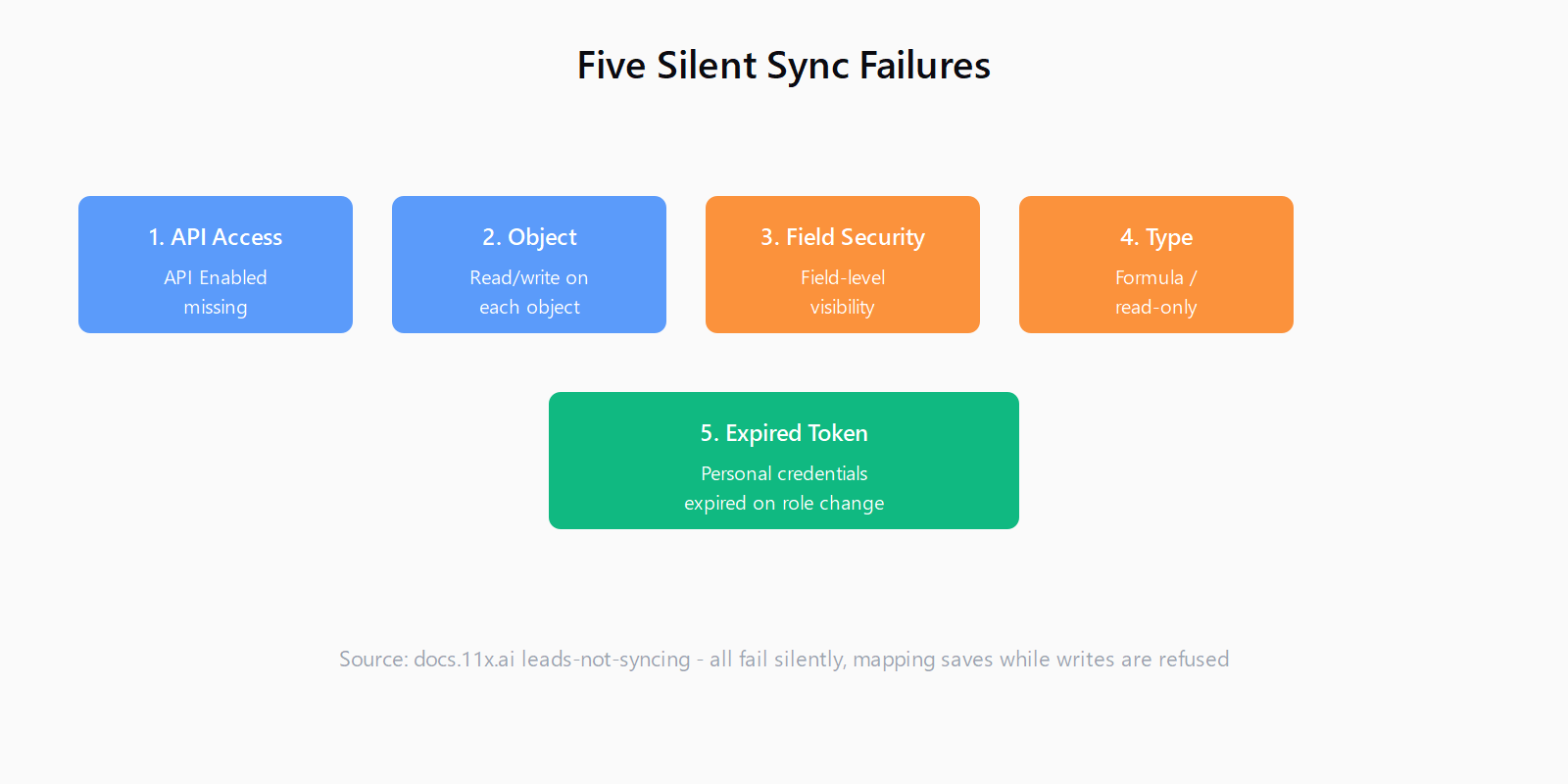
That last sentence is the whole post. None of the five produces a red banner or an error log line you would notice; each one reads as a green integration that happens to be doing nothing. The good news is that all five are configuration problems, not bugs, and all five are fixable from the CRM admin side without touching a single sequence step. Here is how to work through them in the order the causes actually bite.
Check the integration account first: API access and the token
The first two causes are about the identity the connector runs as, not about the fields. On Salesforce, 11x authenticates with OAuth as a specific user, and that user's profile or permission set must include the API Enabled permission. Without it, the authorization flow completes, the connection shows as connected, and then no data moves - every write is refused at the door. The Salesforce integration guide is explicit about this failure mode: API Enabled is a prerequisite, and the docs note that the OAuth flow succeeds even when the permission is missing.
The expired-token cause is the one that explains "sync worked fine for three months and then stopped." It happens when the connection was authorized with a person's credentials rather than a service account. That person changes role, loses a permission set, or leaves the company, and the token dies with the change. Both the Salesforce and HubSpot guides give the same blunt recommendation: use a dedicated integration service account, never an individual's login, because personal credentials break on the next org chart move.
If the connection will not authorize at all, that is a different page - 11x routes you to its cannot connect CRM troubleshooting guide. The leads-not-syncing page assumes authorization succeeded and writes are being silently refused, which is the harder case to diagnose precisely because nothing looks wrong.
Object permissions: why some objects sync and others do not
Once the account is valid, the second cause is object-level permissions. 11x reads and writes a specific set of objects on each side - on Salesforce, typically Account, Contact, Lead, Opportunity, Task, and Event, and on HubSpot, Company, Contact, and Deal plus the engagement timeline. The integration user needs read and write on exactly the objects your motion uses.
The symptom of a missing object permission is partial sync: leads appear but activity does not, or contacts sync but the task records Alice created never do. The write to the unauthorized object is refused while everything else flows, so the sync looks healthy and is merely incomplete. This is the same failure shape I traced when I looked at why Gong's Salesforce sync fields stop updating - a mapped destination that the connecting user effectively cannot touch produces a clean dashboard and empty records.
On HubSpot the docs add a warning that applies to both CRMs: confirm the requested scopes cover every object you intend to sync, and if your company runs multiple portals, verify you connected the one your go-to-market team actually uses. Connecting the wrong portal is not a permissions failure at all, but it produces the same symptom - healthy connection, missing data - and it wastes an hour of permission debugging before someone checks which portal ID is in the URL.
Field-level security: why a mapped field never populates
The third cause is the one that generates the most support tickets, and it operates one level down from objects. The 11x docs name it directly: field-level security is the most common reason a mapped field appears configured but never populates.
Here is the trap. The mapping UI in 11x happily saves a mapping to a field the integration user cannot see, because mapping configuration and field visibility are enforced separately. In Salesforce, field-level security sits on the profile or permission set and controls whether the API user can read or write a given field even when the object permission is granted. In HubSpot, the equivalent is property visibility: the docs warn that unmapped or invisible properties fail silently.
So when a specific mapped field - the ICP score, the research summary, the qualification reason - stays empty while every other field populates, do not re-save the mapping. Open the CRM, look at the field through the integration user's permissions, and check whether that identity can actually see and edit it. The Salesforce guide's own checklist makes this the first thing to verify when a test record comes back with a blank field.
Unwritable field types: why data lands on the wrong fields or nowhere
The fourth cause is subtler still: the field is visible, the permission is fine, and the write still fails because the destination cannot hold what 11x is trying to put there. Unwritable field types reject writes at the API level, and the classic cases are formula fields, read-only system fields, and fields whose type does not match the value being written.
This is where the type of the destination matters. The 11x docs recommend creating dedicated custom fields for what the digital workers output - qualification result, ICP score, research summary - and writing them to the field types designed for that content. A research summary needs a long-text field in Salesforce or a multi-line text property in HubSpot, not a single-line text field that silently truncates. The mapping detail I have seen bite teams most is the opposite direction: reusing an existing CRM field that a workflow, list, or formula already depends on, which is exactly the duplicate-company and data-corruption mess I covered in how to configure Cognism-to-HubSpot field mapping without duplicate companies. 11x gives the same advice in fewer words: create dedicated fields for tool output rather than overloading fields your reporting already uses, so you can remove the integration later without side effects.
Transcripts and call outcomes deserve their own mention, because they are the data people notice missing first. On Salesforce these land as activity records plus custom fields on the Contact; on HubSpot they land as call engagements plus custom properties. If your reporting expects transcripts on the Contact record itself and the integration writes them to an activity record, the data is not missing - it is in the wrong place, which produces the "our reporting does not match what 11x shows" complaint the help center lists among its own FAQs.
Fix it in the right order and verify with a test record
The reason to work the causes in this order is that they stack. An expired token looks like an object permission problem until you check the account. A field-level security block looks like an unwritable field type until you open the profile. Diagnose top-down - account first, then object, then field - and you avoid re-saving a mapping that was never the problem.
Both integration guides converge on the same verification ritual, and it is worth doing before you relaunch. Create a test Contact or Lead you are allowed to write to. Confirm 11x can read it back with the right owner and stage. Run one real outreach through a motion. Then open the CRM and check the write direction: did the activity land on the timeline, did the score land in the custom field, did the transcript land where your reporting expects it?
I think about this verification loop constantly because it is the same discipline Leadex builds around its own CRM push - you approve a research plan, the agent runs it against the open web, and the rows land in your CRM or as a CSV you can inspect before anything is trusted. The principle transfers across tools: never trust a green connection icon, trust a test record you opened with your own eyes.
The deeper lesson of the five silent causes is that a CRM integration is a permission problem wearing an automation costume. Every one of the failure modes is the integration user being unable to do something the mapping UI assumed it could do, and none of them surface in the product that wrote the data. What I keep wondering about is the tool side of the fix: when a write is refused at the API level, the vendor knows exactly why, and surfacing that reason in the integration status - "field X is not visible to this user" instead of "syncing" - would delete half of this post. Until that lands, the cheapest habit is to keep one throwaway test record and actually open it after a real run.
FAQ
Why does 11x authorization succeed but no data sync?
The Salesforce user 11x authenticates as is missing the API Enabled permission, so OAuth completes but every subsequent write is refused. Check the integration account's profile and permission set first.
Why do some objects sync and others do not?
The integration user has object-level read and write on part of the CRM but not all of it - for example, leads sync but the task or event records Alice creates never do. Grant read and write on every object your motion uses.
Why does a mapped Salesforce field or HubSpot property never populate?
Field-level security in Salesforce, or property visibility in HubSpot, is hiding the field from the integration user. The mapping saves fine, but the write is refused. Open the field through the integration account's permissions and grant visibility.
Why did 11x sync work and then stop?
The connection was authorized with a person's credentials and that token expired when the person changed role or left. Reconnect using a dedicated integration service account.
Why are call transcripts and outcomes missing from the record?
The data is usually landing somewhere your reporting does not look - activity records and custom fields on Salesforce, call engagements and custom properties on HubSpot. Map transcripts to a long-text field or multi-line property and point reporting at the right object.