
How to Fix Outlook 550 5.7.15 After Microsoft's May 2025 DMARC Rule
Microsoft began rejecting non-DMARC bulk mail to Outlook.com, Hotmail.com, and Live.com on May 5, 2025 with the 550 5.7.15 error. Here's the runbook to clear the gate.
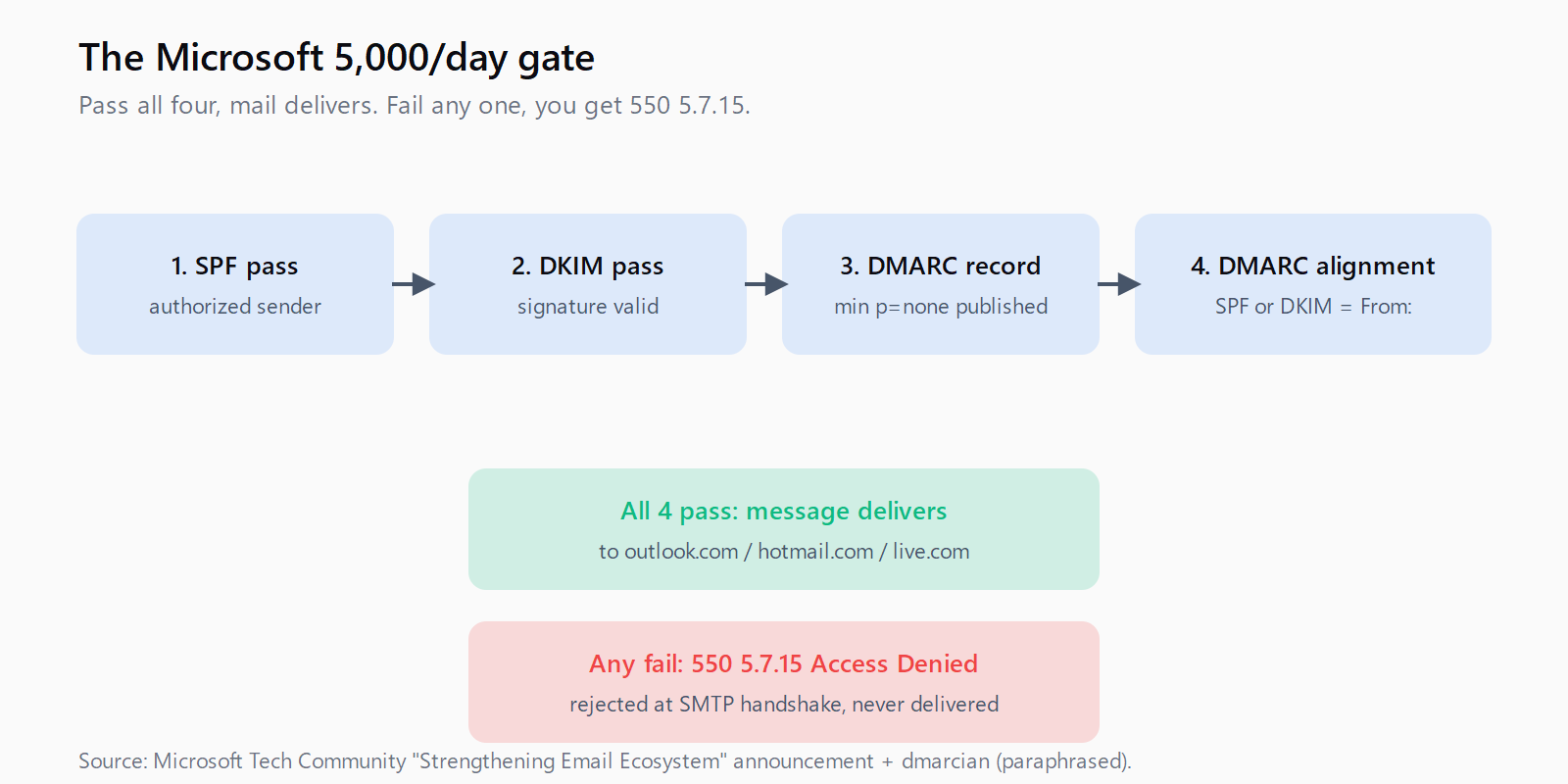
On May 5, 2025, Microsoft began rejecting any mail from senders pushing more than 5,000 messages per day into Outlook.com, Hotmail.com, or Live.com unless SPF, DKIM, and DMARC all pass with alignment on at least one of SPF or DKIM. The rejection comes back as a 550 5.7.15 Access Denied bounce - the cold-email operator sees it in the Instantly or Smartlead dashboard and assumes the inbox is broken, when the actual problem is that the sending domain hasn't published a DMARC record. A year into enforcement, I'm still seeing teams discover this the hard way around quarter-end campaign launches. This is the runbook.
The trip wire is the 5,000-per-day threshold to consumer Microsoft endpoints specifically - not Office 365 corporate inboxes, just the @outlook.com / @hotmail.com / @live.com surface. Multi-domain cold email stacks running 10 sending domains at 600 messages a day cross that threshold in aggregate without realizing it, because Microsoft sums the volume across your envelope sender identity rather than per-domain. If you're running outbound at any meaningful scale, the math says you're affected. The fix is three DNS changes and a discipline you should have had anyway, and it pairs naturally with the Gmail spam-complaint discipline from the parallel Google rollout.
What the 550 5.7.15 bounce actually means
The error code itself is unambiguous, but the wording is easy to misread. Microsoft documented the rejection language in their Defender for Office 365 announcement:
"Messages will be rejected that don't pass the required authentication requirements detailed above (SPF, DKIM, DMARC). The rejected messages will be designated as '550; 5.7.15 Access denied, sending domain [SendingDomain] does not meet the required authentication level.'"
Three things to read out of that. First, the rejection is at SMTP time - the message never lands in the recipient's mailbox, it bounces during the delivery handshake, which is why your inbox-warmup tool will report it as a hard bounce and Bounce Protection (if you run Instantly) will start auto-pausing inboxes. Second, the domain Microsoft cites in the error string is the sending domain - the value from your envelope sender, not your From: header. If those two diverge (a sending platform that uses a shared bounce domain plus your custom From:) you have a DMARC alignment problem regardless of how cleanly your From: domain is set up. Third, the bounce is per-message, not per-account - one bad message does not get your IP banned, but a sustained 4-5% bounce rate across consumer Microsoft endpoints will degrade reputation at every other provider too.
Why aggregate volume catches teams off guard
The 5,000/day threshold sounds high in isolation. It's not. A cold-email team running 10 sending domains at 30 emails per inbox per day across 20 inboxes per domain is sending 6,000 emails a day - if even 12% of those land at Microsoft consumer endpoints (a normal share for B2B prospect lists), you're at 720 daily messages to consumer Outlook, well below the per-domain trip wire. But Microsoft measures by sender identity aggregated across what looks to them like one operator: shared bounce domains, shared SPF records, shared IP ranges. The aggregate easily clears 5,000 the moment you scale to 30 sending domains, and the bounces start showing up on the lowest-reputation domain first while the operator's mental model says "but no single domain is sending that much."
The audit move: pull 30 days of message logs from your sending platform, filter to recipient domains ending in @outlook.com, @hotmail.com, or @live.com, sum the daily volume across every domain you operate, and check whether that sum has ever crossed 5,000 in a single day. If yes, you're on the enforcement list whether you've noticed bounces yet or not.
The three DNS changes that fix the bounce
The actual remediation is a checklist, not a project. For each sending domain:
SPF. Publish a single SPF TXT record at the domain root that lists every authorized sender for that domain. The record must pass when Microsoft's resolver checks it (return PASS, not NEUTRAL or SOFTFAIL), and the lookup count must stay under DNS's 10-lookup cap or SPF will fail with a permerror. If you're using a sending platform that recommends a generic `include:`, verify their record doesn't blow the cap by chaining four more includes underneath - this is the most common silent failure.
DKIM. Generate a DKIM keypair through your sending platform, publish the public key as a TXT record at the platform's selector (commonly `selector1._domainkey.yourdomain.com`), and verify the platform signs outgoing messages with the matching private key. Test by sending a message to mail-tester or by inspecting the Authentication-Results header on a message delivered to your own Outlook.com test address. The signature must validate and the d= domain in the DKIM-Signature header must align with the From: header domain.
DMARC. Publish a DMARC TXT record at `_dmarc.yourdomain.com` with at minimum `v=DMARC1; p=none; rua=mailto:dmarc-reports@yourdomain.com`. The `p=none` policy is the floor that satisfies Microsoft's gate while letting you collect aggregate reports before tightening the policy. Microsoft's rule is explicit on what alignment means:
"A valid DMARC policy is now a must. At minimum, you need a policy of p=none, and it must align with SPF or DKIM - ideally both."
One of SPF or DKIM has to pass with alignment - meaning the domain on the passing protocol matches the From: header domain. A passing SPF record with the wrong alignment domain (common when you use a sending platform's shared bounce return-path) is no longer sufficient on its own; you need DKIM aligned, or you need to override the bounce return-path to your own domain. The dmarcian writeup of the enforcement is the cleanest reference if you're learning DMARC for the first time.
Unsubscribe and From: address - the second gate
Authentication is necessary but not sufficient. Microsoft layered a content-and-hygiene check on top of the DMARC gate that's documented in the same announcement but easy to skim past:
Microsoft recommends valid From/Reply-To addresses, clear unsubscribe mechanisms, clean mailing list maintenance, and transparent practices. The company reserves authority to filter or block non-compliant senders, particularly for authentication or hygiene violations.
"Reserves authority" is the diplomatic way to say we'll block you on principle if your authentication is fine but your unsubscribe isn't. For bulk mail above the threshold you need a one-click unsubscribe header (List-Unsubscribe: with both mailto: and https: methods) and a From: address that isn't an obvious no-reply spoof. The unsubscribe header is the cold-email equivalent of Gmail's RFC 8058 requirement, and the same operational rule applies: implement it once at the platform level, test it on every sending domain, and don't rely on the link in the email body alone. Personalization tuning is downstream of all this - the cleanest body copy in the world bounces if the envelope fails authentication.
Where Leadex sits relative to this
Leadex doesn't send the email - that's Instantly, Smartlead, Lemlist, or whatever sequencer you've standardized on. What Leadex does is the step before the email exists: you describe the ICP in chat, the agent browses the open web, dedupes against your CRM, and pushes a contact list with verified email addresses to your sending platform. The relevance to Microsoft's enforcement: the lower your bounce rate, the further you sit from the 4-5% reputation cliff that gets you blocked even when your DMARC is clean. Company enrichment in Leadex "typically completes in under 60 seconds" per batch, which means you can re-verify a list the morning you send to it rather than relying on data that aged for six weeks. Authentication keeps you legal; list hygiene keeps you delivering.
FAQ
What does the 550 5.7.15 error code actually mean?
It's Microsoft's SMTP rejection code for bulk senders that fail SPF/DKIM/DMARC authentication. The full text includes "Access denied, sending domain does not meet the required authentication level." The message is rejected at SMTP handshake time and never reaches the recipient mailbox.
Does this only apply if I'm sending over 5,000 emails per day?
The enforcement gate is triggered at 5,000+ messages per day to consumer Microsoft endpoints (outlook.com, hotmail.com, live.com). Microsoft measures aggregate volume across what they identify as a single sender, not per individual domain - cold-email stacks running multiple domains can cross the threshold without any single domain looking high-volume.
Is SPF alone enough or do I need both SPF and DKIM?
You need DMARC with alignment on at least one of SPF or DKIM. SPF alone with broken DKIM no longer passes the gate at consumer Microsoft endpoints if DMARC alignment fails on the SPF side. The safest configuration is SPF passing and DKIM passing with both aligned to the From: header domain.
Can I use p=none for DMARC, or do I need p=reject?
p=none is the minimum to satisfy Microsoft's authentication gate. Tighten to p=quarantine or p=reject only after you've reviewed at least 30 days of aggregate (rua) DMARC reports to confirm no legitimate mail flow is failing alignment. Tightening prematurely can block your own transactional mail.
Does Office 365 corporate mail enforce the same rules?
The May 2025 enforcement applies specifically to the consumer Outlook surface (outlook.com, hotmail.com, live.com). Office 365 corporate domains have their own deliverability rules and have been progressively tightening throughout 2025-2026; if your prospect list is heavily B2B and Office-365-routed, expect similar enforcement to apply on a rolling basis even if the public dates haven't been announced yet.