
How to Fix HubSpot Workflow Enrollment API Calls That Return 204 But Skip
HubSpot's v2 workflow enrollment API returns 204 even when the contact is skipped, paused workflow, or re-enrollment is off. Here's how to verify and fix it.
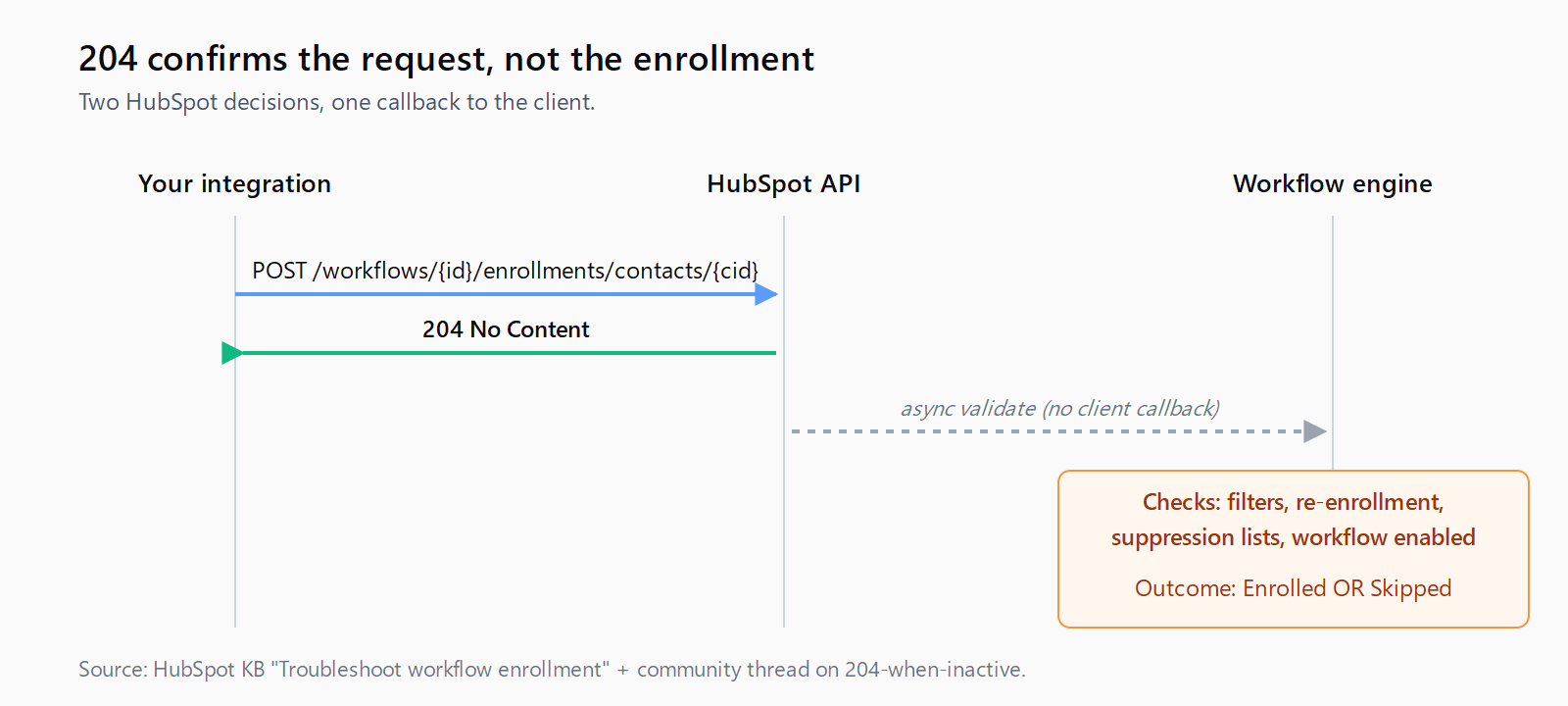
The HubSpot v2 workflow enrollment endpoint is a quietly hostile thing. You POST a contact id, the API returns 204 No Content, and your sync log declares victory - then a week later your nurture report shows the contact never received a single email and is sitting in a "skipped" bucket nobody looks at. The 204 is honest about the HTTP layer: HubSpot received your request, the auth checked out, the payload was well-formed. The 204 is also completely silent about whether the workflow engine actually accepted the enrollment. Those are two different decisions and HubSpot only tells you about the first one.
I have watched four separate teams burn a quarter on this. The bug is always the same: a CSV pipeline or a Zap or a Make scenario pushes contacts into an enrollment endpoint, the calling code checks for 2xx and moves on, and nobody notices the workflow is sitting paused or that re-enrollment was never turned on. HubSpot's own community forum thread "Workflow Enrollment returns 204 even when Workflow is inactive" has been open since 2020. It is not a bug they are going to fix; it is a contract.
By default, records are only enrolled in workflows the first time they meet the workflow enrollment triggers or are enrolled manually. [...] Records may fail to enroll when the record doesn't satisfy enrollment trigger conditions, existing records weren't enrolled when the workflow was activated, the record qualifies for immediate unenrollment (meets goals, suppression lists, or unenrollment criteria), [or] the workflow isn't enabled.
That paragraph from the HubSpot knowledge base is the whole rule set. The API endpoint does not check any of these conditions before returning 204. The validation happens asynchronously in the workflow engine, with no callback, no webhook, no log line you can subscribe to without paying for Operations Hub Enterprise.
How to confirm whether a 204 actually enrolled the contact
The diagnostic tool exists, but it is buried under a Help menu inside the workflow editor. In your workflow, click Help > Troubleshoot enrollment, paste the contact id, set the date range to the day of your API call. The panel will tell you whether the contact passed the enrollment triggers at that timestamp. There is a real catch noted directly in the docs: "only property, list, and form submission filters are supported in this tool." If your enrollment trigger is event-based (calendar booking, custom behavioral event, sequence reply) the troubleshooter says nothing useful and you are back to reading the workflow history view.
The faster check, for monitoring at scale, is the contact timeline itself. Pull /crm/v3/objects/contacts/{id}?associations=workflow after each enrollment call. If the workflow id is in the associations response, the enrollment landed. If it is not, the 204 was a lie and you need to log the contact for retry. This is a CRM-property round-trip per call, but it is the only way to turn the silent 204 into an observable signal without paying for Ops Hub.
How to fix the most common skip cause: re-enrollment is off
Re-enrollment is off by default on every new workflow. Every. New. Workflow. If your integration is syncing leads that have ever previously been enrolled - leads imported in a backfill, contacts who were in the workflow last month and unenrolled at the goal, contacts touched by a related workflow - the API call returns 204 and the contact is silently skipped because HubSpot's rule is "first match only, no exceptions, unless you say so."
The fix is in the workflow editor under Settings > Re-enrollment. Toggle re-enrollment on, then explicitly add the re-enrollment triggers. The triggers can be the same as enrollment triggers, but you have to copy them across - HubSpot does not infer "use the same filters" even though the UI implies it might. I have re-checked this three times because it keeps surprising me.
If your use case is "every API call should enroll, full stop, no matter what" - the workflow is acting as a notification fanout, say - the cleanest pattern is to set the workflow's enrollment trigger to contact list membership, create a static list, and have your integration add contacts to that list rather than calling the enrollment endpoint directly. List membership fires the workflow even on second touches as long as re-enrollment is on, and you get the side benefit of an inspectable list you can audit later.
How to verify the workflow itself is enabled
This sounds insulting until you have watched it happen. A team deploys a new workflow in draft, runs an integration test against the API, gets 204s back, sees zero emails go out, and spends a half-day debugging the integration before realizing the workflow was never clicked Review and publish. HubSpot returns 204 for paused or unpublished workflows because the API only validates that the workflow id exists and the contact id exists, not the workflow's state.
Add a publish-check to your deploy script. The Admin API exposes /automation/v3/workflows/{id} with an enabled boolean - hit it once before your first enrollment call, refuse to proceed if it is false, log a deploy-time error. Five lines of code; saves a half-day every time someone forgets to publish.
This is the kind of silent-failure plumbing that sits at the seam between discovery and enrichment - the seam Leadex is built to close. When the agent pushes new contacts into HubSpot, it polls the workflow-association endpoint after each batch and surfaces the skip count back in the chat log, so you see "12 of 50 contacts not enrolled - re-enrollment off on workflow 982" instead of a green checkmark and a quiet bug. Same pattern works in any pipeline; the point is to never trust the 204 alone.
How to design a sync pattern that survives this contract
The pattern I have settled on after watching this go wrong: every external-to-HubSpot enrollment call gets paired with a workflow-association verify call within 60 seconds. The two calls are logged as a single transaction; the contact is only marked "enrolled" in the source-system database when the association check returns true. Failures are logged with the specific skip cause (workflow disabled, re-enrollment off, contact in suppression list, filter mismatch) and retried by humans, not by the integration.
This is more work than the docs suggest. It is also the only pattern that has not bitten me. The Salesforce equivalent of this problem - where flow entry conditions silently skip records - we wrote about in the Salesforce duplicate rules piece; both platforms ship the same "silent skip on the happy path" anti-pattern, and the fix in both cases is verify-then-trust, never trust-and-move-on. For HubSpot's prospecting-agent surface specifically, the same observability gap appears - we covered the audit pattern in auditing HubSpot Breeze drafts.
FAQ
Does a 204 from the HubSpot workflow enrollment API mean the contact was enrolled?
No. The 204 confirms HubSpot received and accepted the API request - the workflow id and contact id are valid and the auth is good. The actual enrollment decision happens asynchronously in the workflow engine after the API call returns, and depends on trigger filters, re-enrollment settings, suppression lists, and whether the workflow is enabled.
Why does HubSpot return 204 when the workflow is paused?
The API only validates that the workflow id and contact id exist; it does not validate workflow state. Per the HubSpot community forum, this has been documented behavior since at least 2020. Add a pre-deploy check against /automation/v3/workflows/{id} and refuse to enroll if enabled is false.
How do I enable re-enrollment in HubSpot workflows?
Open the workflow, go to Settings, find the Re-enrollment section, toggle it on, then explicitly add the re-enrollment triggers. HubSpot does not infer the re-enrollment triggers from the enrollment triggers - you copy them across manually. Re-enrollment is off by default on every new workflow.
Why are some contacts marked Skipped even after a 204 success?
Common causes: the workflow is paused, the contact was previously enrolled and re-enrollment is off, the contact meets a suppression-list filter, or the contact does not satisfy the enrollment trigger conditions. Use Help > Troubleshoot enrollment inside the workflow to inspect the decision - the panel supports property, list, and form submission filters but not event-based triggers.
Can I get a webhook when a workflow enrollment is skipped?
Not on Marketing Hub Professional or below. Operations Hub Enterprise exposes workflow-level webhooks that can fire on enrollment events, but on standard tiers you have to poll the contact's workflow associations after the enrollment call to determine whether it landed.