
How to Cut the 20-30% of Clay Credits Burned on Failed Waterfall Lookups That Return Nothing
Clay charges credits whether or not a waterfall lookup hits. Cheap-first ordering, early-exit gates, and domain pre-filtering halve the burn.
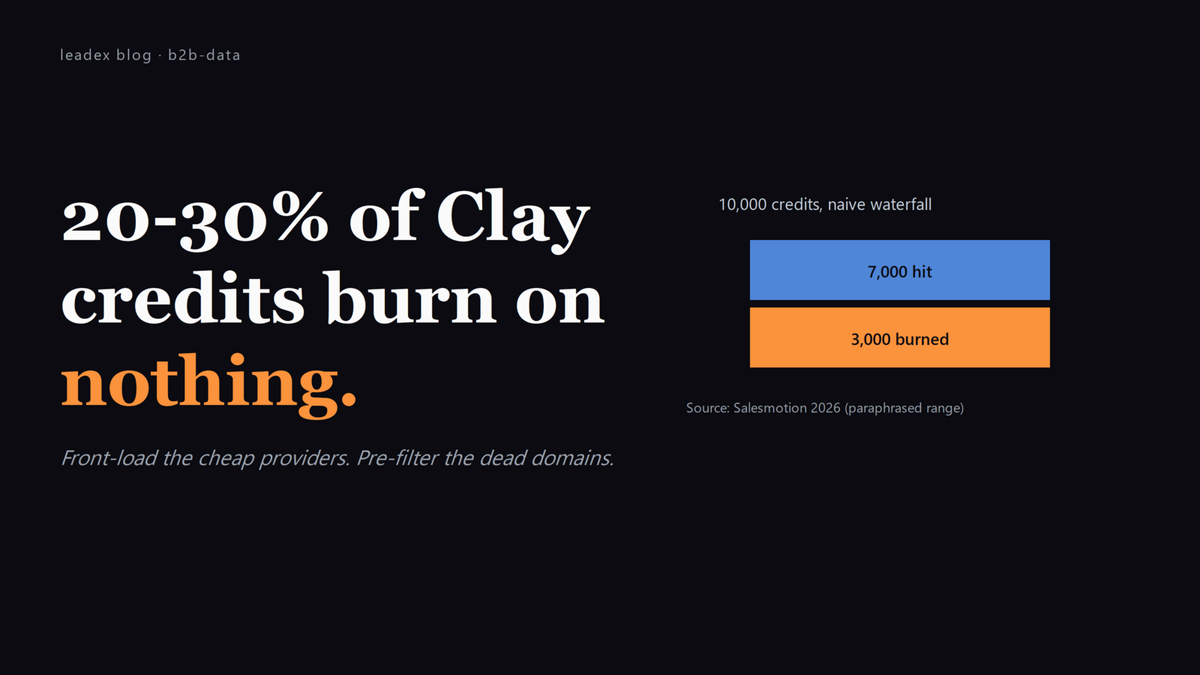
The Clay credit meter has a quiet feature most teams discover at month-end: it spins for lookups that return nothing. Run a five-step waterfall against 1,000 contacts and roughly 20-30% of the credits will burn on null returns - the provider was queried, the provider didn't have the record, the credit was charged anyway. On Clay's Launch plan (2,500 credits/month) that's 500-750 credits gone before any matched data lands in the table.
Salesmotion's 2026 Clay pricing teardown says it directly: "Failed lookups still consume credits. If Clay queries a data provider and returns no result, you are still charged." The same piece estimates teams burn 20-30% of their credit budget on lookups that return nothing - a number that lines up with what shows up in the Clay credit log when anyone bothers to filter it by null result.
Failed lookups still consume credits. If Clay queries a data provider and returns no result, you are still charged. [...] Teams can burn 20-30% of their credits on lookups that return nothing.
The cost is invisible in the Clay UI until the end-of-month credit summary. By the time it surfaces, the team is already negotiating a credit top-up at $0.0144 per credit (Pro tier) or paying the overage rate. Worth noting: a typical full enrichment per contact is 25-50 credits, per Marketbetter's Clay 2026 review. At the high end of that range, a 500-lead workflow consumes 25,000 credits - half a Pro plan's monthly allowance, in one afternoon.
How the waterfall actually burns credits
Clay's waterfall is sequential: provider A is hit first, if it returns nothing provider B is hit, then C, then D, then E. Each provider call costs credits whether the result is hit or miss. If a contact's domain is dead, a misspelling, or just outside every provider's database, the row eats credits across all five steps and the cell stays blank. The waterfall's match-rate uplift (20-40% over single-provider, per the Marketbetter review) is real - it's also the most expensive way to discover that no provider in your stack has the record.
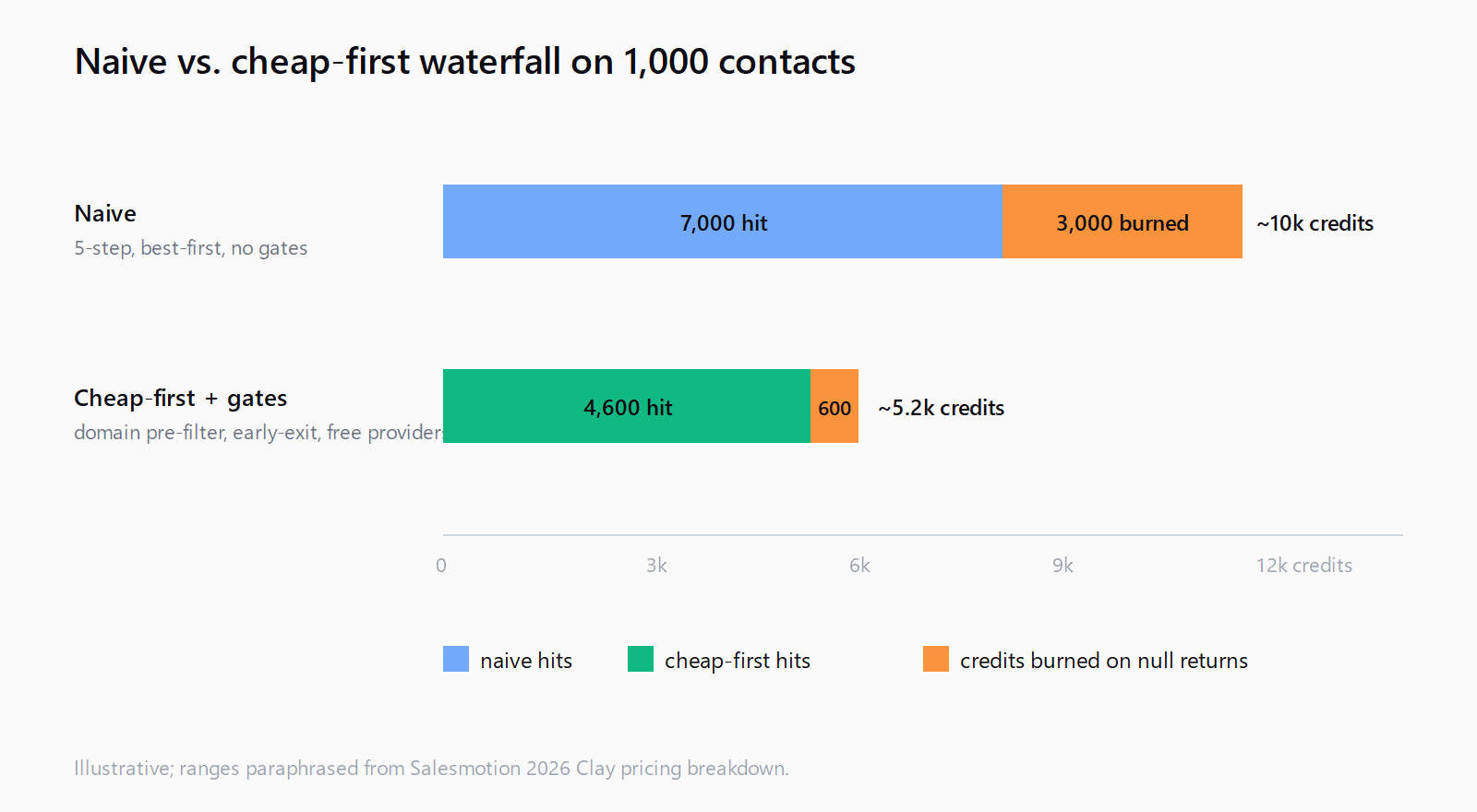
The math, with rounding: a 1,000-contact list, a five-provider waterfall at 3 credits per provider call, no early-exit logic, runs 15,000 credits in the worst case (no hits) and 3,000 in the best case (every contact hits on provider A). The realistic case lands at around 9,000-11,000 credits, with 20-30% of those burned on rows that never match. The match-rate gap and the waste gap are the same gap, looked at from opposite sides.
How to front-load the cheapest provider and exit early
The first fix is conditional logic - Clay supports it, most teams don't use it. Order the waterfall cheapest-first instead of best-first: the lowest-credit (or free) provider runs first, and the next provider only runs if the target field is still empty. In the credit log this shows up as the more expensive providers (LinkedIn enrichment at 5-15 credits, mobile phone at 15-25) firing only on the misses from the cheap providers, not on every row.
Concrete pattern: if you have a Hunter API key (already paid for) as one of your providers, run it as step 1. It costs no Clay credits at all (BYO key), so the credits start counting only on the misses. Step 2 might be a free Clay-bundled provider; step 3 is the first paid lookup. By the time the expensive providers see a row, the easy ones are already filled - which is exactly the inversion most teams have backwards because the original Clay tutorial showed the waterfall best-first.
The Clay UI for conditional waterfall is under the column settings: "Run this enrichment only if..." with a dropdown of conditions. The relevant one is "[target column] is empty." Set it on every step except the first, and the early-exit happens automatically. We covered the broader version of this pattern in building a 5-step Clay waterfall that hits 85% match rate without burning credits.
How to pre-filter the input list before any provider runs
The second fix is upstream: before any waterfall step runs, validate the input. Two checks in particular catch the worst credit burners.
Domain validity: a column that runs a DNS lookup (Clay has one bundled, costs 0 credits) and flags rows where the domain has no MX record or returns NXDOMAIN. Skip those rows from the waterfall entirely - they will burn credits across every provider and return nothing every time. In any list pulled from older CSVs, this typically drops 5-15% of rows before they touch the expensive enrichers.
Email format validity: if the workflow takes emails as input, a regex check (also 0 credits in Clay) flags malformed addresses. Same idea: skip them from the waterfall. The cost is two cheap columns at the top of the table; the saving is the 20-30% of credits that would have burned on rows that never had a chance.
Combined, the pattern looks like this: validate domain > validate email format > gate the waterfall on both being valid > run the cheap provider first > gate each subsequent provider on the target column being empty. A 1,000-contact list under this pattern typically uses 40-55% of the credits the naive waterfall would, with a match rate within a couple of points.
How to budget by row, not by month
The third fix is reporting, not configuration. Clay's monthly credit view is misleading because it averages high-cost and low-cost rows across the whole month. The useful view is per-row: a credit-cost column at the end of the table that sums credits used by each row across all enrichment steps. The Pro tier exposes this via the column types panel; on lower tiers it can be reconstructed with a formula.
Why it matters: a per-row credit budget makes the bad lists visible. If the average is 9 credits per row but the 90th percentile is 38 credits per row, the top decile is where the credit burn lives - and that decile is almost always the rows that failed every provider but kept trying. Cutting that decile out of future runs is the single largest credit save available without changing the waterfall itself.
This is the same principle we wrote about for teams without a RevOps engineer - the credit math is easier to control when the per-row cost is visible than when only the aggregate is.
Where Leadex fits in the credit-control story
Clay's strength is the spreadsheet workflow and the reusable column stacks; the cost is the credit complexity and the RevOps headcount to keep the templates clean. Leadex takes the other shape: a chat-driven research agent that does discovery, enrichment, and dedup in one run, with no per-contact markup on the enrichment side because you bring your own provider keys. The plan preview shows which providers will run before any credit is spent, so the "20-30% of credits on null returns" pattern doesn't surface at month-end - it surfaces in the plan, where it's still cheap to adjust the brief. For teams running Clay specifically for ad-hoc, brief-shaped research (not for the reusable template workflows), the seam moves toward Leadex; for teams running the reusable template workflows the seam stays at Clay. Both are fine answers; only one shows the cost before the run.
The kicker: Clay's credit log has a hidden filter for "Returned: null." Almost nobody runs it. Filter the log by that value, sum the credits used, divide by total credits used in the month - the percentage is the credit-burn number for that workflow. Most teams see something between 18% and 34% the first time they look. The 20-30% figure isn't a marketing-ish range; it's the median of what actually happens.
FAQ
Does Clay charge credits for failed enrichment lookups?
Yes. Per Salesmotion's 2026 Clay pricing breakdown: "Failed lookups still consume credits. If Clay queries a data provider and returns no result, you are still charged." Teams typically burn 20-30% of their credit budget on lookups that return nothing.
What's a realistic credit cost per contact in a Clay waterfall?
Marketbetter's 2026 Clay review puts a typical full enrichment at 25-50 credits per contact, with basic actions at 1-5 credits, medium actions (LinkedIn, email-finding) at 5-15, and expensive actions (mobile phone, AI research) at 15-25 each. The waterfall's cost depends on how many providers run before a hit.
How do I stop Clay from burning credits on dead domains?
Add a domain-validity column at the top of the table (Clay has a free DNS lookup) and gate the waterfall on it returning a valid MX record. Rows with dead domains skip the enrichment steps entirely, saving 5-15% of credits in lists older than 90 days.
What's the difference between Action credits and Data credits in Clay?
Clay's plans budget both. Action credits cover workflow operations (column formatting, formula execution, AI calls); Data credits cover external provider lookups (email finding, phone enrichment, company data). Data credits are the variable cost that scales with list size and waterfall depth - they're the ones that burn on failed lookups.
Should I run the cheapest provider first or the highest-match-rate one first in a waterfall?
Cheapest first, with early-exit logic on each subsequent step. The expensive providers should only fire on the misses from the cheap ones. The Clay column settings have a "Run this enrichment only if [target] is empty" condition - set it on every step after the first, and the waterfall stops the moment a hit lands.