
How to A/B Test Cold Email Subject Lines Without Breaking the Follow-Up Reply Thread
Changing the subject line on a follow-up variant breaks the reply thread. How to test safely in Instantly A/Z and with GMass spintax.
The advice to A/B test your cold email subject lines is everywhere, and it is mostly right. The execution is where it falls apart, because most of that advice quietly assumes the test lives on a single email. A sequence is not a single email. The follow-ups only work if they stay in the same conversation as the first message, and the subject line is the hinge holding that conversation together. Change the subject on a follow-up and the thread splits - silently, with nothing in any dashboard, right around the time the replies you wanted to measure start arriving somewhere the campaign is not looking.
The tool most people meet this constraint in is Instantly, sitting on top of the cold email infrastructure they spent weeks warming. Instantly's variant feature is called A/Z testing, and it is a good implementation of a seductive idea: up to 26 variants per step, per-variant analytics, and an auto-optimize mode that retires the losers. The catch is that the subject line is the one element a sequence cannot treat as a free variable, and the vendor's own documentation buries that warning in a single paragraph.
What A/Z testing varies, and where it bites
Instantly's A/Z testing works per step. On the first email or any later email you hit Add variant and create as many versions as you like, up to 26, labeled A through Z, each with its own subject line and body copy. Every variant carries an enable toggle you can flip in the editor or in Step Analytics under the campaign's Analytics tab, and Instantly records Sent, Opened, Replied, Clicked, and Opportunities against each one. For a straightforward single-email subject test that is everything you need: two subject variants on one step, a real hypothesis behind each, a chosen metric, a decision.
The distribution model is where the feature stops behaving the way people assume. Instantly balances variant usage over the lifetime of the campaign rather than per day, so a variant you add to a campaign that is already running sends exclusively until its volume catches up with the older ones. Equal daily splits are available, but they are an opt-in preference that resets variant usage tracking each day. And the guidance is to judge results over a long window - the docs suggest something on the order of the last three months - because replies and clicks trickle in slowly. That lag matters more than it sounds once auto-optimize is choosing your winner for you.
Why a changed follow-up subject breaks the thread
Here is the paragraph that explains the whole problem, from Instantly's A/Z testing help article:
If you want follow-up emails to remain threaded, keep the subject line in Step 2 (and subsequent steps) the same as Step 1. You can create multiple variants for the email body while keeping the subject line consistent. Changing the subject line in any follow-up variant will break the thread for that variant.
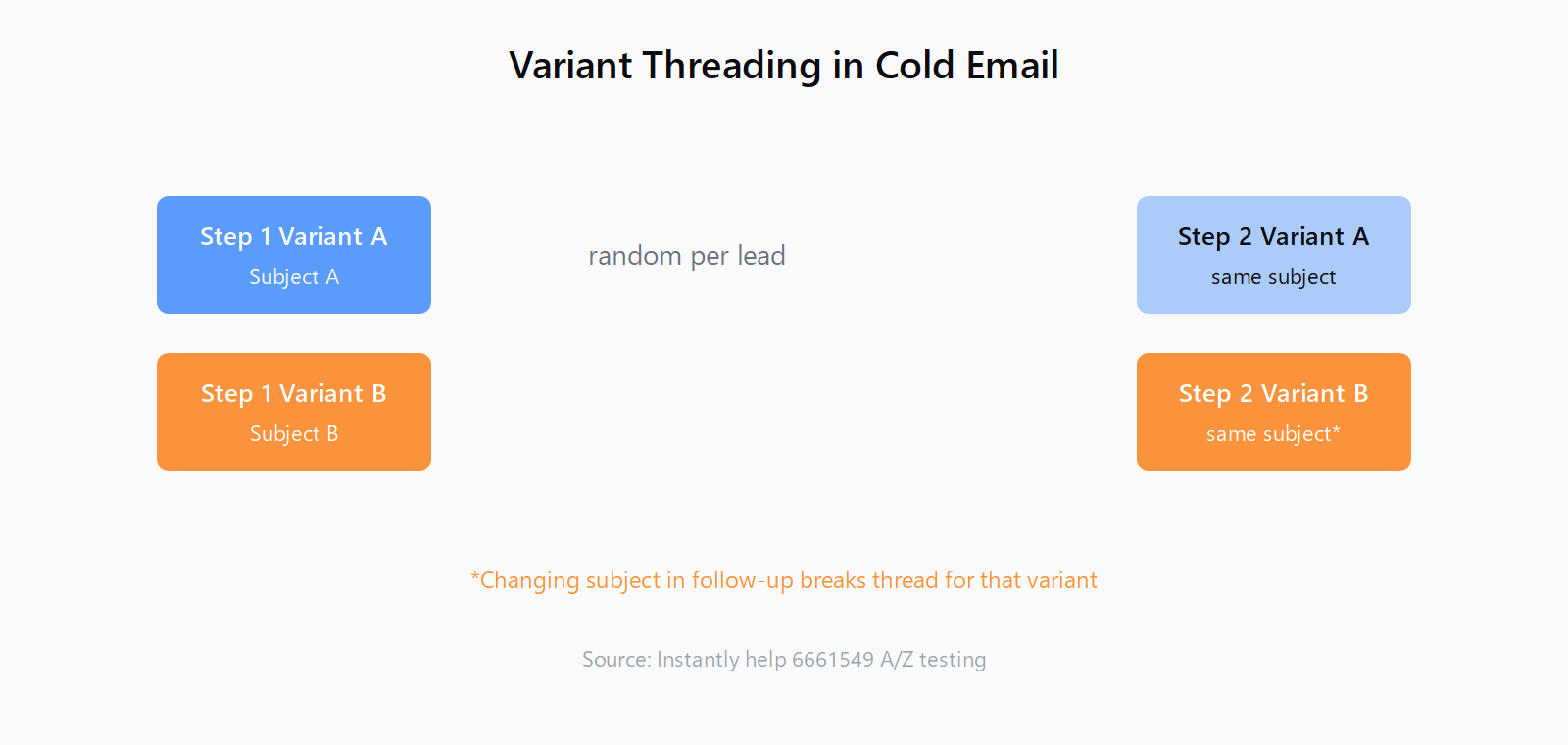
That note deserves two readings. The first claim is that follow-ups stay threaded only while the subject matches Step 1. The second is stronger: changing the subject on a follow-up does not merely look different, it breaks the thread for that variant, which means the replies arrive outside the conversation the campaign is tracking.
The mechanics are unglamorous. A reply inherits the subject of the message it answers, and the people and providers deciding what belongs in a conversation lean on that subject line heavily. A reply to a follow-up with a fresh subject has no obvious home next to the original message, so it starts a new conversation instead. In a one-off test that is an annoyance. In a campaign it compounds, because your reply handling, your analytics, and your follow-up automation all key off the conversation that never formed.
Instantly also cannot help you keep two subject threads coherent if you try. Its own FAQ answers whether Step 2 Variant A will follow Step 1 Variant A with an unambiguous no: variant assignment is random at each step, and there is no option to match variants across steps, by design, since each step can carry a different number of variants. A lead who opened Step 1 as Variant A can be sent Variant B's subject on Step 2. That is harmless for body copy and quietly fatal for subject lines, because it guarantees a share of your leads get a follow-up that splits away from the thread their first email started.
How to test the subject line without splitting the thread
The thread-safe version is deliberately boring. Test the subject on the first email only, keep the body fixed while you do it, and treat every later step as a single-subject zone:
- Create two, at most three, subject variants on Step 1. More than that sounds diligent and just dilutes the sample - 26 is a ceiling, not a target (!), and I would rather test two lines against a meaningful number of leads than five against a fraction of each.
- Leave the subject alone on Steps 2 and beyond. It should read exactly like Step 1's line so the follow-up lands in the same conversation. If you want to experiment on the follow-ups, vary the body copy; Instantly explicitly supports that while the subject stays put.
- Pick the winning metric before launch and let auto-optimize retire the losers. Subject lines earn opens, so open rate is the fastest read; replies are the honest end-state but arrive slowly, which is why the docs push longer analytics windows. Auto-optimize, under Campaign Options and Advanced Options, deactivates the underperformers on the metric you choose - reply rate, click rate, or open rate.
- Once a winner exists, lock it in. After auto-optimize prunes the field, set Step 1 to the surviving line and keep the follow-up subjects identical to it for the rest of the run.
Volume discipline is the silent partner in all of this. Each variant needs enough real sends to mean anything, and the numbers behind Instantly's Bounce Protection auto-pause - roughly 30 cold emails per inbox per day - determine how long a two-variant test needs before you can trust the result. More variants on a fixed send volume do not buy more information; they buy noise.
The cleaner alternative: settle the winner before the sequence runs
None of this is forced. You can run the subject test before the sequence exists and remove threading from the equation entirely. GMass's A/B testing documentation shows the shape: all variations live inside one email via a spintax syntax, the test goes to a slice of the list - GMass suggests something like 20 to 30 percent - and the tool, or you manually, picks the winner and sends it to the untouched remainder. GMass's own guidance is to match the waiting window to the metric: give a reply-based test at least 24 hours, because replies lag, while an open-based test can resolve faster.
The trade is real, so let me state it plainly. In-campaign A/Z testing measures real behavior on real leads with no extra setup, but you cannot control which subject a given lead saw on Step 1, and you must never touch the subject again after that step without splitting threads. A pre-flight test costs you setup and a slice of your list before day one, and in exchange you commit to a single subject for the entire sequence, thread intact. For a team with thin deliverability headroom, I would run the pre-flight test every time.
The thread is downstream of the message, and the message is downstream of the list. That upstream seam is where Leadex does its work: you describe the accounts you are after, approve a research plan, and get a deduped list with source URLs into your CRM before the first subject line is drafted. A subject test tells you which opener works on the audience you already have; it cannot tell you whether the audience is the problem. Get the list right and even a mediocre subject test teaches you something.
The thought I keep coming back to is that every thread-split story I have traced shares a cause: someone optimized an element the sequence had already spent. A subject line buys you the first open and nothing after it. From the moment a follow-up exists, its subject is not a marketing decision anymore - it is plumbing. Treat it as plumbing, run your A/B test on Step 1, and the reply rate you measure will actually reflect what your subject line did, which is the entire point of measuring it.
FAQ
Does Instantly send the winning A/Z variant to the rest of the list?
No. Instantly's auto-optimize deactivates the lower-performing variants so leads who enter later receive the survivor, but it does not re-send the winning email to people who already received a losing variant. Sending the winner to the untouched remainder of a list is the GMass model, and it requires deciding the winner before the full campaign goes out.
Will Step 2 Variant A always follow Step 1 Variant A?
No. Instantly assigns variants randomly at each step and offers no option to match variants across steps, by design, since steps can have different variant counts. This is safe for body copy and a trap for subject lines, which must stay constant on follow-ups to keep the reply thread intact.
Can I change the subject line in a follow-up email?
Technically yes, but it breaks the thread for that variant. Replies to the follow-up arrive as a new conversation rather than attaching to the original email. Keep the follow-up subject identical to Step 1 and vary the follow-up body instead.
What is the best metric to optimize a subject-line test on?
Open rate is the fastest read because a subject line's job ends at the open. Reply rate is the honest end-state but arrives slowly, so give it a longer window. Click rate is the weakest of the three for subject tests, since a click happens after the email is already opened.
How many subject variants should I test at once?
Two, occasionally three. Instantly allows up to 26 variants per step, but every variant you add splits your send volume thinner, and at roughly 30 cold emails per inbox per day it takes most campaigns a long time to give each variant a trustworthy sample.