
How to Diagnose Unexpected HubSpot Lead Scores
Trace unexpected HubSpot lead scores to their rules and input values, test the correction, and verify that the right prospects reach sales.

When a HubSpot lead score disagrees with your routing expectations, test the record against the scoring rules before changing the threshold. The mismatch can come from the rule, the underlying property value, or the version you are inspecting. Raising the cutoff hides the symptom without explaining why the prospect received those points.
How to capture the score that needs explaining
HubSpot's record-testing documentation distinguishes testing an individual record from previewing a distribution. Distribution previews can use a sample of eligible records. A preview therefore does not necessarily describe every contact. Use an individual test to investigate a particular routing disagreement.
Start with a record the sales team can identify and a clear statement of the surprise. "This company should not have gone to enterprise" is useful only after someone writes down the expected company size, the actual routed segment, and the score being used. Record the time of the observation, because the underlying data may change while you investigate.
Keep the qualification rule separate from its implementation. Your policy might say that an account needs a particular size and a relevant operating region. The implementation might check a contact field, a company field, or an associated record. A policy that sounds unambiguous in a meeting can become ambiguous when different objects hold different answers.
I would ask the owner of the routing policy to state the expected outcome before looking at the points. This avoids a circular discussion in which the current score becomes the justification for the current score. If nobody agrees on what the prospect should receive, the immediate problem is an unresolved qualification decision rather than a broken calculation.
Reproduce the rule, not just the final number
For the current interface, open Marketing > Lead Scoring, select the score, and use Actions > See live score for the published version or Edit score for the draft. Select Test a contact/company/deal and choose the affected record. The individual record test shows the total and the contributions of individual rules. Compare the live version first when investigating an already-routed prospect.
The following is a hypothetical fit-score model. One rule grants 20 points for an approved company-size band. Another grants 15 for an approved region. With no binding caps or other rules, an account matching both receives 35. An account matching only the size rule receives 20. If the intended policy was "both conditions or no points," two separate additive rules implement a different policy.
| Illustrative account | Size match | Region match | Separate-rule total |
|---|---|---|---|
| A | Yes: +20 | Yes: +15 | 35 |
| B | Yes: +20 | No: +0 | 20 |
| C | No: +0 | Yes: +15 | 15 |
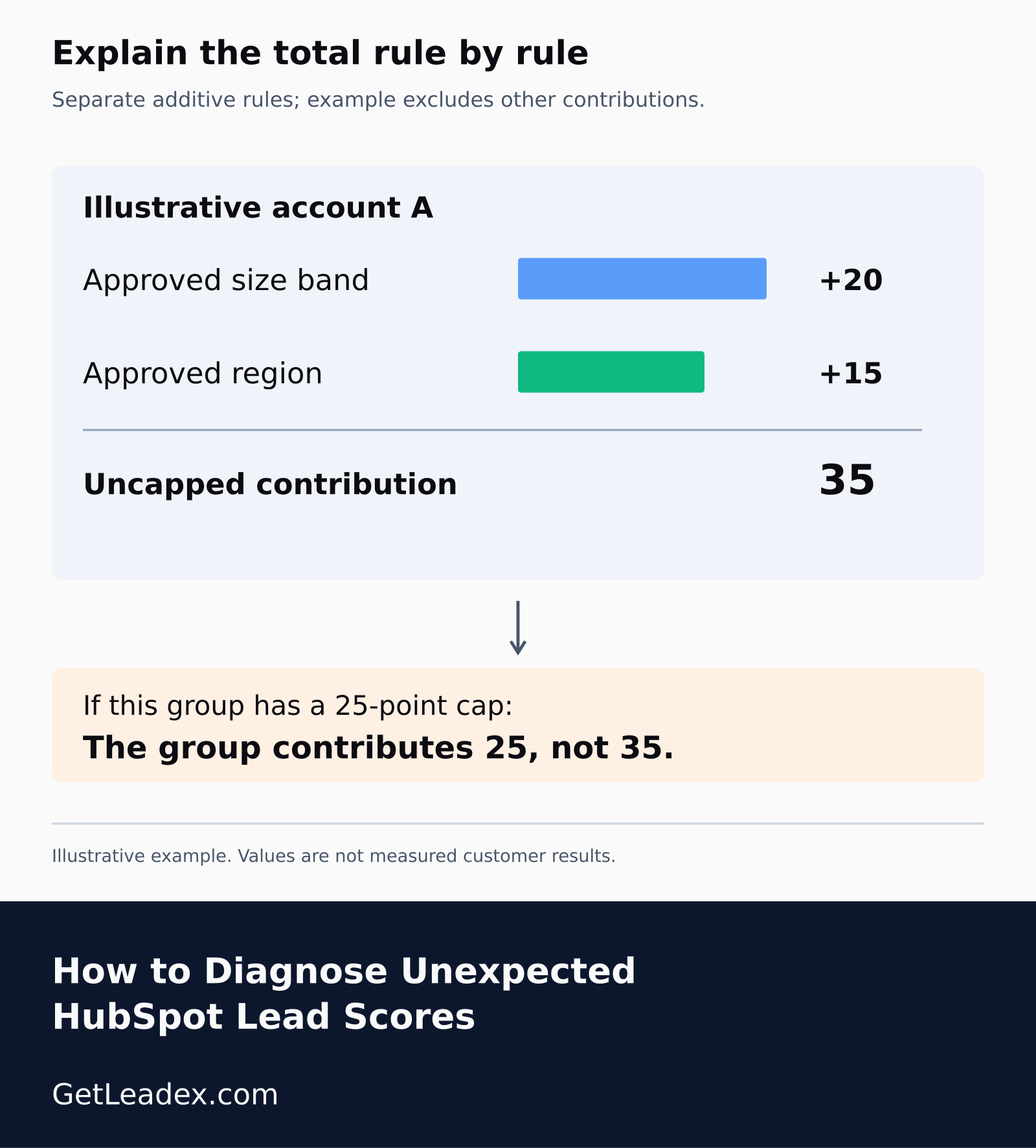
HubSpot's scoring overview distinguishes independently scored rules from multiple criteria within one rule, which use AND logic. Inspect that structure before changing weights. Also inspect group and total limits: a group cap of 25 would constrain the 35-point example if both rules were in that group. The hypothetical arithmetic above deliberately excludes that cap.
Write down the matched input, rule contribution, group subtotal, and final total from the test. If the region rule says zero, find the exact property and association it reads. If it says 15 but the total is lower than expected, inspect the applicable limits and other contributions. Those are different explanations for an identical-looking routing complaint.
Do not infer historical scoring inputs solely from today's record test. A contact changed by enrichment this morning may not reproduce yesterday's routing. Compare property history and workflow history for the original handoff, then use the current test to evaluate the proposed correction. Record which question each piece of evidence answers.
How to trace points back to inputs
The useful question is more specific than "why is the number wrong?": which stored fact caused this rule to match? Read the history beside the score test and note the relevant value, where it came from, and when it changed. Do not assume the value visible today was present when routing occurred.
Imagine a hypothetical account that moved into a larger company-size band after enrichment. A contact may have qualified using an earlier value, while the manager is judging it from the updated company page. Reproducing the earlier state and testing the current state answer different questions. Both can be useful, provided the investigation identifies which state it is explaining.
A different case is a condition that looks like two requirements in prose but behaves like alternatives in configuration. Write the desired rule in ordinary language, then compare it with the actual group structure. Use one record that meets both conditions and another that meets only one. Their outcomes reveal more than repeatedly testing the same unexpected prospect.
Do not repair an unknown source by manually editing the visible property and walking away. If another import, integration, or workflow supplies the same incorrect value tomorrow, the score will move again. Identify who owns that value and correct the mapping or update process there. A manual correction can be part of recovery, but it should not become the unexplained permanent operating procedure.
Our article on Breeze targeting after an ICP change covers a related boundary. Updating the business definition of a good prospect does not prove that every downstream tool now uses the same definition. Check the field and rule the current routing path actually reads.
How to test a correction without changing qualification
For the hypothetical size-and-region rule, choose an account with the right size in the wrong region, another with the right region but insufficient size, and an account satisfying both. Add a record with an unknown size if that occurs in your database. Decide explicitly whether unknown means ineligible or needs research; silence on that point usually becomes accidental policy.
Change the smallest rule or upstream input that explains the failure, then retest the examples. Avoid adjusting several weights at once just because you are already in the editor. Multiple simultaneous changes make it difficult to say which correction fixed the mismatch and whether a new error is an intended tradeoff or a regression.
This distinction matters to Leadex users preparing prospect lists. A research brief describes the audience before execution, but a CRM may translate the resulting fields into another qualification model. Keep the approved audience definition beside the CRM score rules so the handoff preserves the meaning of the research instead of merely accepting the next numeric threshold.
Once the individual examples behave correctly, inspect the wider distribution for unexpected shifts. A repaired rule can legitimately move many records. The question is whether the movement follows the intended qualification change. Review a few records on both sides of the routing boundary rather than treating a tidy histogram as proof that the sales team will receive the right people.
How to verify the handoff after the score changes
Keep draft evaluation separate from the live routing decision. A proposed rule can produce the expected test result while the operating workflow still reads the previously published score or another property. Record which version you tested and which property the receiving workflow uses. If those differ, do not compensate by adding extra points. Confirm the intended configuration through the supported publishing process, then inspect a fresh eligible record at the handoff. This additional check catches a version mismatch without changing the qualification policy or repeatedly modifying records that were already routed under an earlier model.
Follow an affected record through the receiving process. Confirm which score property the route uses, the owner it chooses, and any additional eligibility conditions. A correct score can coexist with an incorrect handoff. Our guide to workflow enrollment that returns 204 but skips explains why an accepted request alone is weak evidence of completed business behavior.
Leave a short investigation record with the changed rule, the original mismatch, and the expected outcomes of the examples. Include the person who owns the source property. The next unexpected lead should arrive with somewhere to begin, rather than another round of adjusting weights until the current dashboard looks reassuring.