
How to Find Lookalikes of Your Best Customer (From a Single Prompt)
The 'find me 100 more like this one' brief is the oldest job in B2B sales, and for a decade the interface has been a filter UI. The 2026 wave of prompt-based prospecting tools is making a different bet. Here is the brief, the prompt, and the worked example.
"Find me 100 more like this one" is the oldest brief in B2B sales. Until recently it was also the most expensive: a RevOps analyst, a closed-won export, a week of squinting at firmographic overlaps, and a list of 200 accounts that maybe-fit. Lookalike modeling has been the dominant frame for that work for a decade, and the dominant interface has been a filter UI - LinkedIn Sales Navigator's account-search panel, ZoomInfo's saved-search builder, 6sense's 80+ filter criteria, Demandbase's account-list builder. Drop in a seed list, tick boxes, save, export.
The 2026 wave of prompt-based prospecting tools is making a different bet: that for the specific job of "lookalikes of customer X," a prose brief beats a dropdown stack, because the brief carries the parts of an ICP that filters cannot express - the signals, the stage, the why-they-bought.
The canonical lookalike vector is six features wide. Industry, revenue band, headcount band, tech stack, geography, and - the one most ICP-builder UIs handle badly - signals. A closed-won customer is not just "Series B fintech in France with 200 employees and Snowflake in the stack." It is "Series B fintech in France with 200 employees and Snowflake in the stack whose head of data posted about hiring three weeks before they took the call." The signal is what made the deal close in eight weeks instead of six months. Filter UIs collect the first five features cleanly and the sixth one badly, because signals are temporal, free-text, and cross-source - exactly the data shape that resists a dropdown.
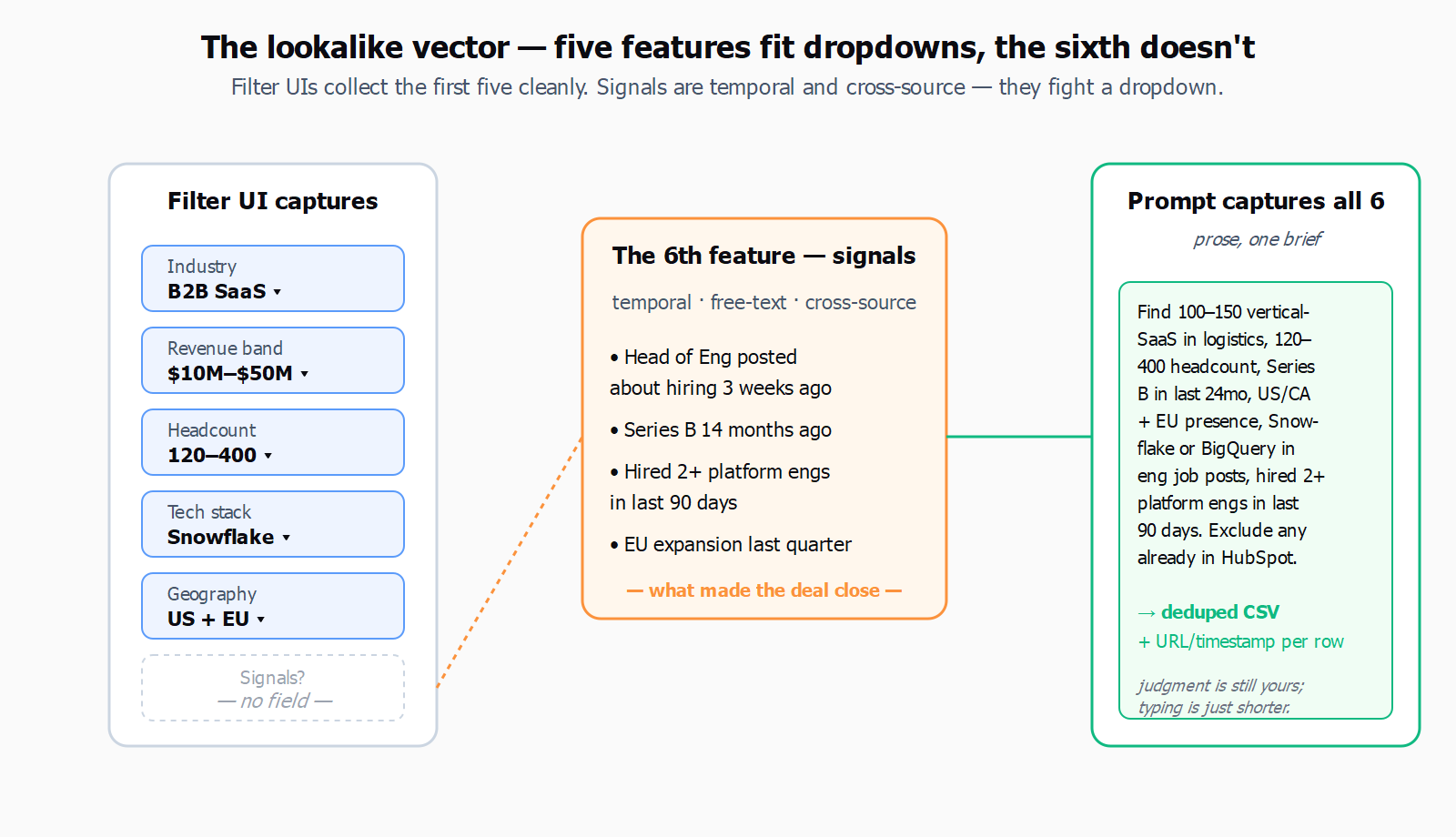
This is also where the seed-data hygiene problem bites. The standard guidance from the 2026 lookalike-audience playbook is to seed with at least 50 best-fit accounts, never the whole CRM, and to filter ruthlessly - closed-won with the shortest cycles and highest LTV. The same piece notes, dryly, that "only 5% of your market is ready to buy at any given time," which is the unspoken reason most lookalike lists feel like noise: five out of every hundred returned accounts will buy from anyone this quarter, and the other ninety-five are timing problems dressed as fit problems.
Not everyone thinks prompts are the right primary surface. Anton Mart, a marketer with ten-plus years in digital growth, argues in a February 2026 piece that the structure of the ICP work is what matters, and the prompt is just the last mile:
Deep ICP Work does not cancel prompts - AI requests are still needed - but turns them from the main work into fine-tuning.
- Anton Mart, marketer, M1-Project
That framing is correct and worth keeping in view. A prompt without a careful ICP behind it is a faster way to generate the same generic list. But the failure mode Mart is describing is the prompt-as-substitute case - someone typing "find me companies like Stripe" with no further structure. The interesting case is prompt-as-interface: the analyst has done the ICP work, has the closed-won segment in hand, knows which signals matter, and wants the brief expressed once, in prose, instead of translated into eleven filter widgets across three tools.
Here is what that brief actually looks like. Take one closed-won customer - say a logistics-SaaS firm with 240 employees, Series B 14 months ago, US-headquartered, EU expansion last quarter, Snowflake plus dbt in the stack, and a CTO who hired three platform engineers in the run-up to the deal. The lookalike prompt for that customer, written once:
Find 100 to 150 vertical-SaaS companies in logistics or procurement, headcount 120 to 400, that raised a Series B in the last 24 months, are headquartered in the US or Canada with active EU presence, mention Snowflake or BigQuery in their engineering job posts, and have hired at least two platform or data engineers in the last 90 days. Exclude anyone already in our HubSpot.
That is the whole brief. In Leadex, that prompt produces a plan preview - the agent shows which sources it will hit (Crunchbase for the funding band, the company sites for the tech-stack mentions, LinkedIn for the headcount and the hiring deltas, the connected HubSpot for the dedupe), you approve, and a CSV with company names, domains, headcount, last-round date, and the matched signals lands in chat with URL-and-timestamp provenance per row. The "exclude anyone already in our HubSpot" line works because the agent carries the conversation context and can route the dedupe through your connected CRM. The same brief in a filter UI would be three saved searches, a CSV export, a manual de-dupe, and an afternoon - which is fine if you only do it once.
The honest limit: prompt-based does not replace human ICP refinement, and a single prompt does not replace the second iteration. The first list back from the brief above will include twenty companies that look right on the firmographics and wrong on the signals, a handful that are correct but already three months past the buying window, and a few that are clearly the agent's overreach - a procurement-tech company at the edge of the headcount band, a logistics company that mentioned Snowflake in a single archived blog post from 2022. The right move is the same move it was in the filter-UI workflow: read the list, flag the misses, and re-prompt with the exclusions ("drop anyone whose Snowflake mention is older than 18 months; tighten the headcount to 150-300"). Two iterations gets you a clean 80; three gets you the 100-150. The interface changed; the judgment did not.
Where prompts genuinely fail is the audit-heavy enterprise list. If every account on the final CSV needs a documented reason for inclusion that maps to a procurement-approved filter taxonomy, a UI builder still wins, because the filter values are the audit trail. A prompt-based list with URL-per-row provenance is auditable in a different shape - you can show where each row came from - but you cannot show that it was generated from filter X = Y, because there is no filter X. For most teams that is fine. For some teams, regulated or otherwise, it is not, and the right move is to use the prompt-based agent for the discovery pass and the filter UI for the compliance pass.
The harder question, which the lookalike-modeling literature has been circling for a decade, is how much of the work is the seed and how much is the search. The 50-best-fit-accounts rule keeps holding because it does not matter what the search interface looks like if the seed is six churned customers and one whale - and a prompt makes that worse, because the prompt makes the bad seed faster to act on. The companion piece on context layering - context data as a third axis to the intent-vs-signal split - is the version of this problem one level up: the right data to feed the brief is not just "who they are" but "what is true about them this week."
The pragmatic stance for 2026 is to write the brief, run it, read the list, re-prompt, and stop pretending the dropdown stack is the source of truth. The prospecting prompts library has the templates if the blank-page problem is the bottleneck, and most of them start the same way: pick one closed-won customer, describe what made it close, and ask for fifty more. The judgment is still yours; the typing is just shorter.