
Why 11x Alice Stops Sending Emails, and How to Debug It in 6 Steps
Six documented reasons Alice stops sending, in triage order - from domain authentication to exit conditions, with the fix for each one.
If you have run an AI SDR for more than a week, you have met the dashboard. Sequence active, mailbox connected, send counter frozen at zero since Tuesday. With 11x's Alice, the explanation is usually not a mystery anymore - the company now documents six distinct reasons a workspace produces no sends, in a prescribed order, and the first two account for most cases.
The six documented reasons Alice goes quiet
The page, Alice is not sending emails on the 11x documentation site, reads like a triage sheet rather than a troubleshooting essay. Six checks, in order, each with a specific place to look: the sending domain is authenticated, mailbox health has not paused sending, at least one prospect passed the Qualification Agent, exit conditions have not emptied the audience, warm-up pacing is not throttling volume, and the sequence is actually activated. The first two are visible in analytics, and no configuration needs to change to see them.
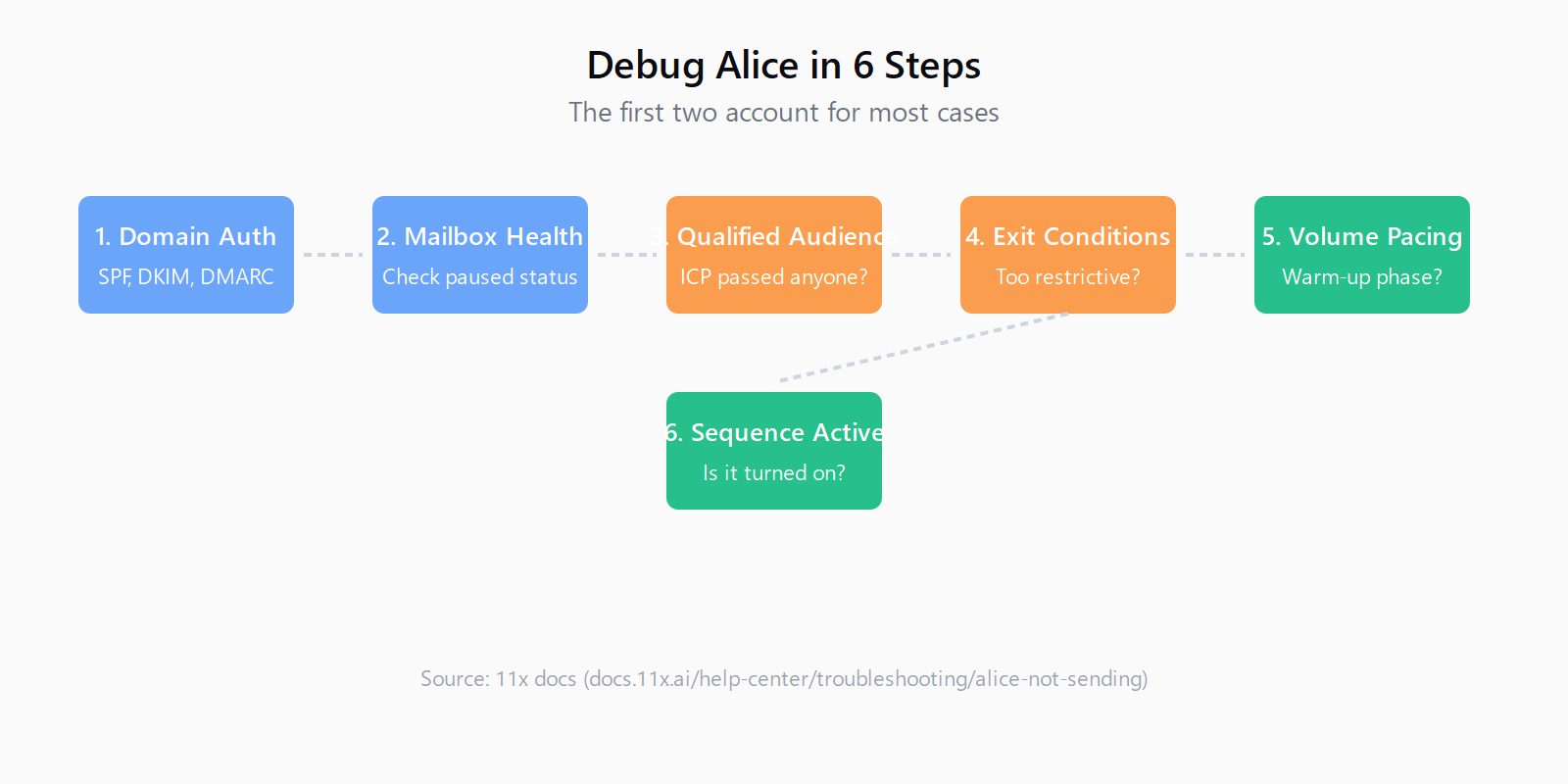
Alice sends nothing for six common reasons. Work through them in this order - the first two account for most cases, and both are visible in analytics without changing any configuration.
That ordering is the part I would keep. It tells you to stop inspecting copy and ICP filters on day one, because the two most likely causes live in infrastructure and mailbox state, and both are diagnosable in five minutes. It also quietly makes the point that most stops are protective rather than broken - the same idea I kept coming back to when I wrote up what 11x's Alice actually automates.
Steps 1-2: check domain auth, then mailbox health
Step one is authentication. SPF, DKIM, and DMARC all have to resolve for the sending domain, and 11x's free domain health checker tests all three in one pass. The frustration is that adding the DNS records is not the same as them working: typos, wrong hostnames, multiple conflicting SPF records, and records that have not propagated are all routine, so a domain can carry all three records and still fail. It is the same wall covered in how to set up cold email infrastructure, and the deliverability docs call authentication the most common cause by a wide margin. The recovery asymmetry is worth internalizing too: authentication misconfigured takes hours, while reputation damage from complaints takes weeks of low-volume, high-engagement sending.
Step two is mailbox health, and this is where Alice differs from a self-hosted stack. 11x treats deliverability as core infrastructure rather than a setting: it configures DKIM, DMARC, and SPF automatically, warms domains automatically, monitors health in real time, and when a domain's health declines it is pulled from sending and rotated out for a warm replacement. Blacklist detection pauses sending and cools the affected mailboxes down, with recovery starting automatically. Inbox placement is tested before volume goes out, and the docs point at five metrics to watch: inbox placement, bounce rate, complaint rate, per-mailbox variance, and how many domains sit in rotation.
The metric to watch is per-mailbox, not the domain aggregate, because a single mailbox with a high complaint rate can pull an otherwise healthy domain down and the aggregate hides it. If Alice has gone quiet and the health view shows a mailbox on cooldown, that is the answer - and it is the system working as intended. The harder case is when domains are rotating repeatedly; the docs are explicit that rotation protects you from symptoms, not causes, and that the fix is to stop increasing volume, check the complaint rate first, and tighten the ICP before touching the copy.
Steps 3-4: check the audience, then exit conditions
Step three is the audience. Alice is priced per prospect, and the Qualification Agent filters prospects against your ICP before any outreach is spent, so an out-of-profile prospect consumes allowance that an in-profile one could have used. If the filters are too narrow, or the exclusions too aggressive, the audience count can sit at zero and nothing will ever send. The targeting docs push you to start narrow and widen one dimension at a time, and to read who actually got disqualified, because that is where the expensive mistakes hide - a wrongly disqualified good account disappears silently and nobody reports it.
The exclusions list is the highest-stakes part of the page, and it is where the CRM earns its keep: accounts with an open opportunity, existing customers, accounts with an assigned owner, competitors and partners, your do-not-contact list, contacts who opted out, and accounts already active in another play. None of that protects you if your CRM hygiene is stale - the docs are blunt that exclusion rules are only as good as the ownership data behind them. I would audit ownership before launch rather than after the first rep complains, because a digital worker contacting an account a rep already owns is the fastest way to lose internal trust in a rollout.
Step four is exit conditions, which the sequences documentation calls the most common source of embarrassing behaviour. Sequences exit on any reply, a booked meeting, disqualification, a bounce, an opened opportunity, an opt-out, or a prospect entering another play. Most of those are good, and the reply exit is non-negotiable. The failure mode is exit conditions so aggressive they drain the audience before the first send fires - the same protective-default logic as Instantly's bounce protection auto-pause, where a safety mechanism silently stops a campaign that looks healthy.
Steps 5-6: pace volume, then confirm the sequence is on
Step five is warm-up pacing. A new domain has no sending reputation, and a sharp increase in volume looks like a compromised account even on a domain with good history, so the Deliverability Engine paces volume during ramp and the docs are blunt about not overriding it. "Don't override pacing because early results look good" is the line from the mailbox health page, and it is the counter-take to this whole post: some quiet weeks are the product protecting you, not failing you. The same page warns that if domains are rotating repeatedly, the fix is upstream - stop increasing volume, check the complaint rate, tighten the ICP before touching the copy.
Step six is the boring one - confirm the sequence is actually activated. It happens. Run the six checks in order and the fix is usually authentication fixed in hours, a mailbox let out of cooldown, a segment widened by one dimension, or an exit condition loosened. What I like about the order is that it front-loads the checks that cost nothing: the first two are visible in analytics before you change a single setting, so you know within five minutes whether you are fixing a plumbing problem or hunting for a config one.
I have the same debugging habit from the other side of this stack. Leadex is a research agent rather than a sender - you describe the ICP in chat, approve a plan, and get a deduped CSV - and the version of this loop I see most is a provider key that quietly stops authorizing mid-run. It surfaces exactly the way Alice's zero-send counter does: nothing fails loudly, the output just stops arriving. The discipline the 11x page instills, check the plumbing before you rewrite the message, is worth importing wholesale.
The next time Alice goes silent, run the health checker before you touch a single sequence step. That instinct - prove the plumbing is live before blaming the message - is the whole six-step list in one sentence, and it transfers to every tool that goes mysteriously quiet. I suspect that is exactly why 11x wrote the page: "why did it stop" is the first question every Alice user asks, and the answer is usually not a bug report.
FAQ
Why is Alice not sending any emails at all?
Work the six checks in order, domain authentication first and mailbox health second, since those two account for most cases. Both are visible in analytics without changing any configuration.
Why did Alice stop sending after working normally?
The most likely cause is mailbox health - a domain whose health declined is pulled from sending and rotated out, and blacklist detection pauses and cools the affected mailbox. Warm-up volume pacing is the second candidate.
Why is my audience count zero?
No prospect passed the Qualification Agent, or the exclusions emptied the audience. Widen the ICP one dimension at a time and read who got disqualified rather than assuming the filters are right.
Why did prospects disappear from the sequence?
An exit condition fired - any reply, a booked meeting, a bounce, disqualification, an opened opportunity, an opt-out, or entry into another play. Check the sequence configuration for conditions that are draining the audience too early.
Why is send volume much lower than configured?
The Deliverability Engine is pacing volume during warm-up, or a mailbox in rotation is on cooldown. Per-mailbox health is the place to look, not the domain aggregate.